Jobber review
Evidence status
16 tasks tested · 27 documented
How we assess evidenceRecord dates
- Price checked
- · re-checked monthly
- Last tested
- Last edited
Platforms: web, ios, android
Price context
Grow · flat · billed monthly · US / USD
Recorded prices in the tested plan’s family, selected by user capacity. Other user tiers are not separate protocol tests.
1 technician
Grow · 1 included user
Renewal
- Monthly equivalent
- $199.00
- Annual equivalent
- $2,388.00
Recurring-rate equivalents, not an introductory-year estimate. Billing and conditions remain separate for each charge below.
Recorded limits for Grow
- team-size: 1 people included in this pricing tier
Plan: Grow
Renewal: $199.00 / month.
Monthly billing, 1 user tier as shown on the public pricing page. Sales tax excluded.
Source (public) · Observed
3 technicians
Grow (2-5 people) · 5 included users
Renewal
- Monthly equivalent
- $299.00
- Annual equivalent
- $3,588.00
Recurring-rate equivalents, not an introductory-year estimate. Billing and conditions remain separate for each charge below.
Recorded limits for Grow (2-5 people)
- team-size: 5 people included in this pricing tier
Plan: Grow (2-5 people)
Renewal: $299.00 / month.
Monthly billing, 2-5 user tier as shown on the public pricing page. Sales tax excluded.
Source (public) · Observed
8 technicians
Grow (6-10 people) · 10 included users
Renewal
- Monthly equivalent
- $399.00
- Annual equivalent
- $4,788.00
Recurring-rate equivalents, not an introductory-year estimate. Billing and conditions remain separate for each charge below.
Recorded limits for Grow (6-10 people)
- team-size: 10 people included in this pricing tier
Plan: Grow (6-10 people)
Renewal: $399.00 / month.
Monthly billing, 6-10 user tier as shown on the public pricing page. Sales tax excluded.
Source (public) · Observed
Available add-ons
- Marketing Suite · flat · Optional add-on listed at $99/month on the pricing page (28 Sep 2026); not needed for T-01 to T-15.
- Receptionist · flat · Optional add-on listed at $29/month on the pricing page (28 Sep 2026); not needed for T-01 to T-15.
- Pipeline · flat · Optional add-on listed at $49/month on the pricing page (28 Sep 2026); not needed for T-01 to T-15.
Documented price conditions
- Connect: Monthly billing, 1 user tier as shown on the public pricing page. Sales tax excluded. Documented
- Connect — annual: Regular annual price after the first-year offer for the 1 user tier; effective monthly figure with annual prepayment. Documented
- Connect — annual: First-year annual offer shown on the pricing page for the 1 user tier; effective monthly figure with annual prepayment. Documented
- Connect (2-5 people): Monthly billing, 2-5 user tier as shown on the public pricing page. Sales tax excluded. Documented
- Connect (2-5 people) — annual: Regular annual price after the first-year offer for the 2-5 user tier; effective monthly figure with annual prepayment. Documented
- Connect (2-5 people) — annual: First-year annual offer shown on the pricing page for the 2-5 user tier; effective monthly figure with annual prepayment. Documented
- Connect (6-10 people): Monthly billing, 6-10 user tier as shown on the public pricing page. Sales tax excluded. Documented
- Connect (6-10 people) — annual: Regular annual price after the first-year offer for the 6-10 user tier; effective monthly figure with annual prepayment. Documented
- Connect (6-10 people) — annual: First-year annual offer shown on the pricing page for the 6-10 user tier; effective monthly figure with annual prepayment. Documented
- Core: Monthly billing, 1 user tier as shown on the public pricing page. Sales tax excluded. Documented
- Core — annual: Regular annual price after the first-year offer for the 1 user tier; effective monthly figure with annual prepayment. Documented
- Core — annual: First-year annual offer shown on the pricing page for the 1 user tier; effective monthly figure with annual prepayment. Documented
- Grow: Monthly billing, 1 user tier as shown on the public pricing page. Sales tax excluded. Documented
- Grow — annual: Regular annual price after the first-year offer for the 1 user tier; effective monthly figure with annual prepayment. Documented
- Grow — annual: First-year annual offer shown on the pricing page for the 1 user tier; effective monthly figure with annual prepayment. Documented
- Grow (2-5 people): Monthly billing, 2-5 user tier as shown on the public pricing page. Sales tax excluded. Documented
- Grow (2-5 people) — annual: Regular annual price after the first-year offer for the 2-5 user tier; effective monthly figure with annual prepayment. Documented
- Grow (2-5 people) — annual: First-year annual offer shown on the pricing page for the 2-5 user tier; effective monthly figure with annual prepayment. Documented
- Grow (6-10 people): Monthly billing, 6-10 user tier as shown on the public pricing page. Sales tax excluded. Documented
- Grow (6-10 people) — annual: Regular annual price after the first-year offer for the 6-10 user tier; effective monthly figure with annual prepayment. Documented
- Grow (6-10 people) — annual: First-year annual offer shown on the pricing page for the 6-10 user tier; effective monthly figure with annual prepayment. Documented
- Plus (10 users): Monthly billing, 6-10 user tier as shown on the public pricing page. Sales tax excluded. Documented
- Plus (10 users) — annual: Regular annual price after the first-year offer for the 6-10 user tier; effective monthly figure with annual prepayment. Documented
- Plus (10 users) — annual: First-year annual offer shown on the pricing page for the 6-10 user tier; effective monthly figure with annual prepayment. Documented
- Plus (5 users): Monthly billing, 2-5 user tier as shown on the public pricing page. Sales tax excluded. Documented
- Plus (5 users) — annual: Regular annual price after the first-year offer for the 2-5 user tier; effective monthly figure with annual prepayment. Documented
- Plus (5 users) — annual: First-year annual offer shown on the pricing page for the 2-5 user tier; effective monthly figure with annual prepayment. Documented
Task results and evidence
T-01: From signup to the first job scheduled, including importing the 25 customers from CSV · pass
Tested in a trial exposing Grow features
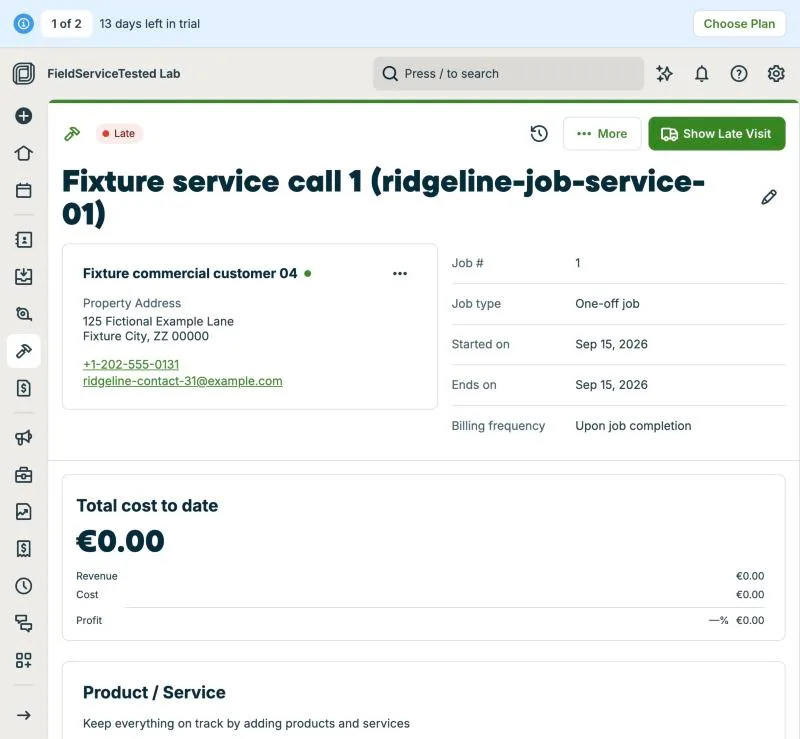
Sign-up done by Hugo on 2026-09-28 00:30 (Google login; the email form returned 'An unexpected error occurred' with two different addresses). Coordinator-run part started 18:50 CEST. customers.csv converted to Jobber's importer columns (one row per property, canonical ids kept in Notes because the importer has no external-id field). Importer (Flatfile) auto-mapped 12/12 columns; 31 rows processed: 25 clients and 30 properties, exactly the fixture counts; no rejected or merged rows; fixture state 'ZZ' and zip '00000' accepted. Payer-only client Cedar Lane Properties created without property. Payer relationship (commercial-01 pays for commercial-02 and -03 locations) cannot be expressed at import: kept in notes only; to be modelled in T-03. Three technicians created via Manage Team with fixture example.com emails; trial shows '4/1 seats assigned' without blocking. Job 'Fixture service call 1' scheduled for Fixture commercial customer 04 at 125 Fictional Example Lane on 2026-09-15 (fixture date, in the past, so Jobber flags it Late) assigned to Marcus Fixture; reopened job shows client, property, date and technician. Time inputs rejected typed values; 'Anytime' used. Lab configuration note: account currency defaulted to EUR from the Spanish sign-up; to be switched to USD before price evidence.
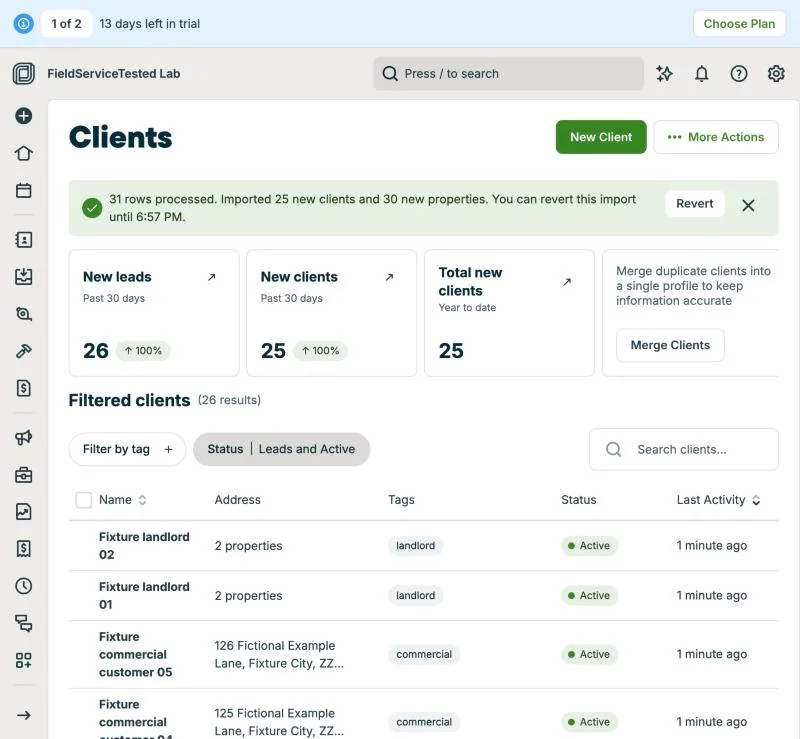
Jobber, T-01 (from signup to the first job scheduled, including importing the 25 customers from CSV): import. Own capture from the test account, fictional Ridgeline fixture data.
- Task
- T-01 — From signup to the first job scheduled, including importing the 25 customers from CSV
- Plan
- Grow
- Device
- MacBook Air M3 24 GB
- App version
- Jobber web app, 2026-09-28 (14-day trial, day 2)
- Captured
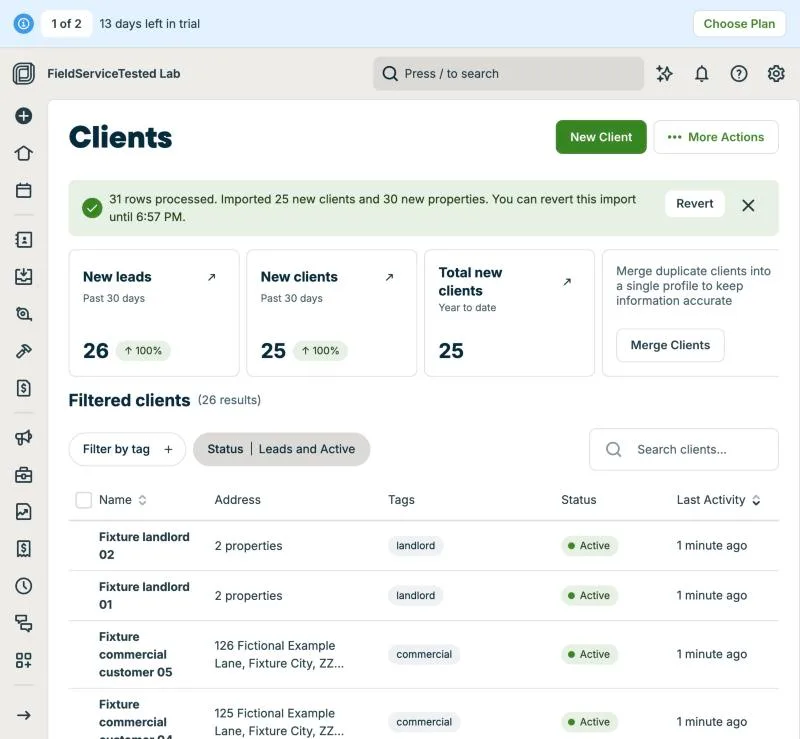
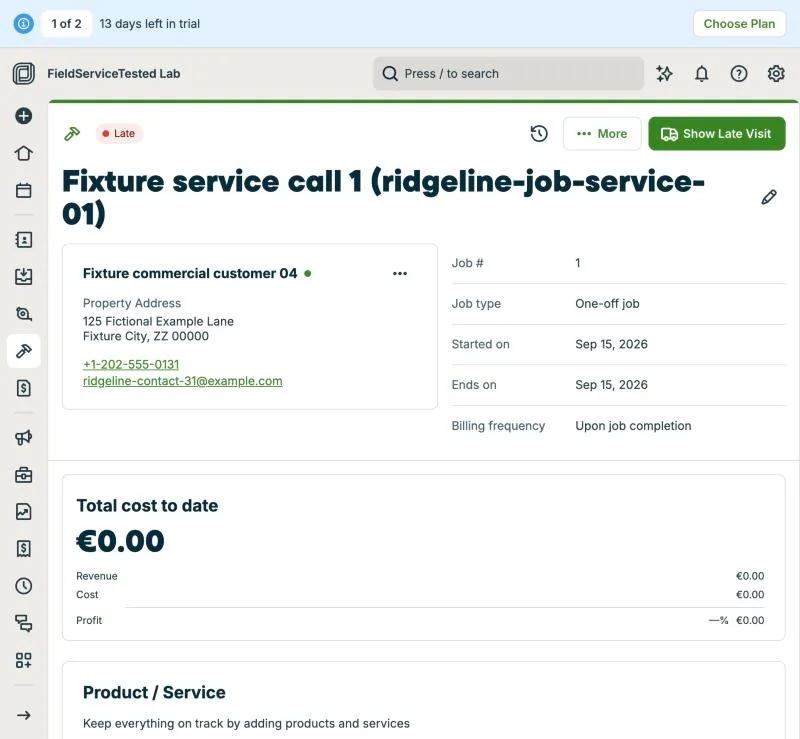
Jobber, T-01 (from signup to the first job scheduled, including importing the 25 customers from CSV): job. Own capture from the test account, fictional Ridgeline fixture data.
- Task
- T-01 — From signup to the first job scheduled, including importing the 25 customers from CSV
- Plan
- Grow
- Device
- MacBook Air M3 24 GB
- App version
- Jobber web app, 2026-09-28 (14-day trial, day 2)
- Captured
T-02: Import the 30-item price book from CSV, including options · partial
Tested in a trial exposing Grow features
Jobber's Products & Services CSV template has Name, Description, Category (Service/Product), Unit Price, Unit Cost, Duration Minutes, quantity flags and Taxable: no item code field and no option tiers. Codes were carried as a [CODE] prefix in Description; the three replacement packages (RIDGELINE-REPLACE-01/02/03) were imported as single items at the good-tier amount with the good/better/best tiers written into Description because the importer cannot represent them. Import of 30 rows succeeded without errors: list went from 8 pre-loaded HVAC sample services to 38 items; all 30 codes present, no duplicates of RIDGELINE-DIAG, RIDGELINE-REPAIR-01 or RIDGELINE-PART-01. Part names with a comma and quotation marks ('Fixture part 1, "example"') imported intact. Pass criteria partially met: codes and descriptions preserved via workaround, option tiers not preserved as options. Note: Jobber pre-loads eight HVAC sample services during onboarding; the file was injected into the native file input by the coordinator's browser (no OS dialog).
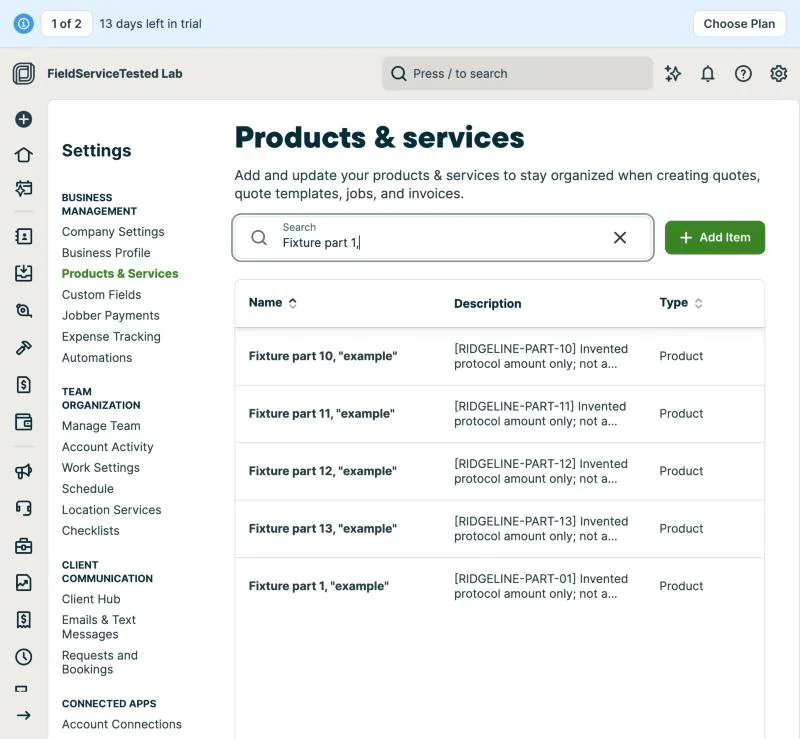
Jobber, T-02 (import the 30-item price book from CSV, including options): parts. Own capture from the test account, fictional Ridgeline fixture data.
- Task
- T-02 — Import the 30-item price book from CSV, including options
- Plan
- Grow
- Device
- MacBook Air M3 24 GB
- App version
- Jobber web app, 2026-09-28 (14-day trial, day 2)
- Captured
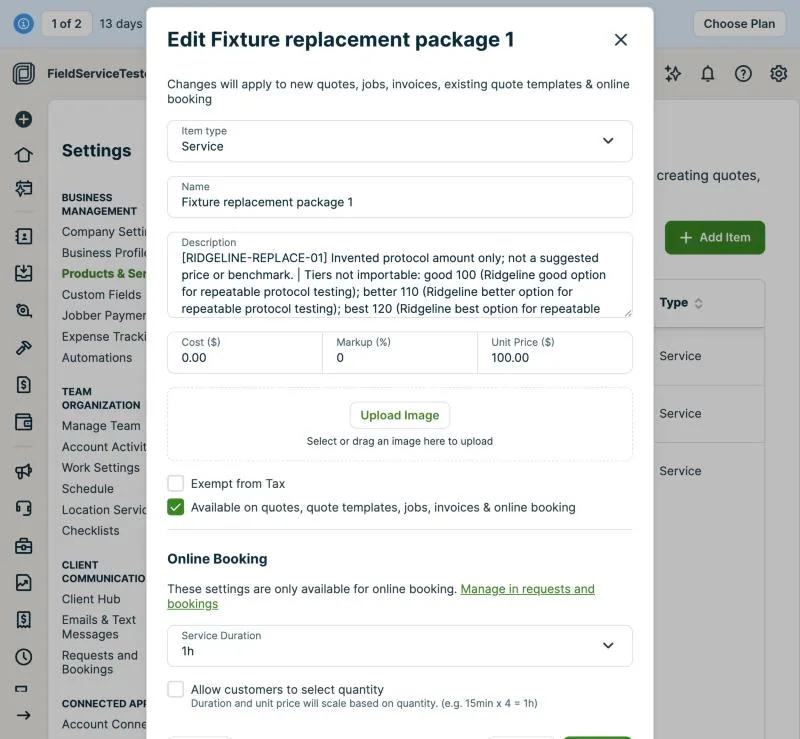
Jobber, T-02 (import the 30-item price book from CSV, including options): replacement. Own capture from the test account, fictional Ridgeline fixture data.
- Task
- T-02 — Import the 30-item price book from CSV, including options
- Plan
- Grow
- Device
- MacBook Air M3 24 GB
- App version
- Jobber web app, 2026-09-28 (14-day trial, day 2)
- Captured
T-03: Commercial customer with 3 locations and a separate payer (Cedar Lane) · partial
Tested in a trial exposing Grow features
Jobber's data model has no 'bill to another client' relationship: an invoice always bills the client that owns the property, and Jobber's own Properties article describes tenants as 'property contacts' of the paying client (help.getjobber.com/en/articles/properties/). After import, commercial-02 (service customer) owned locations 19-21 and Cedar Lane Properties (payer, imported without property) could not be set as payer on those properties; there is no move-property-to-another-client action. Workaround executed: added 119 Fictional Example Lane as a property under Cedar Lane Properties, named for ridgeline-location-19, with 'Fixture commercial customer 02' as property contact (role: service customer/tenant); created job #2 at that property with the RIDGELINE-DIAG line ($11.00) and generated invoice #1: bill-to Cedar Lane Properties, property address 119 Fictional Example Lane (shown as 'same as billing address' because the payer-only client had no address of its own). Client list still shows exactly 5 commercial clients (no duplicate client), but location 19 now exists twice: as a property of commercial-02 (from import) and as a property of Cedar Lane; keeping both means duplicate properties, keeping one means the service customer is a contact, not a client. Pass criteria: billing the payer works; 'no duplicate' holds for customers, not for the location.
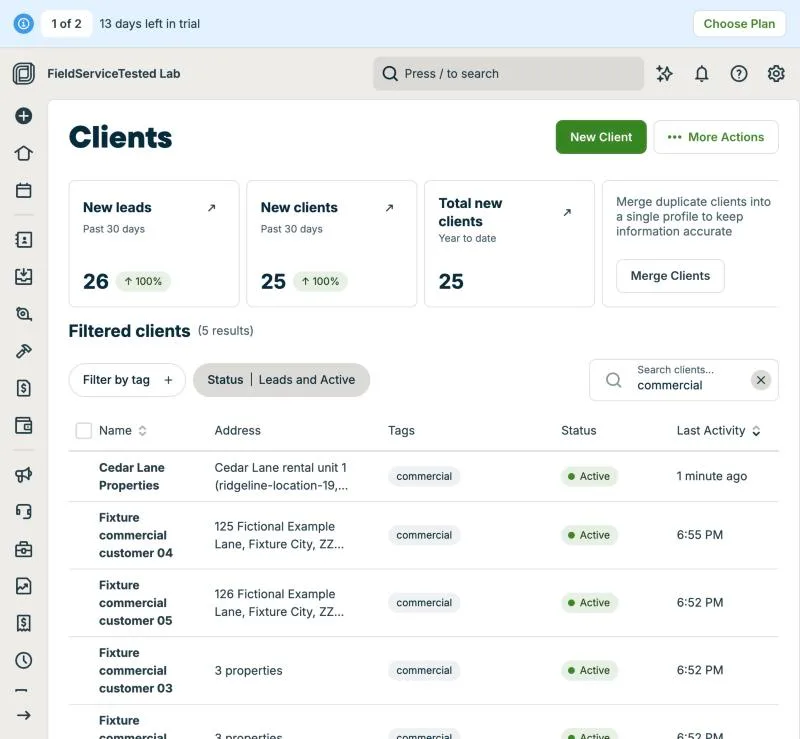
Jobber, T-03 (commercial customer with 3 locations and a separate payer (Cedar Lane)): clients. Own capture from the test account, fictional Ridgeline fixture data.
- Task
- T-03 — Commercial customer with 3 locations and a separate payer (Cedar Lane)
- Plan
- Grow
- Device
- MacBook Air M3 24 GB
- App version
- Jobber web app, 2026-09-28 (14-day trial, day 2)
- Captured
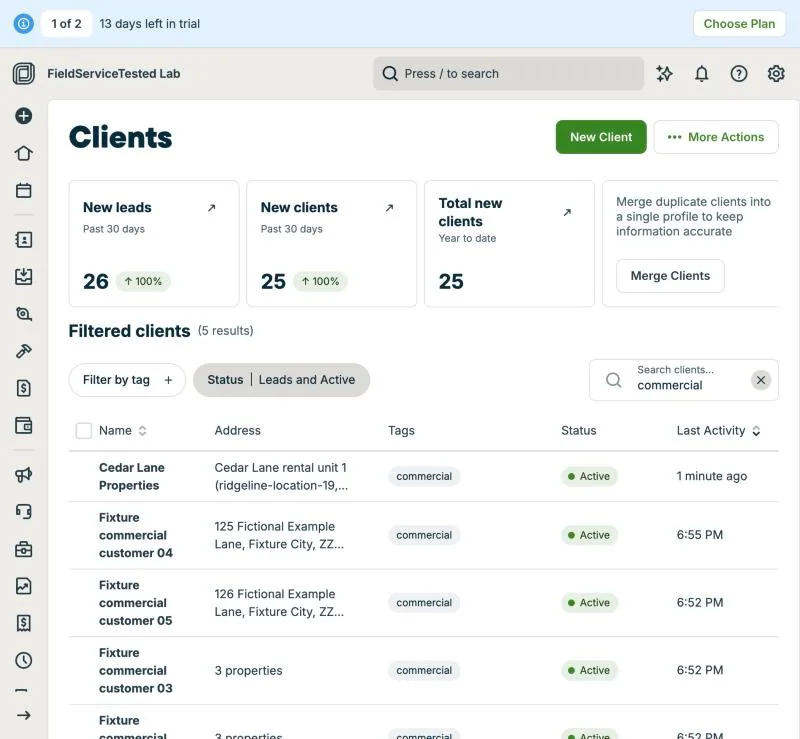
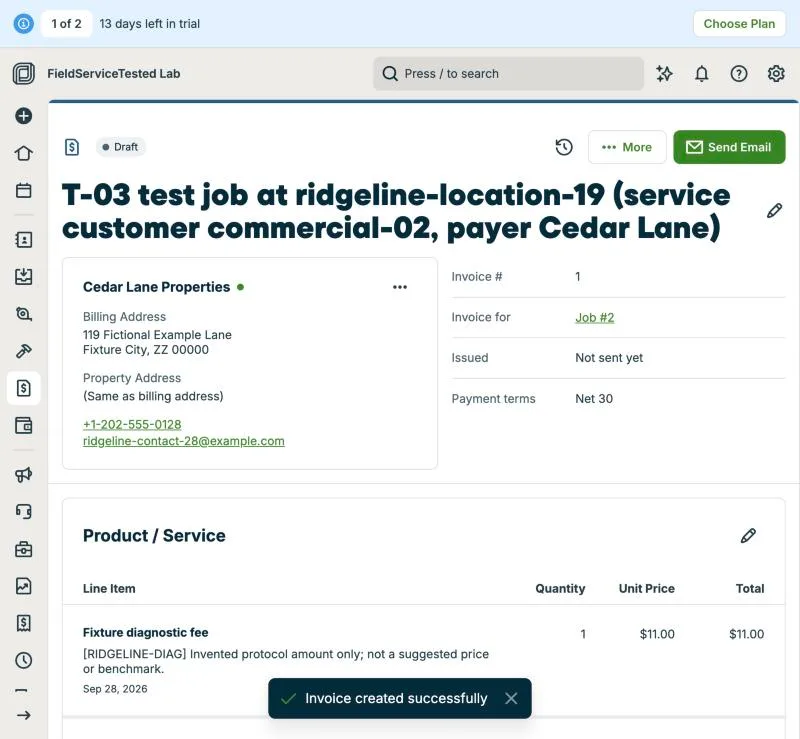
Jobber, T-03 (commercial customer with 3 locations and a separate payer (Cedar Lane)): invoice. Own capture from the test account, fictional Ridgeline fixture data.
- Task
- T-03 — Commercial customer with 3 locations and a separate payer (Cedar Lane)
- Plan
- Grow
- Device
- MacBook Air M3 24 GB
- App version
- Jobber web app, 2026-09-28 (14-day trial, day 2)
- Captured
T-04: Equipment history: see every visit for one rooftop unit · not-possible
Tested in a trial exposing Grow features
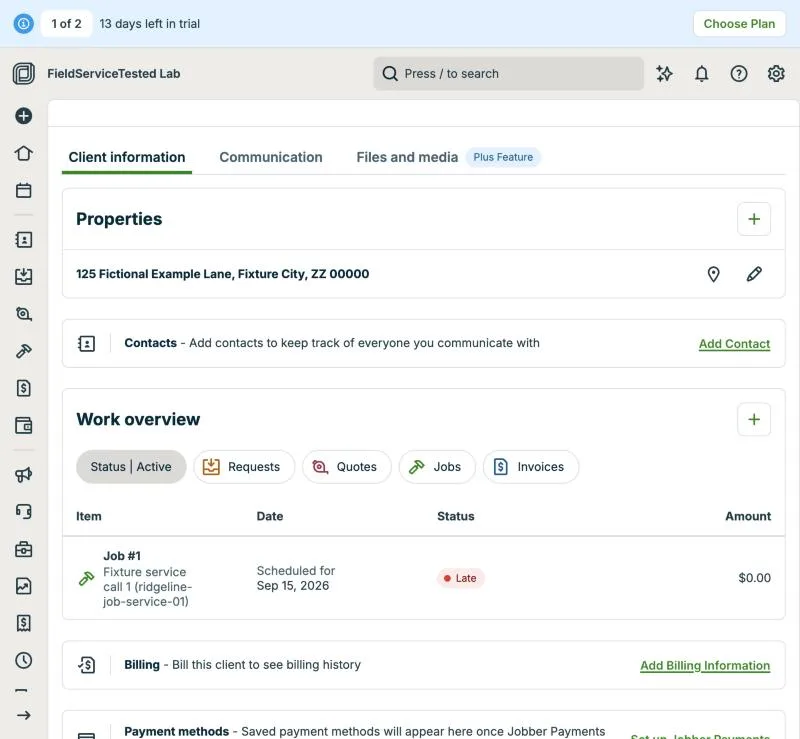
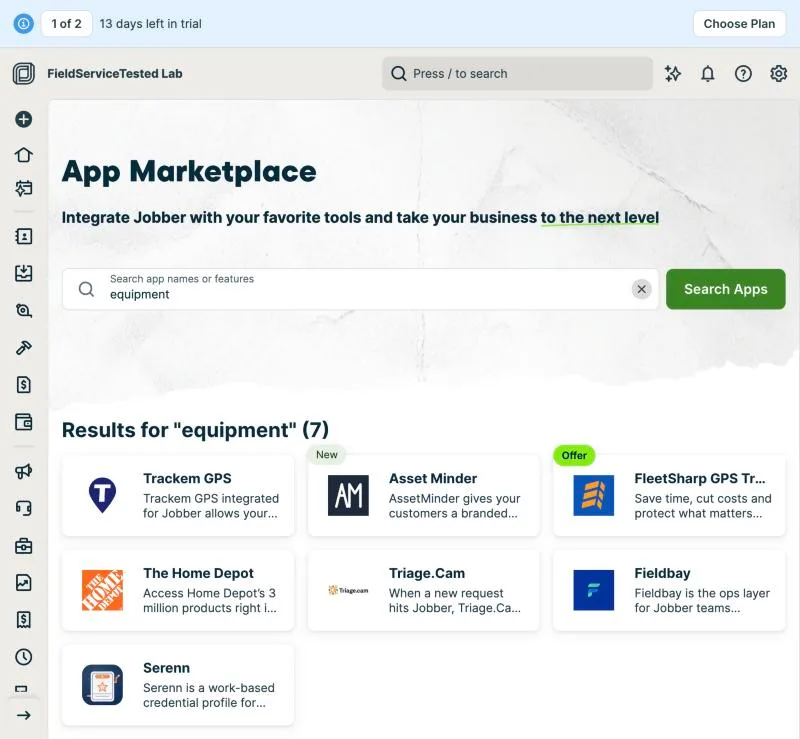
Jobber has no equipment or asset record: there is nowhere to load ridgeline-equipment-39 with make, model, serial and install date, so no per-unit history exists. Its glossary lists Property ('a client's address where work is performed') and Custom Fields (on properties, clients, quotes, jobs, invoices, team members) but no equipment entity; the in-app App Marketplace search for 'equipment' returns third-party apps, including Asset Minder, which advertises 'the full service history of every asset you maintain', confirming the gap is filled by add-ons. Location-level history does exist: the client page's Work overview lists Job #1 (Fixture service call 1) for the 125 Fictional Example Lane property, and the property filter narrows it per address. Workaround available but not executed as a pass: property custom fields can hold one unit's identifiers, and job titles or line items can name the unit; neither yields a history per unit without manual convention.
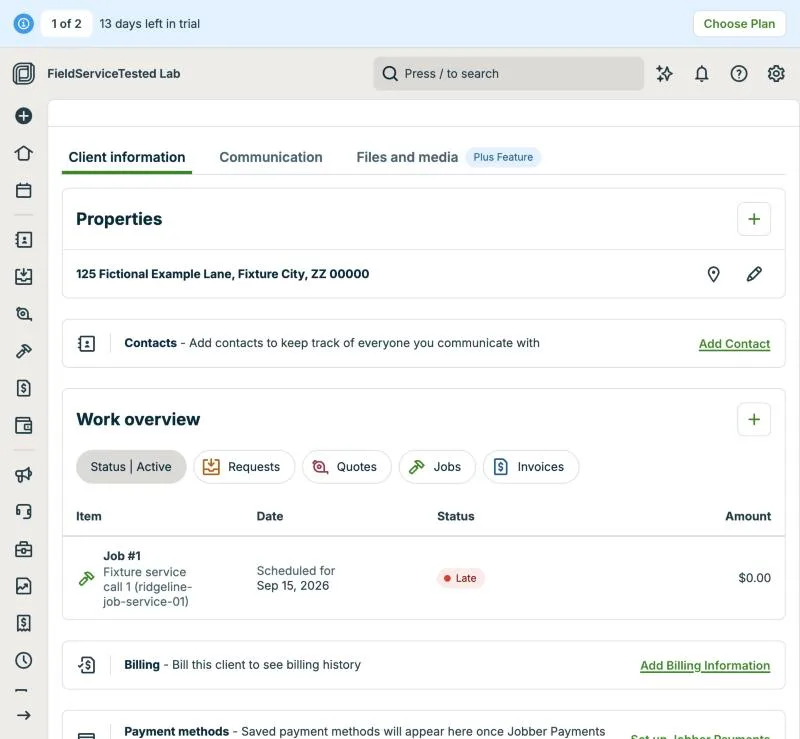
Jobber, T-04 (equipment history: see every visit for one rooftop unit): location history. Own capture from the test account, fictional Ridgeline fixture data.
- Task
- T-04 — Equipment history: see every visit for one rooftop unit
- Plan
- Grow
- Device
- MacBook Air M3 24 GB
- App version
- Jobber web app, 2026-09-28 (14-day trial, day 2)
- Captured
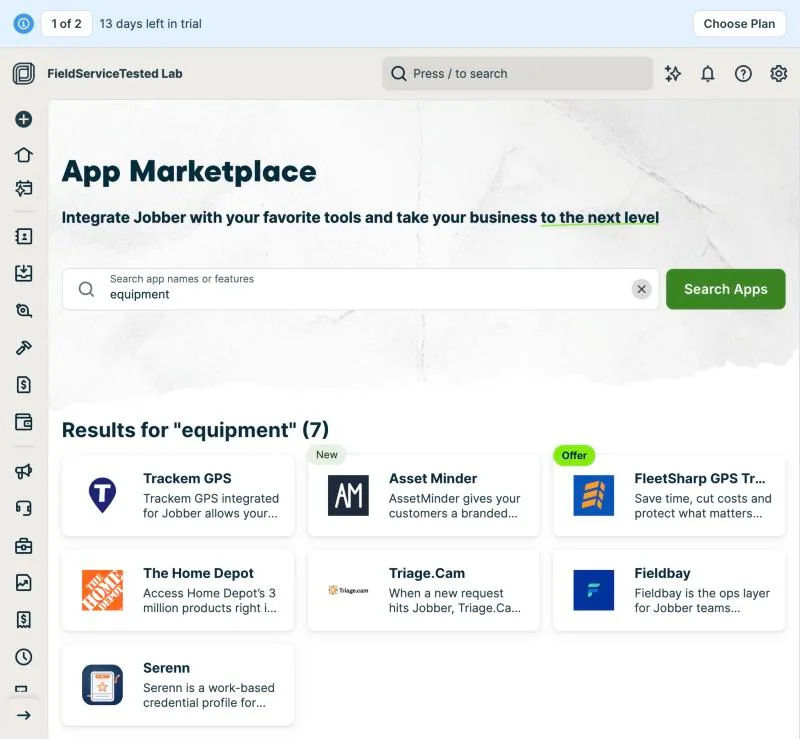
Jobber, T-04 (equipment history: see every visit for one rooftop unit): marketplace. Own capture from the test account, fictional Ridgeline fixture data.
- Task
- T-04 — Equipment history: see every visit for one rooftop unit
- Plan
- Grow
- Device
- MacBook Air M3 24 GB
- App version
- Jobber web app, 2026-09-28 (14-day trial, day 2)
- Captured
T-05: 3-option quote (AC replacement); the customer approves one option online · pass
Tested in a trial exposing Grow features
Quote #1 for Fixture residential customer 01 at 101 Fictional Example Lane with three line items from RIDGELINE-REPLACE-01 (good $100, better $110, best $120; descriptions match the fixture). Jobber has no good/better/best package object: options are built with 'Mark as optional' line items that the client ticks in Client Hub, so the quote subtotal changes with the selection; in this run the better line stayed non-optional and good/best were optional, which the client view rendered as '1 of 3 items'. Jobber blocked the first send until the account owner's email was verified ('You must verify your email address before you are able to send any email or SMS messages'). The customer-facing link came from the real quote email to a lab-owned customer mailbox; opened in a separate tab, all three options were visible, Approve required a typed signature, and the quote showed Approved with signature and date. In the office session the quote read Approved with sent/opened/viewed timestamps; Convert to Job created Job #3 with the selected BETTER line ($110), client, property and 'From Quote #1' link without retyping anything. Field carried over: line name, description, amount, client, property. Not carried: visit assignment (job created unassigned, visit 'Today'). Two linked recordings: quote build (trimmed to 2:30) and approval-to-conversion.
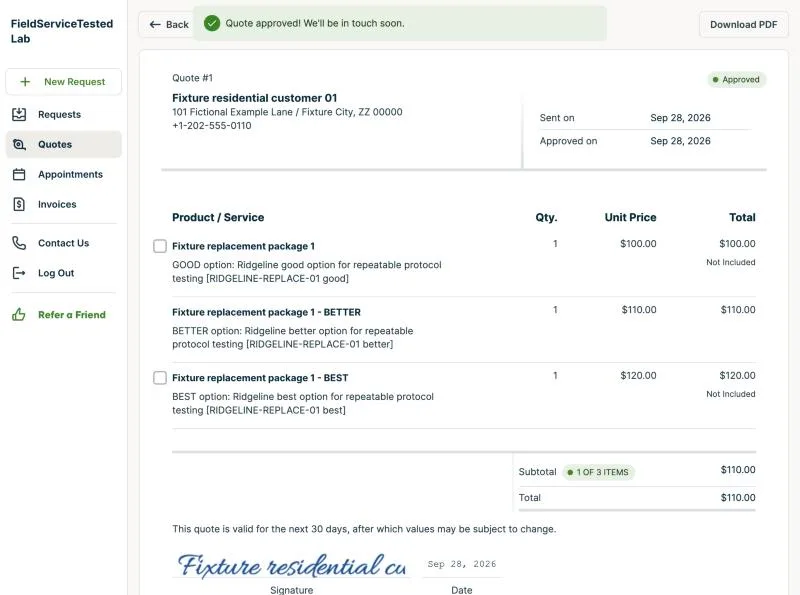
Jobber, T-05 (3-option quote (AC replacement); the customer approves one option online): approved. Own capture from the test account, fictional Ridgeline fixture data.
- Task
- T-05 — 3-option quote (AC replacement); the customer approves one option online
- Plan
- Grow
- Device
- MacBook Air M3 24 GB
- App version
- Jobber web app + Client Hub, 2026-09-28 (14-day trial, day 2)
- Captured
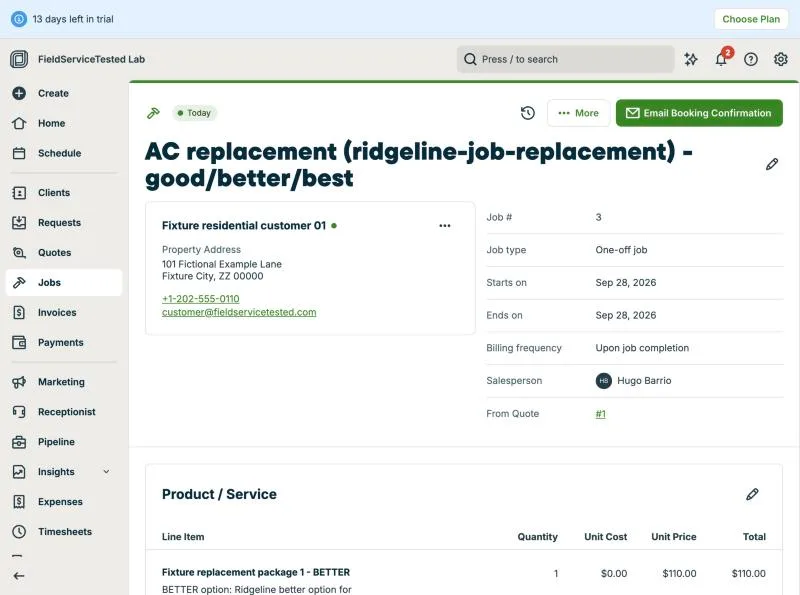
Jobber, T-05 (3-option quote (AC replacement); the customer approves one option online): job. Own capture from the test account, fictional Ridgeline fixture data.
- Task
- T-05 — 3-option quote (AC replacement); the customer approves one option online
- Plan
- Grow
- Device
- MacBook Air M3 24 GB
- App version
- Jobber web app + Client Hub, 2026-09-28 (14-day trial, day 2)
- Captured
T-06: Quote → job → invoice; the tech adds a part in the field · pass
Tested in a trial exposing Grow features
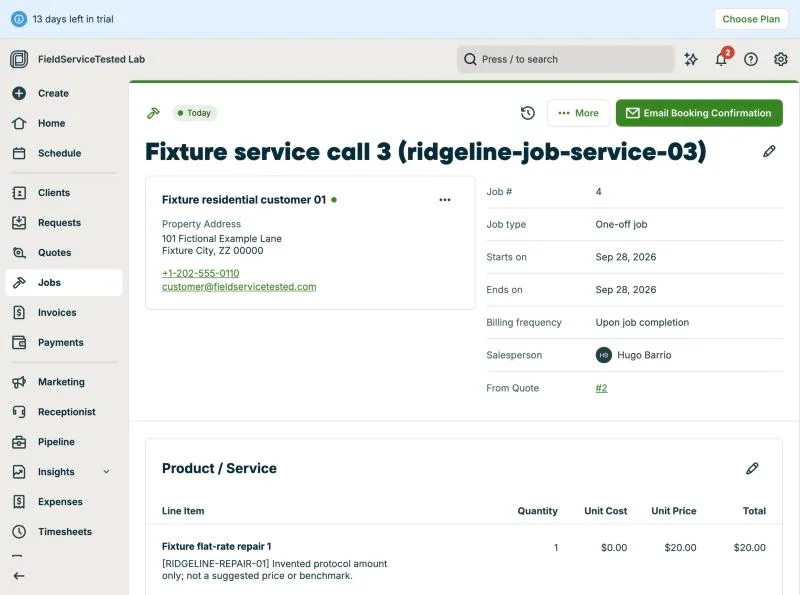
Quote #2 for Fixture residential customer 01 at 101 Fictional Example Lane with RIDGELINE-REPAIR-01 (qty 1, $20.00). More > Convert to Job created Job #4 'From Quote #2' with client, property and line intact; Priya Fixture assigned on the visit. Field session as Priya (own login, web app): with Jobber's 'Field crew' preset the technician sees the job and line names but no prices and no line-item editing (only 'Print or Save PDF'), so adding a part is impossible with that preset; after the owner switched Priya to 'Senior field crew' she could edit Product/Service and add RIDGELINE-PART-01 (qty 1, $1.00); reopened job shows both lines, subtotal $21.00. Office session: Invoice from job offered a job picker (Job #4 $21 uninvoiced, Job #3 $110), generated Invoice #2 'Invoice for Job #4' with both lines, quantities and $21.00 total; no re-entry, no duplicated lines. Invoice reference for T-10/T-13: Invoice #2 (id 173601081). Field part done in the web app, not the mobile app (mobile is covered on the phone day). Three linked recordings: office (quote to job, trimmed to remove operator screen), field (part added), invoice.
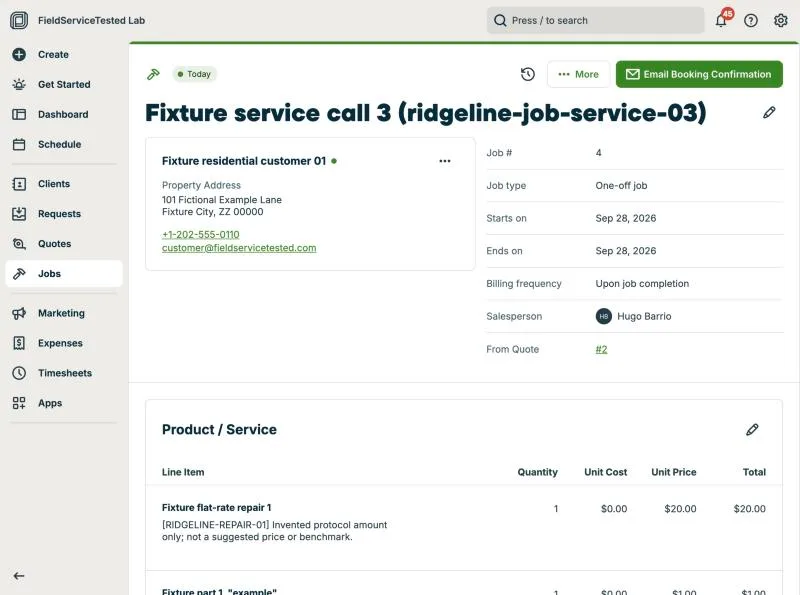
Jobber, T-06 (quote → job → invoice; the tech adds a part in the field): field added. Own capture from the test account, fictional Ridgeline fixture data.
- Task
- T-06 — Quote → job → invoice; the tech adds a part in the field
- Plan
- Grow
- Device
- MacBook Air M3 24 GB
- App version
- Jobber web app, 2026-09-28 (14-day trial, day 2)
- Captured
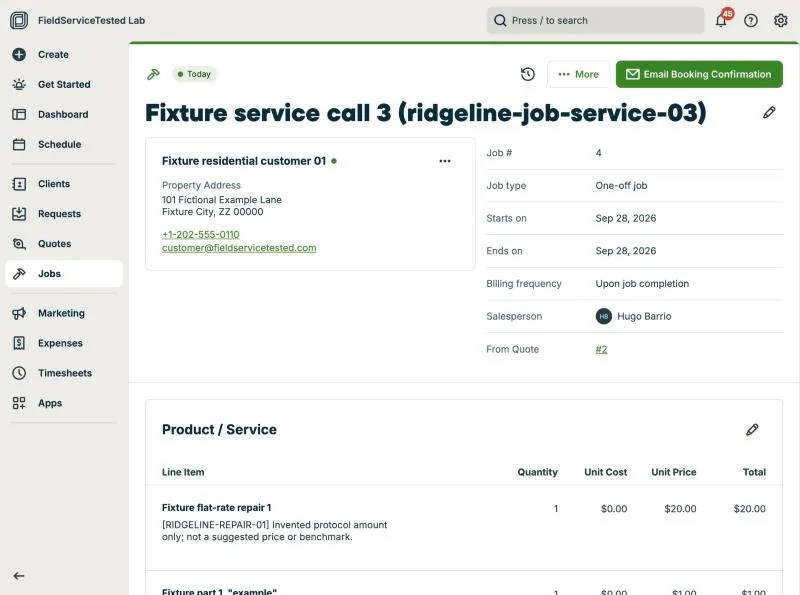
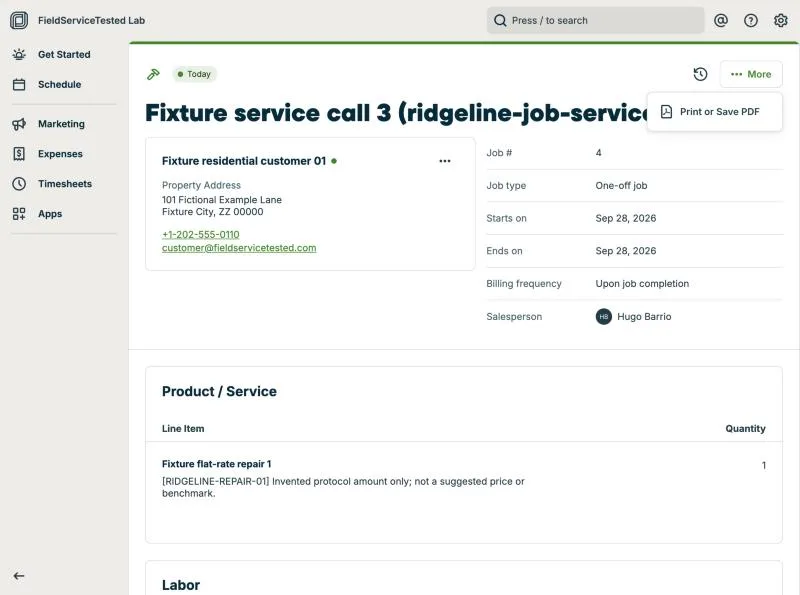
Jobber, T-06 (quote → job → invoice; the tech adds a part in the field): fieldcrew view. Own capture from the test account, fictional Ridgeline fixture data.
- Task
- T-06 — Quote → job → invoice; the tech adds a part in the field
- Plan
- Grow
- Device
- MacBook Air M3 24 GB
- App version
- Jobber web app, 2026-09-28 (14-day trial, day 2)
- Captured
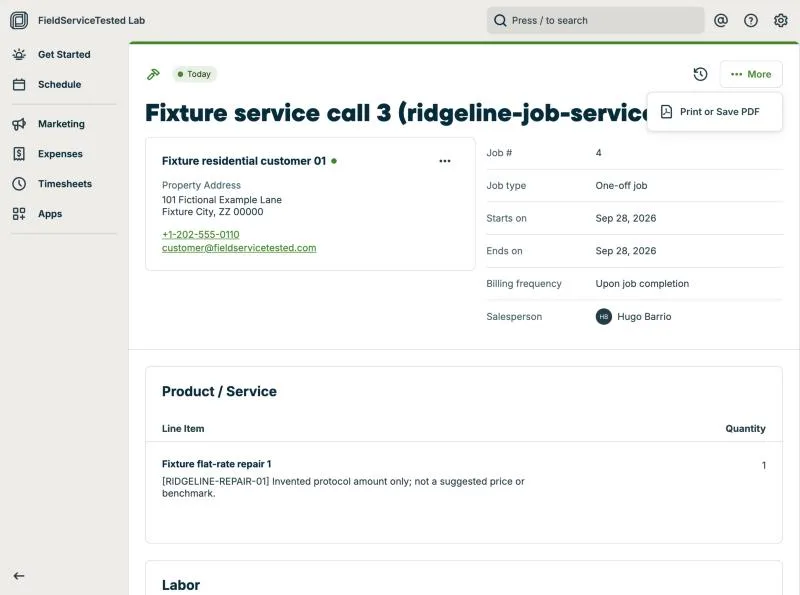
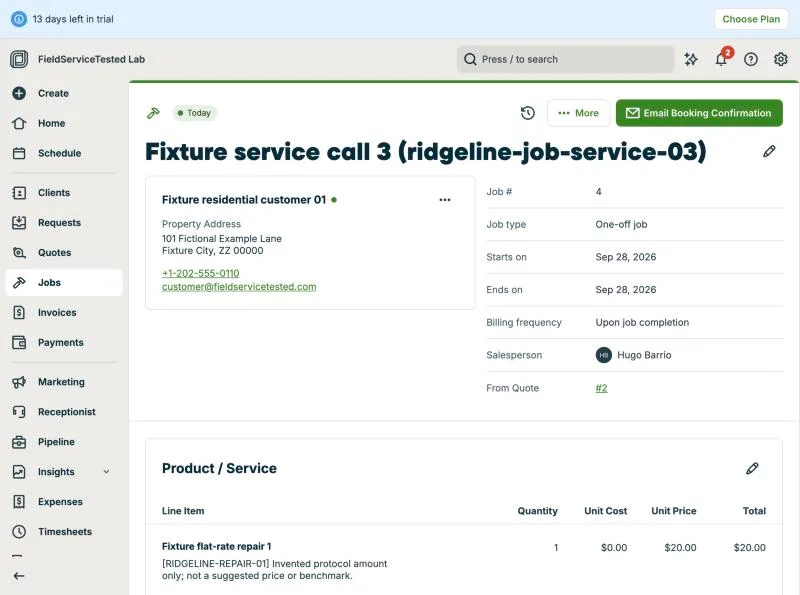
Jobber, T-06 (quote → job → invoice; the tech adds a part in the field): job. Own capture from the test account, fictional Ridgeline fixture data.
- Task
- T-06 — Quote → job → invoice; the tech adds a part in the field
- Plan
- Grow
- Device
- MacBook Air M3 24 GB
- App version
- Jobber web app, 2026-09-28 (14-day trial, day 2)
- Captured
T-07: Schedule 8 jobs across 3 techs; an emergency call bumps one · partial
Tested in a trial exposing Grow features
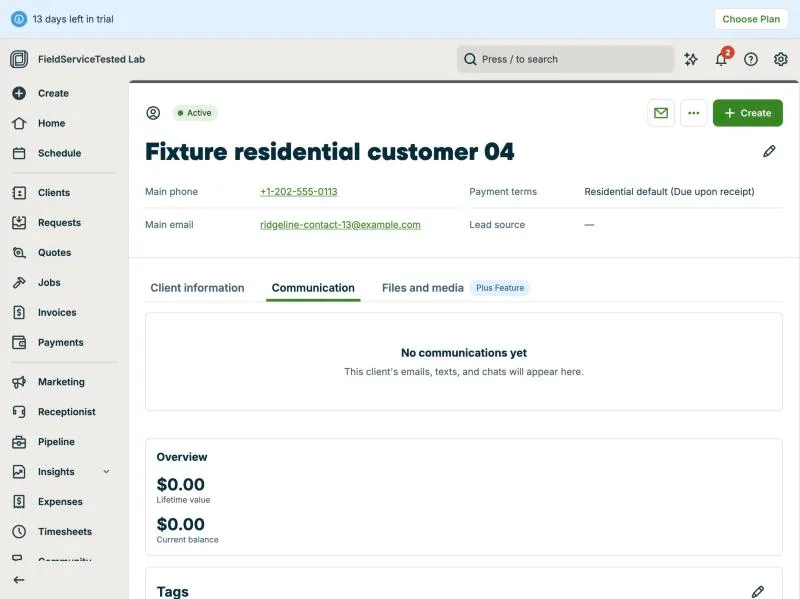
Setup: eight fixture jobs (service-01..08) scheduled on Wed Sep 30 2026 across Marcus, Priya and Tyler (2-hour slots 8-10, 10-12, 13-15); the Schedule day view showed them by technician with the 'before' state (Priya 3 visits, Tyler 2). Emergency: Job #10 (service-08, Fixture residential customer 06, 'no heat') was moved from Priya 13:00-15:00 into Tyler's 10:00-12:00 slot from the job page's Edit visit dialog (times changed, Priya removed, Tyler assigned); Job #8 (service-06, Fixture residential customer 04) was then pushed from 10:00-12:00 to 13:00-15:00 the same way. Both saves succeeded and the day view reflects the new order (Tyler: service-03 8-10, service-08 10-12, service-06 13-15). Client notification: no prompt to notify the displaced client appeared at either save; the job page 'More' menu offers Text/Email Booking Confirmation and follow-up email but no reschedule notice; the calendar visit popover only offers Duplicate; the client's Communication tab shows 'No communications yet' after the change. Settings > Emails & Text Messages lists 'Visit rescheduling notification' as sent 'when sent' (manual) whereas 'Visit reminder' is automatic (1 hour / 1 day before, email only on trial; SMS needs a paid plan). Calendar drag-and-drop could not be exercised from our lab browser (drag registered as a click), so the drag path was not observed. Result partial: reschedule is quick and visible on the calendar, but the displaced client is not informed unless the office sends something manually.
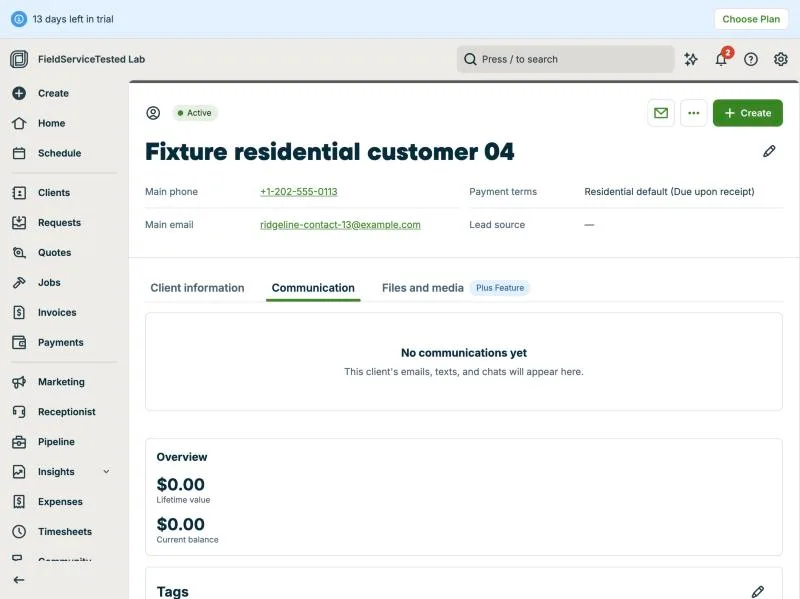
Jobber, T-07 (schedule 8 jobs across 3 techs; an emergency call bumps one): client communication. Own capture from the test account, fictional Ridgeline fixture data.
- Task
- T-07 — Schedule 8 jobs across 3 techs; an emergency call bumps one
- Plan
- Grow
- Device
- MacBook Air M3 24 GB
- App version
- Jobber web app, 2026-09-28 (14-day trial, day 2)
- Captured
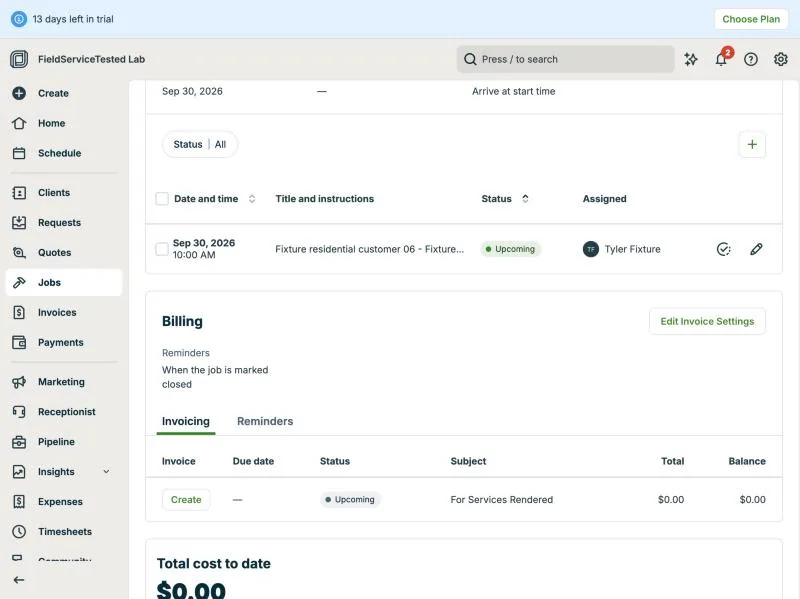
Jobber, T-07 (schedule 8 jobs across 3 techs; an emergency call bumps one): emergency job. Own capture from the test account, fictional Ridgeline fixture data.
- Task
- T-07 — Schedule 8 jobs across 3 techs; an emergency call bumps one
- Plan
- Grow
- Device
- MacBook Air M3 24 GB
- App version
- Jobber web app, 2026-09-28 (14-day trial, day 2)
- Captured
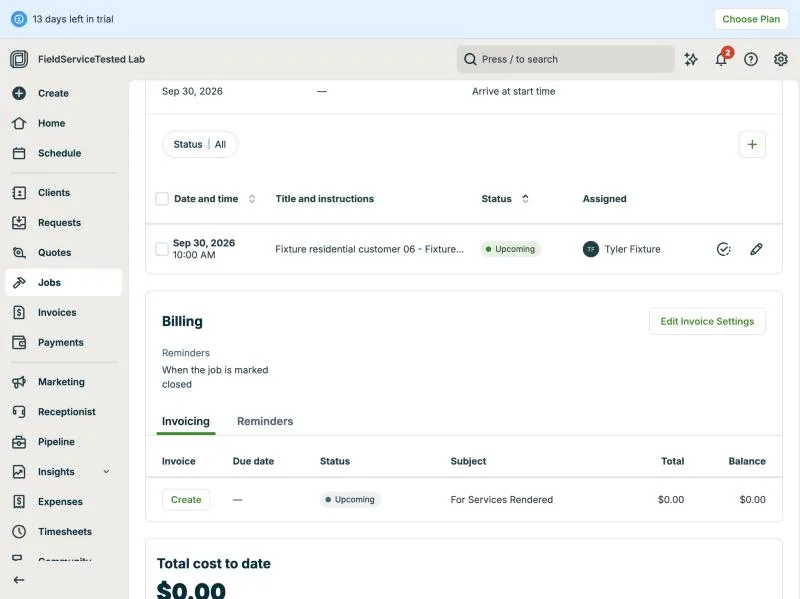
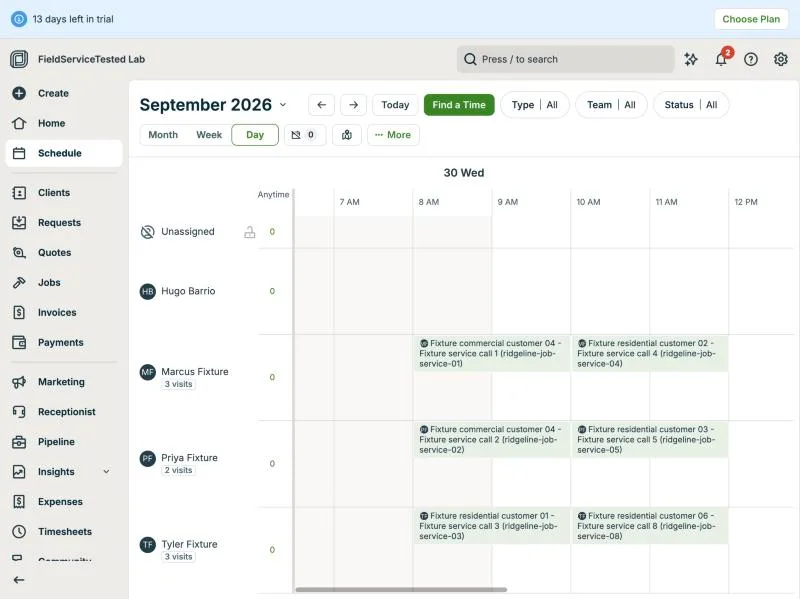
Jobber, T-07 (schedule 8 jobs across 3 techs; an emergency call bumps one): schedule after am. Own capture from the test account, fictional Ridgeline fixture data.
- Task
- T-07 — Schedule 8 jobs across 3 techs; an emergency call bumps one
- Plan
- Grow
- Device
- MacBook Air M3 24 GB
- App version
- Jobber web app, 2026-09-28 (14-day trial, day 2)
- Captured
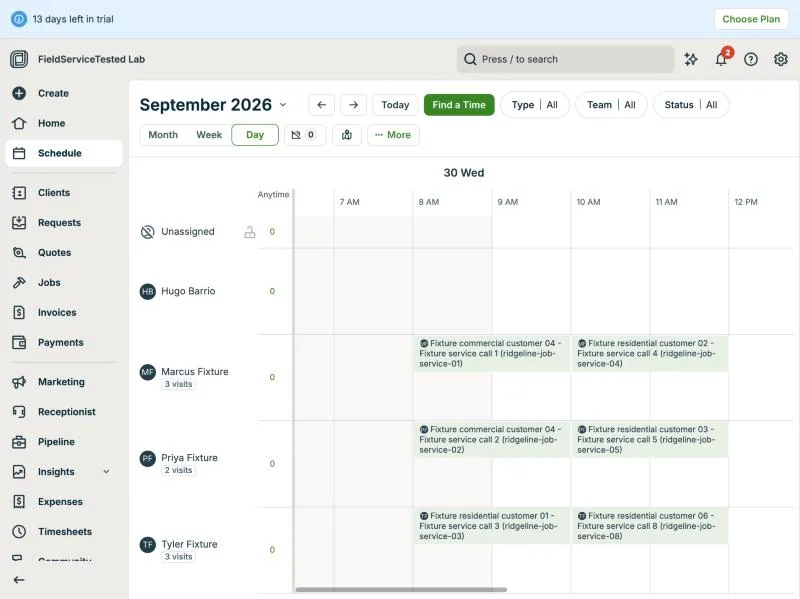
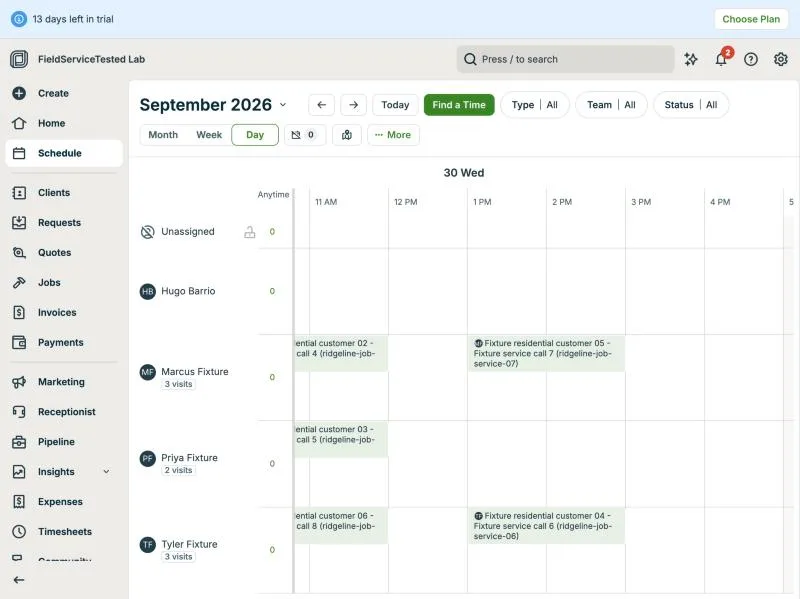
Jobber, T-07 (schedule 8 jobs across 3 techs; an emergency call bumps one): schedule after pm. Own capture from the test account, fictional Ridgeline fixture data.
- Task
- T-07 — Schedule 8 jobs across 3 techs; an emergency call bumps one
- Plan
- Grow
- Device
- MacBook Air M3 24 GB
- App version
- Jobber web app, 2026-09-28 (14-day trial, day 2)
- Captured
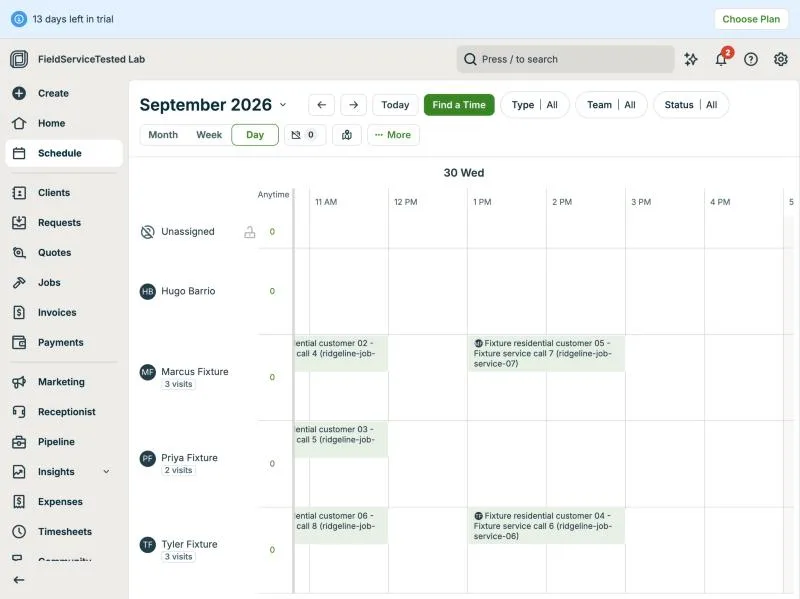
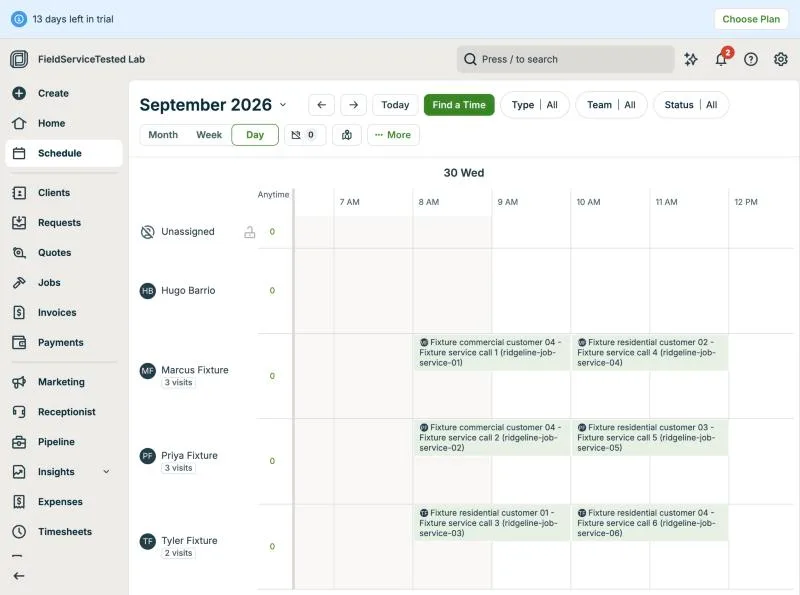
Jobber, T-07 (schedule 8 jobs across 3 techs; an emergency call bumps one): schedule before. Own capture from the test account, fictional Ridgeline fixture data.
- Task
- T-07 — Schedule 8 jobs across 3 techs; an emergency call bumps one
- Plan
- Grow
- Device
- MacBook Air M3 24 GB
- App version
- Jobber web app, 2026-09-28 (14-day trial, day 2)
- Captured
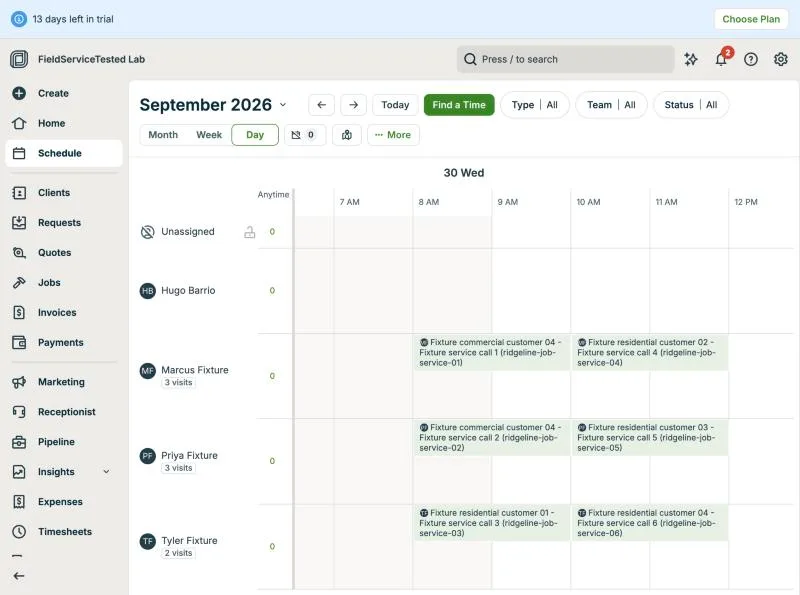
T-08: Multi-stage replacement over 3 visits · pass
Tested in a trial exposing Grow features
New one-off job #11 'Multi-stage AC replacement (ridgeline-job-replacement-01)' for Fixture residential customer 05 at 105 Fictional Example Lane. 'Create Visits' with custom date selection (Oct 1, 5 and 8, 2026) produced three visits under the single job; each visit took its own title (Stage 1 - Remove old unit and prep, 8-12, Marcus; Stage 2 - Install new condenser and air handler, 8-16, Marcus + Tyler; Stage 3 - Commissioning and customer walkthrough, 9-11, Marcus). Line item RIDGELINE-REPLACE-02 ($200.00, fixture amount). Billing offers 'Remind me to invoice when I close the job' (single invoice) and 'Split into multiple invoices with a payment schedule' (by % or $); a third scheduled invoice was added via 'Add Invoice to Payment Schedule' and set to 30/50/20 with descriptions per stage; Jobber computed $60/$100/$40 and a remainder bar. Note: the % inputs ignored scripted value changes and had to be typed. From the job's Payment Schedule, 'Create' generated Invoice #3 'Multi-stage AC replacement (...) - 1 of 3' showing 'Portion of job 30% ($60.00 of $200.00)', item total $200 and 'Due this invoice' $60; the job then shows Draft 30% ($60) and Remaining 70% ($140). Scheduled invoices are not tied to a specific visit (they are portions of the job total), and the job-level billing frequency still reads 'Upon job completion'. Invoice reference: #3 (id 173614793), draft, not sent.
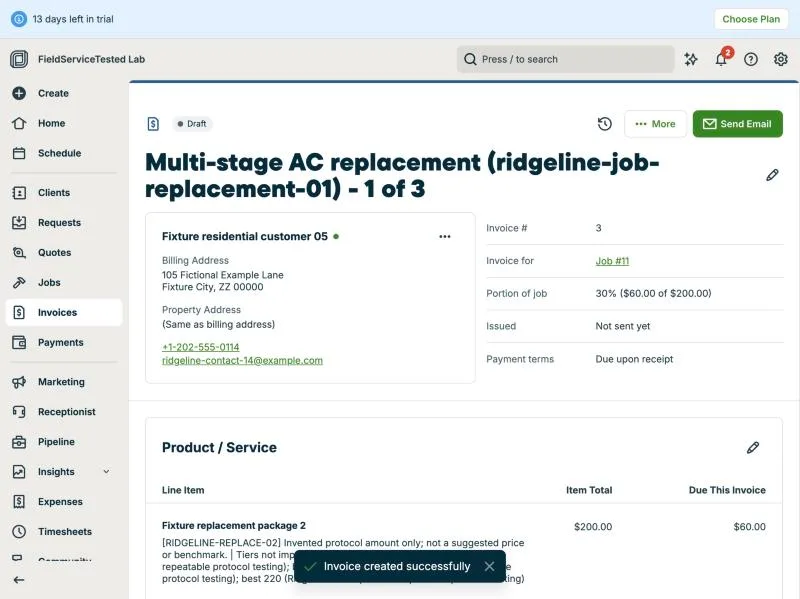
Jobber, T-08 (multi-stage replacement over 3 visits): invoice 1of3. Own capture from the test account, fictional Ridgeline fixture data.
- Task
- T-08 — Multi-stage replacement over 3 visits
- Plan
- Grow
- Device
- MacBook Air M3 24 GB
- App version
- Jobber web app, 2026-09-28 (14-day trial, day 2)
- Captured
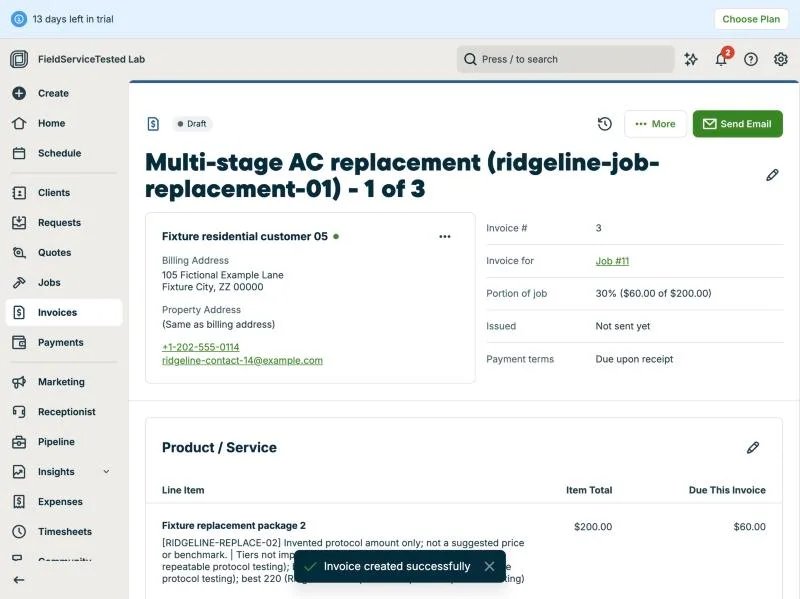
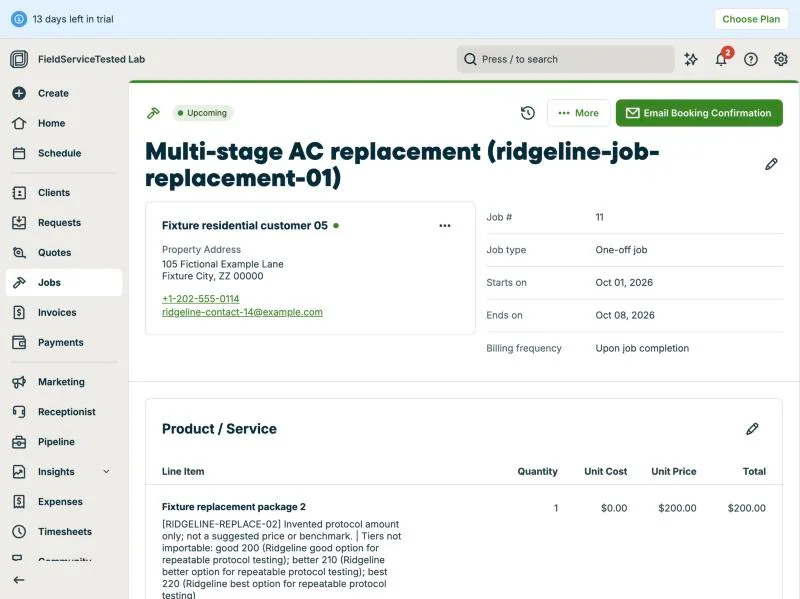
Jobber, T-08 (multi-stage replacement over 3 visits): job. Own capture from the test account, fictional Ridgeline fixture data.
- Task
- T-08 — Multi-stage replacement over 3 visits
- Plan
- Grow
- Device
- MacBook Air M3 24 GB
- App version
- Jobber web app, 2026-09-28 (14-day trial, day 2)
- Captured
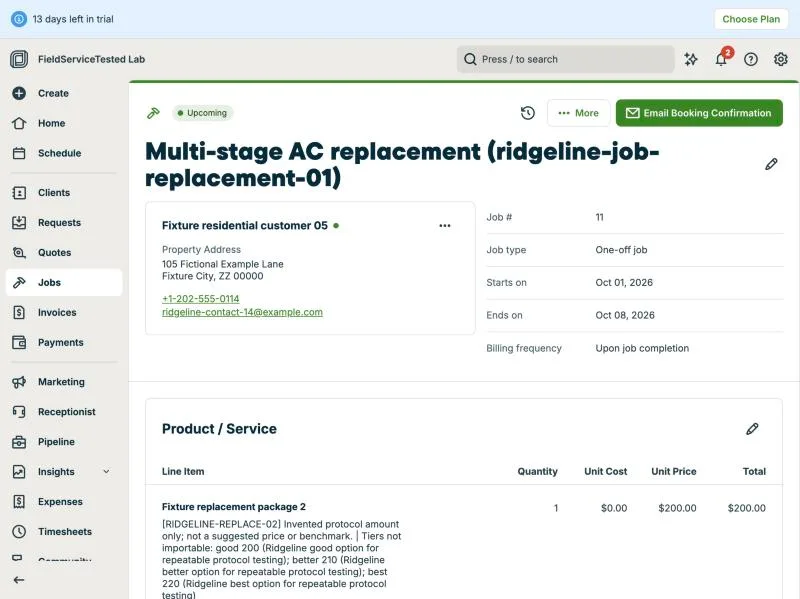
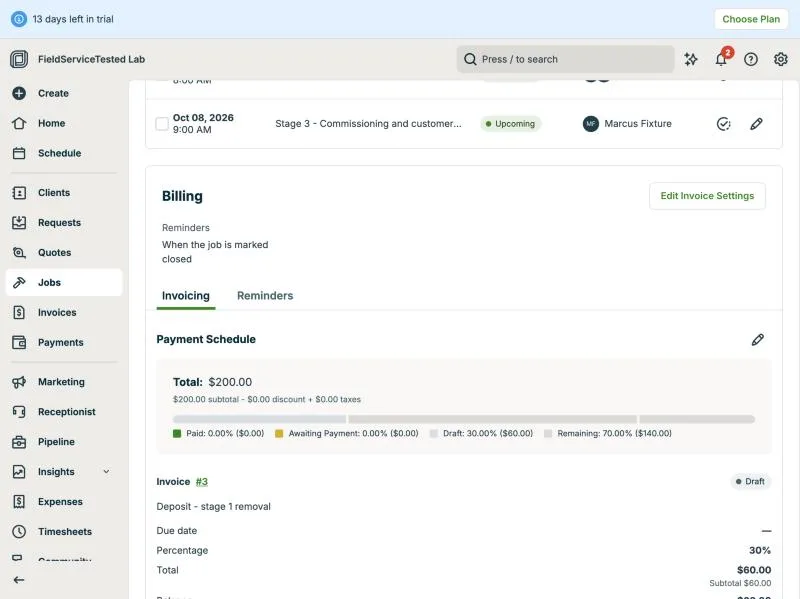
Jobber, T-08 (multi-stage replacement over 3 visits): payment schedule. Own capture from the test account, fictional Ridgeline fixture data.
- Task
- T-08 — Multi-stage replacement over 3 visits
- Plan
- Grow
- Device
- MacBook Air M3 24 GB
- App version
- Jobber web app, 2026-09-28 (14-day trial, day 2)
- Captured
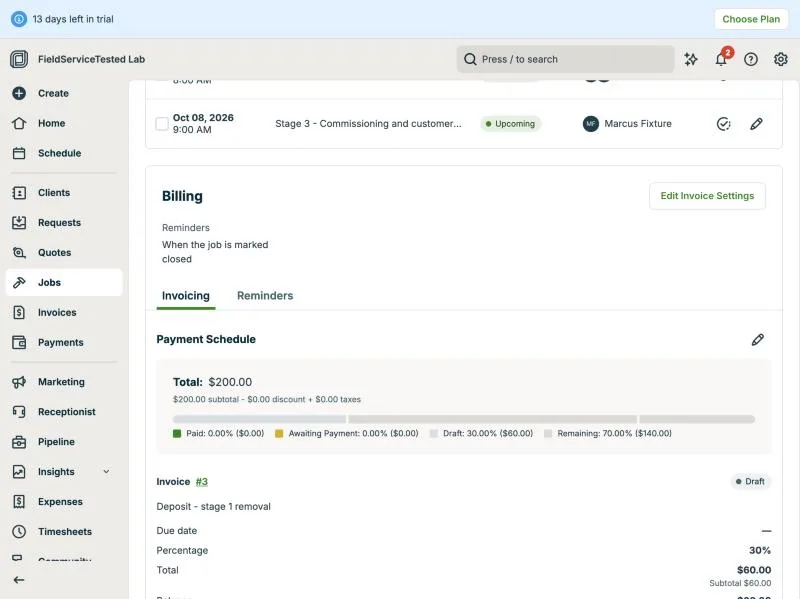
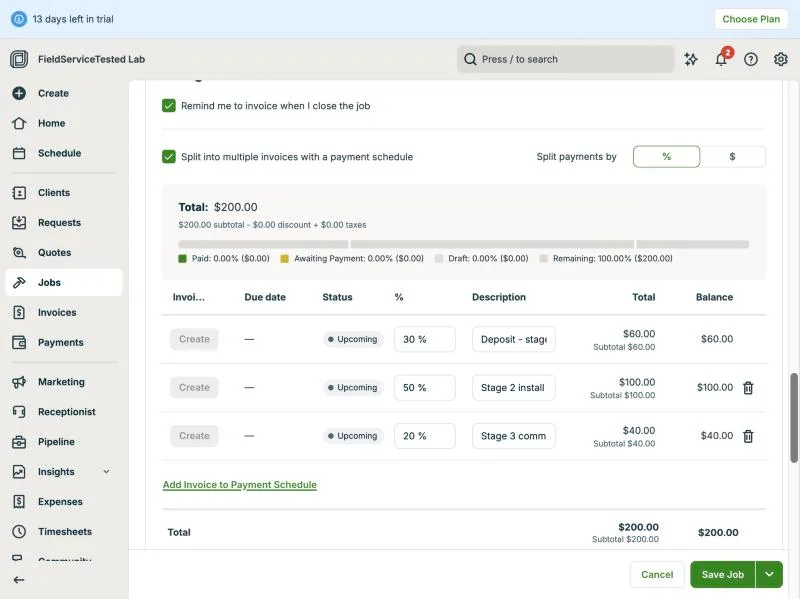
Jobber, T-08 (multi-stage replacement over 3 visits): schedule setup. Own capture from the test account, fictional Ridgeline fixture data.
- Task
- T-08 — Multi-stage replacement over 3 visits
- Plan
- Grow
- Device
- MacBook Air M3 24 GB
- App version
- Jobber web app, 2026-09-28 (14-day trial, day 2)
- Captured
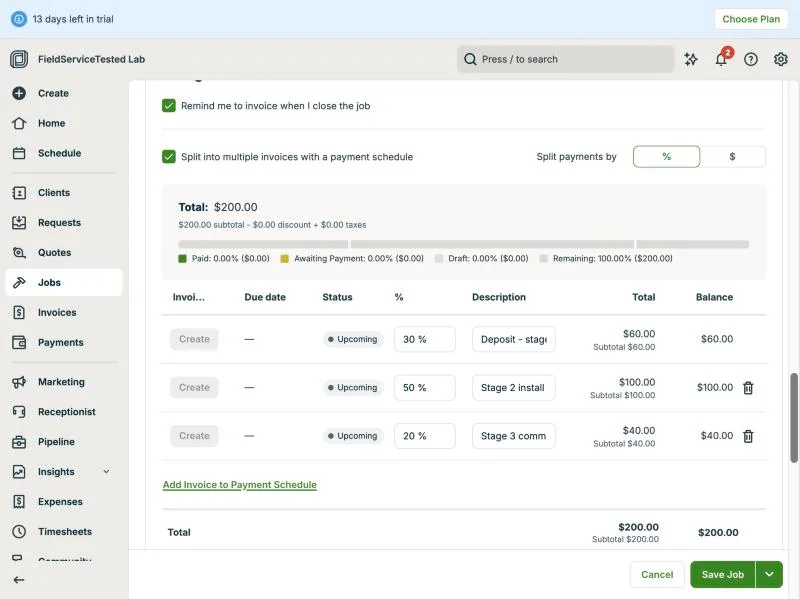
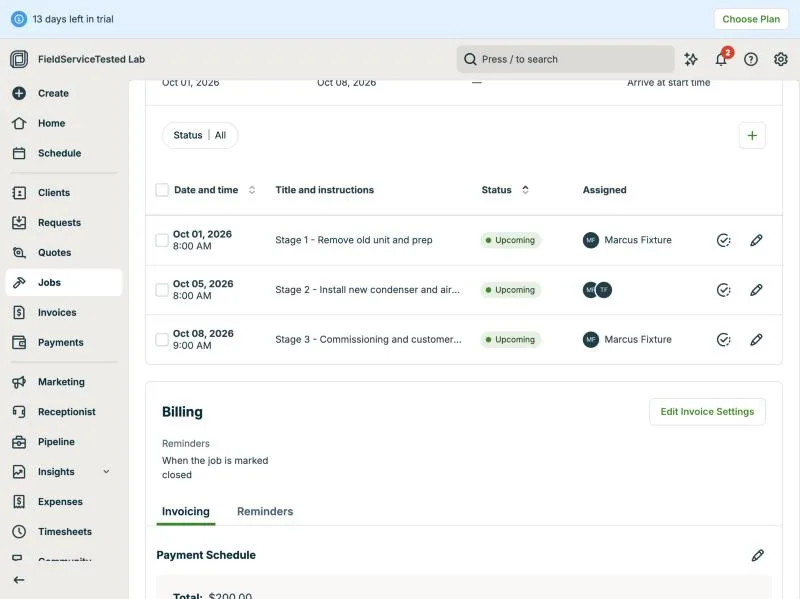
Jobber, T-08 (multi-stage replacement over 3 visits): visits. Own capture from the test account, fictional Ridgeline fixture data.
- Task
- T-08 — Multi-stage replacement over 3 visits
- Plan
- Grow
- Device
- MacBook Air M3 24 GB
- App version
- Jobber web app, 2026-09-28 (14-day trial, day 2)
- Captured
T-09: On a phone: open the job, see equipment history, add photos, notes and a checklist, capture a signature; repeat offline · pass
Tested in a trial exposing Grow features
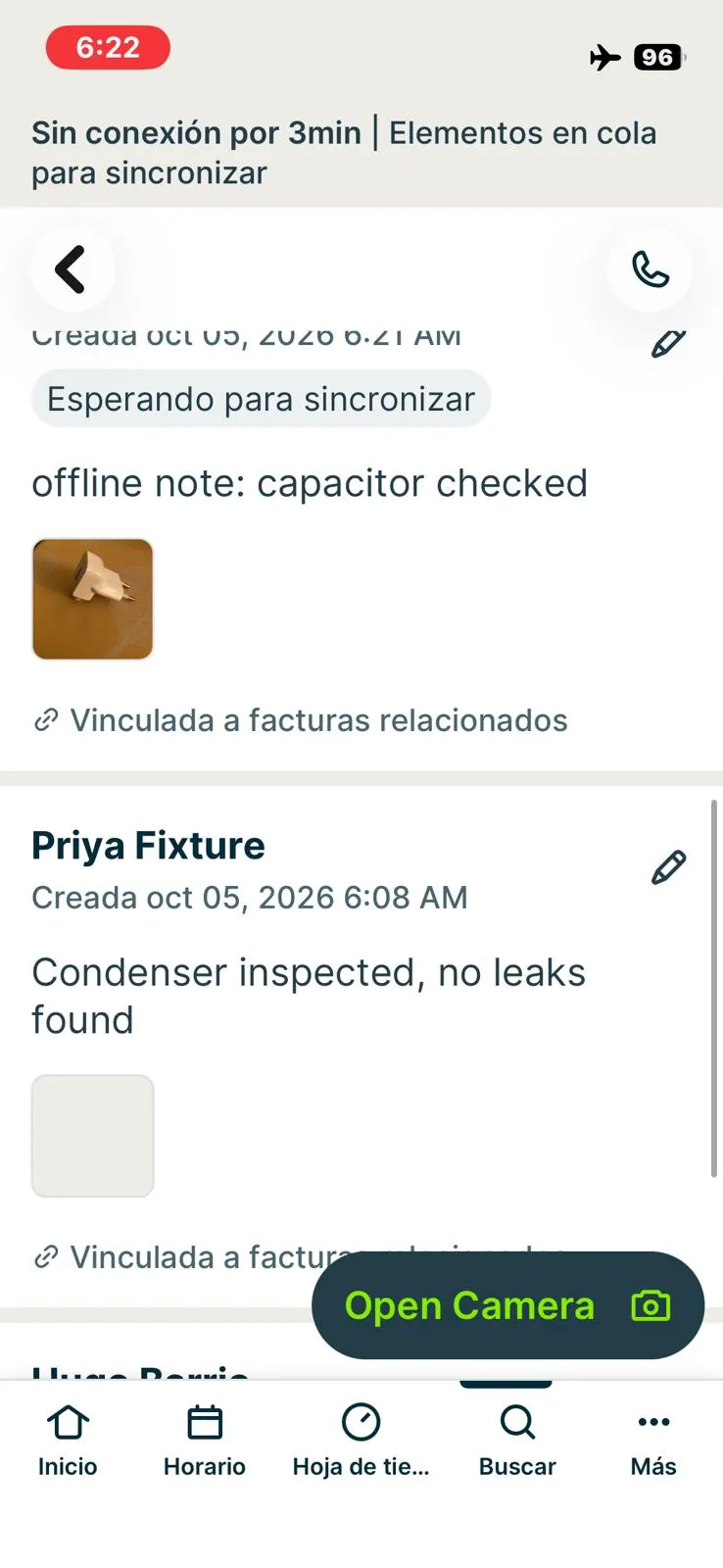
Technician Priya (fixture employee) on the phone, Job #13 'T-09 mobile field visit: AC condenser inspection' for Fixture residential customer 01 (the fixture service job for location 01 in this account). Sign-in: an App Tracking Transparency prompt appeared; declining it returned the session to the login screen, accepting it continued. Notifications skipped, location permission not granted; the home screen shows a map centred on an approximate area without location permission (not used in evidence). Searching '13' or '#13' in the app's search does not find job #13 (only customer 13 and its address). Equipment history: Jobber has no equipment record (see T-04, not-possible), so step 1 cannot be done; the visit shows the property and job history only. Online: started the visit timer, added the note 'Condenser inspected, no leaks found' with a photo (6:08), completed the checklist 'HVAC visit checklist (fixture)' (2/2 items, created on the web and attached to the visit) and captured a signature in it (6:17); all visible on reopening and on the web. Offline (airplane mode, 6:19-6:25): the app stayed usable and showed a banner 'Offline for N min | Items queued to sync'; added the note 'offline note: capacitor checked' with a second photo, labelled 'Waiting to sync' with the toast 'Note saved. It will sync when the files finish uploading'. Completing the visit offline offered close job and invoice now / close job and invoice later / leave job open / cancel; chose leave job open. The office web session showed none of the offline items while the phone was offline. On reconnecting, the app synced by itself within about a minute, without restarting: the web showed the offline note, its photo, the visit marked Completed and a time entry 6:02-6:24 (0h 21m). Timestamps: the offline note shows its creation time on the phone (6:21) but the upload time on the web (6:26); the photo file name keeps the capture time (~6:21); the time entry keeps the real end time. No missing or duplicated data. Not attempted offline: a second checklist entry and a second signature (the checklist and signature were completed online). Result pass against the criterion (everything synced after reconnecting, no data loss), with notes: no equipment history, search by job number fails, office sees upload time for offline notes.
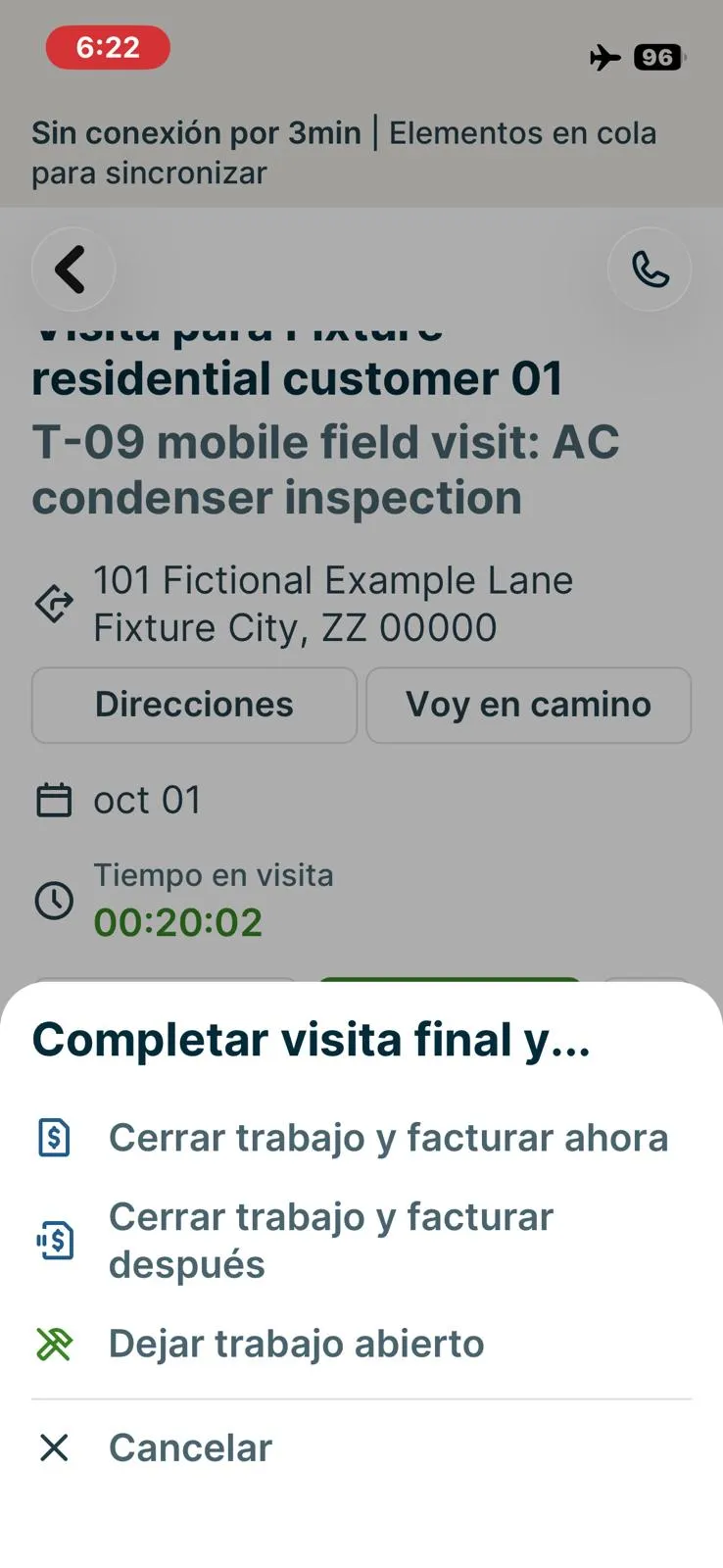
Jobber, T-09 (on a phone: open the job, see equipment history, add photos, notes and a checklist, capture a signature; repeat offline): completing the visit offline. Own capture from the test account, fictional Ridgeline fixture data.
- Task
- T-09 — On a phone: open the job, see equipment history, add photos, notes and a checklist, capture a signature; repeat offline
- Plan
- Grow
- Device
- iPhone 13 mini (MLJC3VC/A)
- App version
- Jobber iOS app (App Store, installed for the test), 2026-10-05, trial day 9
- Captured
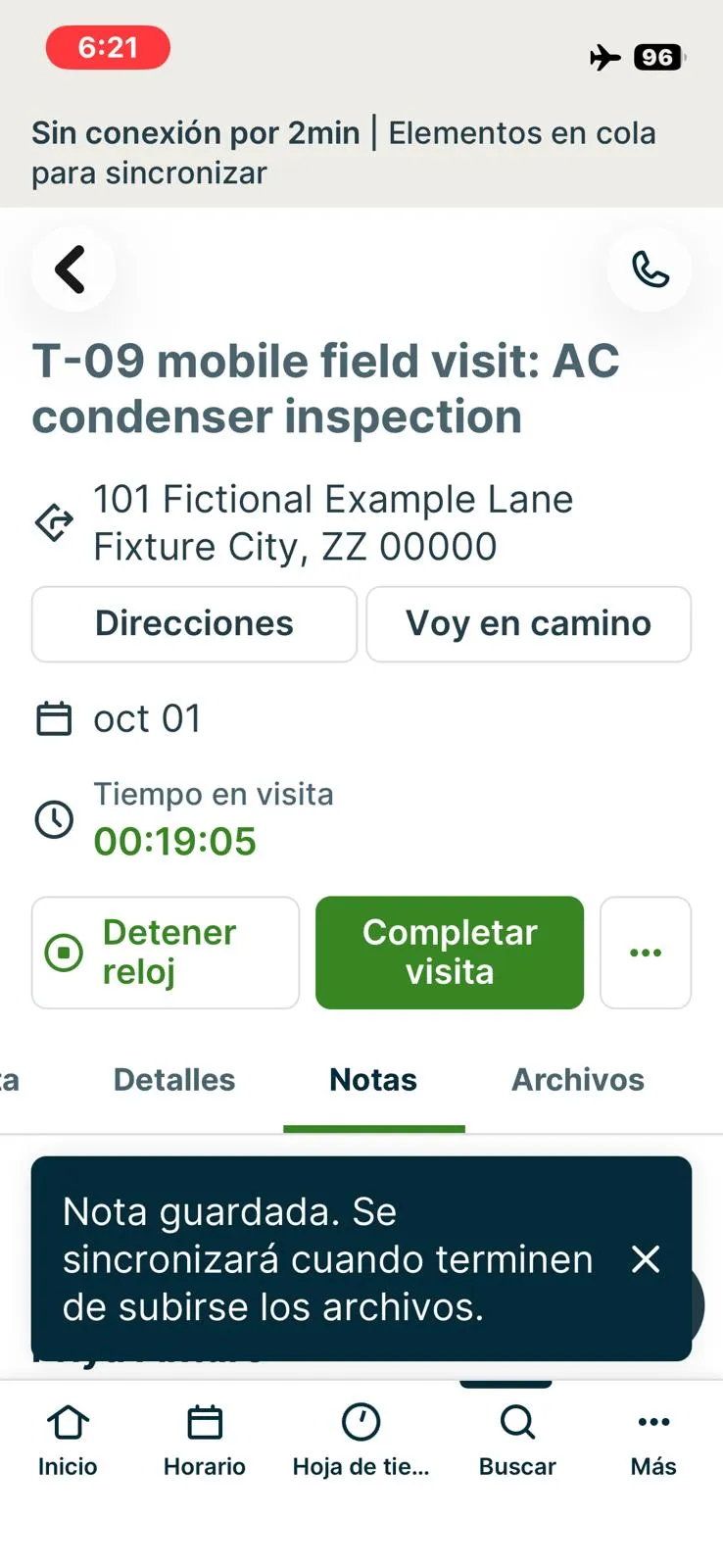
Jobber, T-09 (on a phone: open the job, see equipment history, add photos, notes and a checklist, capture a signature; repeat offline): offline banner with items queued to sync and the note saved. Own capture from the test account, fictional Ridgeline fixture data.
- Task
- T-09 — On a phone: open the job, see equipment history, add photos, notes and a checklist, capture a signature; repeat offline
- Plan
- Grow
- Device
- iPhone 13 mini (MLJC3VC/A)
- App version
- Jobber iOS app (App Store, installed for the test), 2026-10-05, trial day 9
- Captured
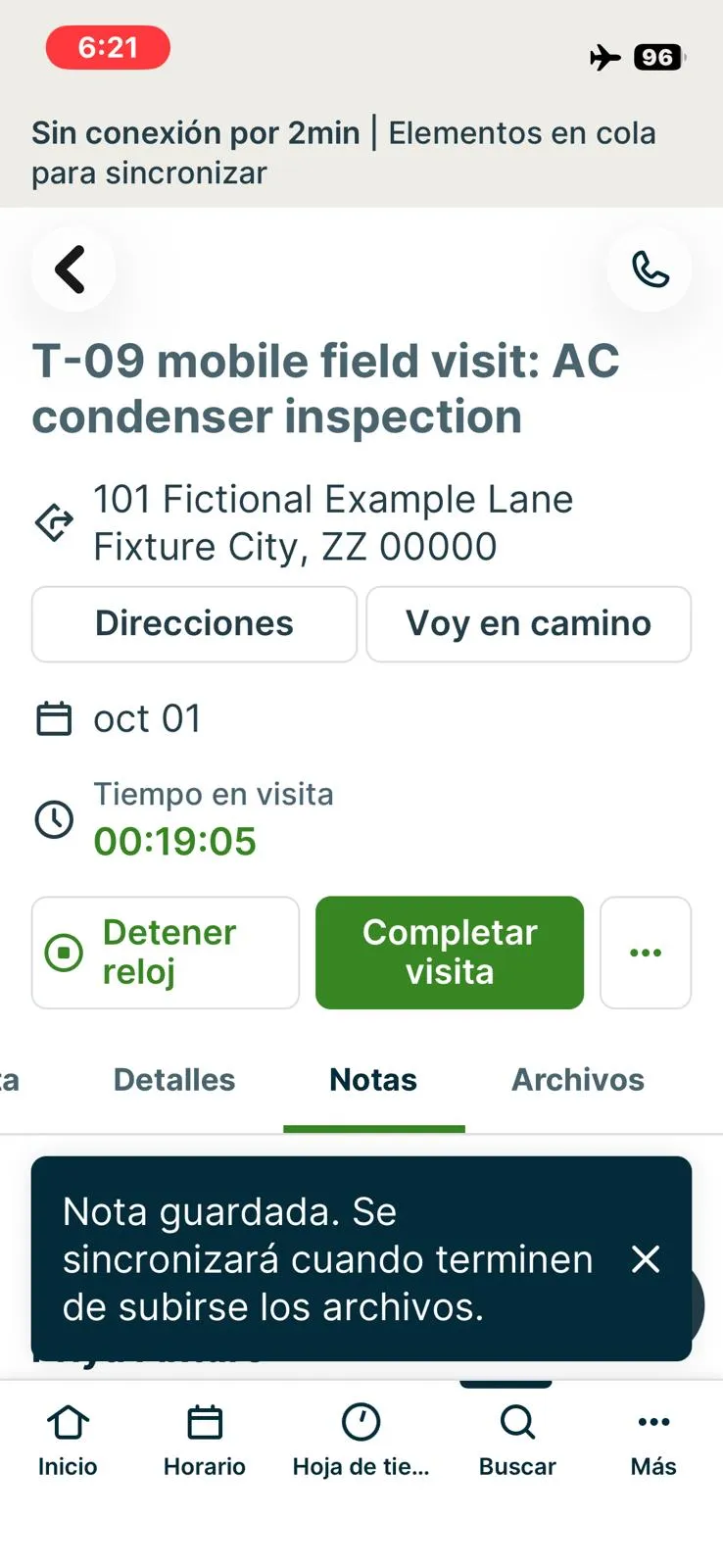
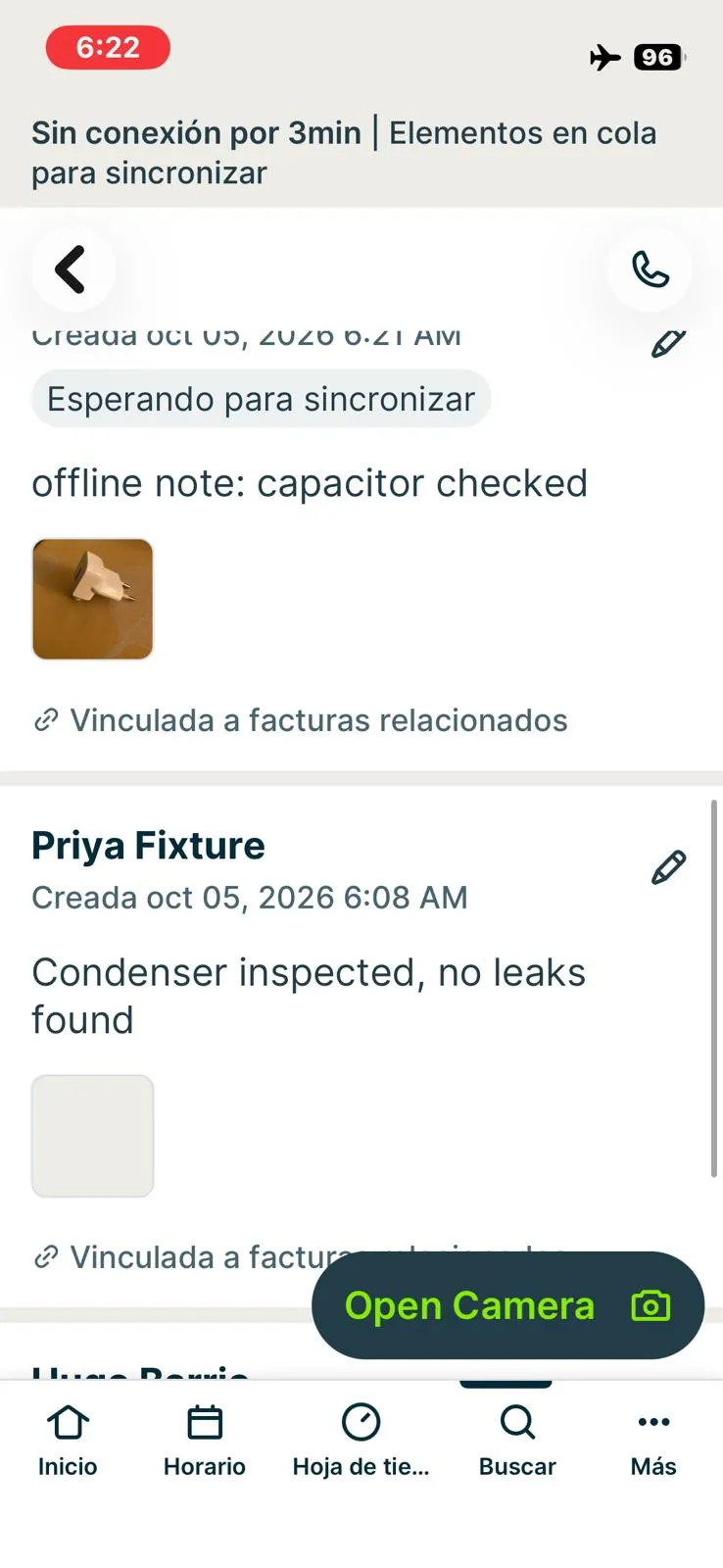
Jobber, T-09 (on a phone: open the job, see equipment history, add photos, notes and a checklist, capture a signature; repeat offline): offline note and photo waiting to sync. Own capture from the test account, fictional Ridgeline fixture data.
- Task
- T-09 — On a phone: open the job, see equipment history, add photos, notes and a checklist, capture a signature; repeat offline
- Plan
- Grow
- Device
- iPhone 13 mini (MLJC3VC/A)
- App version
- Jobber iOS app (App Store, installed for the test), 2026-10-05, trial day 9
- Captured
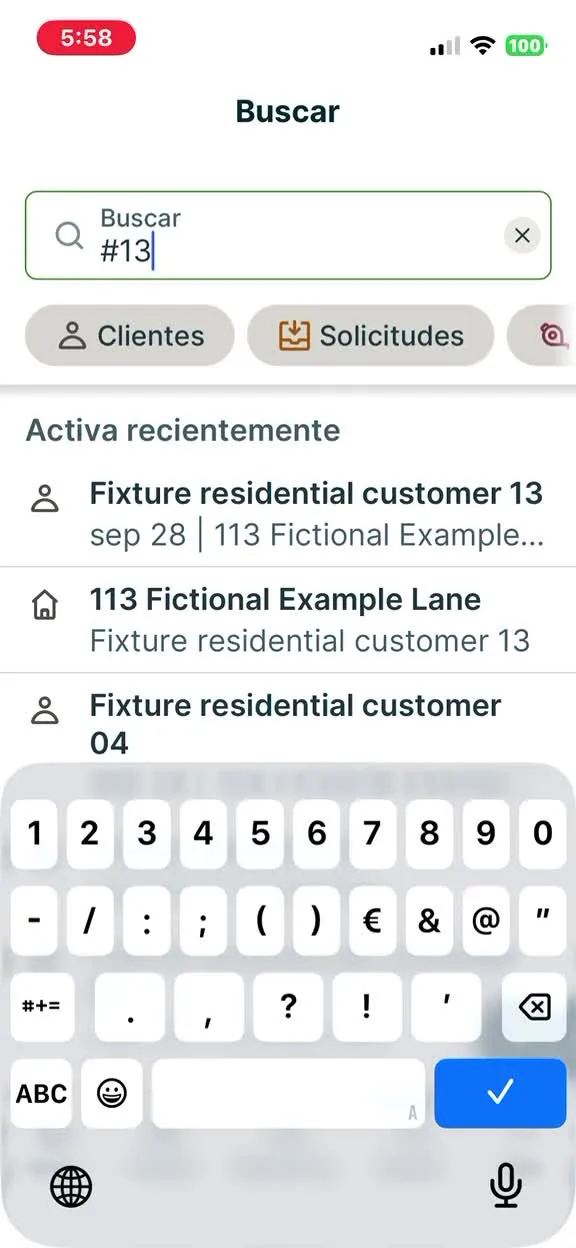
Jobber, T-09 (on a phone: open the job, see equipment history, add photos, notes and a checklist, capture a signature; repeat offline): searching #13 does not return job #13. Own capture from the test account, fictional Ridgeline fixture data.
- Task
- T-09 — On a phone: open the job, see equipment history, add photos, notes and a checklist, capture a signature; repeat offline
- Plan
- Grow
- Device
- iPhone 13 mini (MLJC3VC/A)
- App version
- Jobber iOS app (App Store, installed for the test), 2026-10-05, trial day 9
- Captured
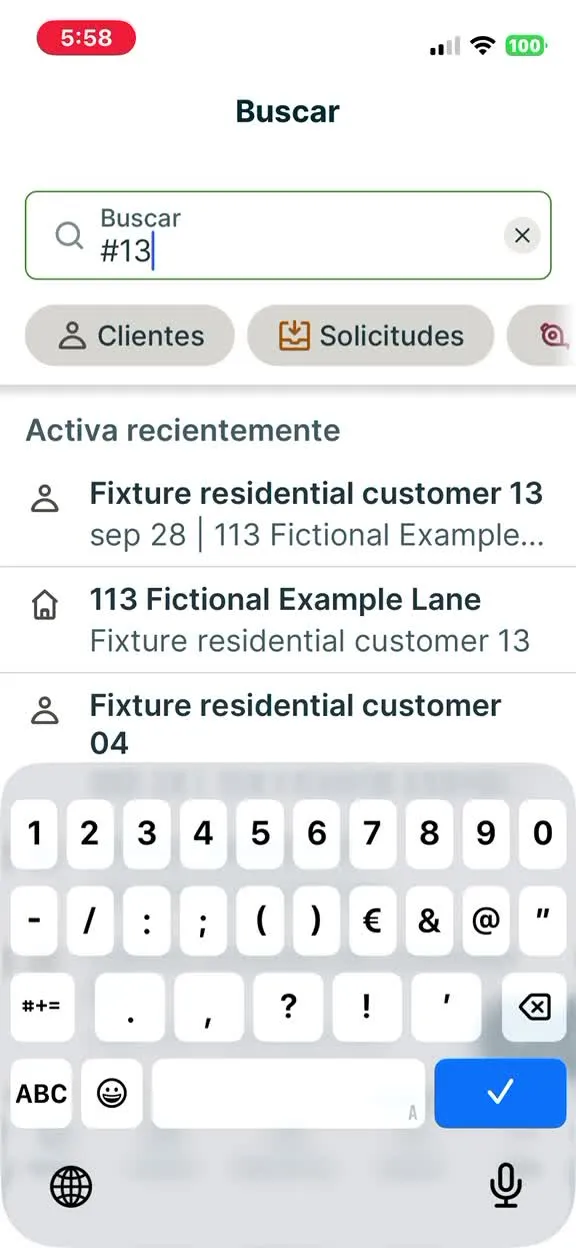
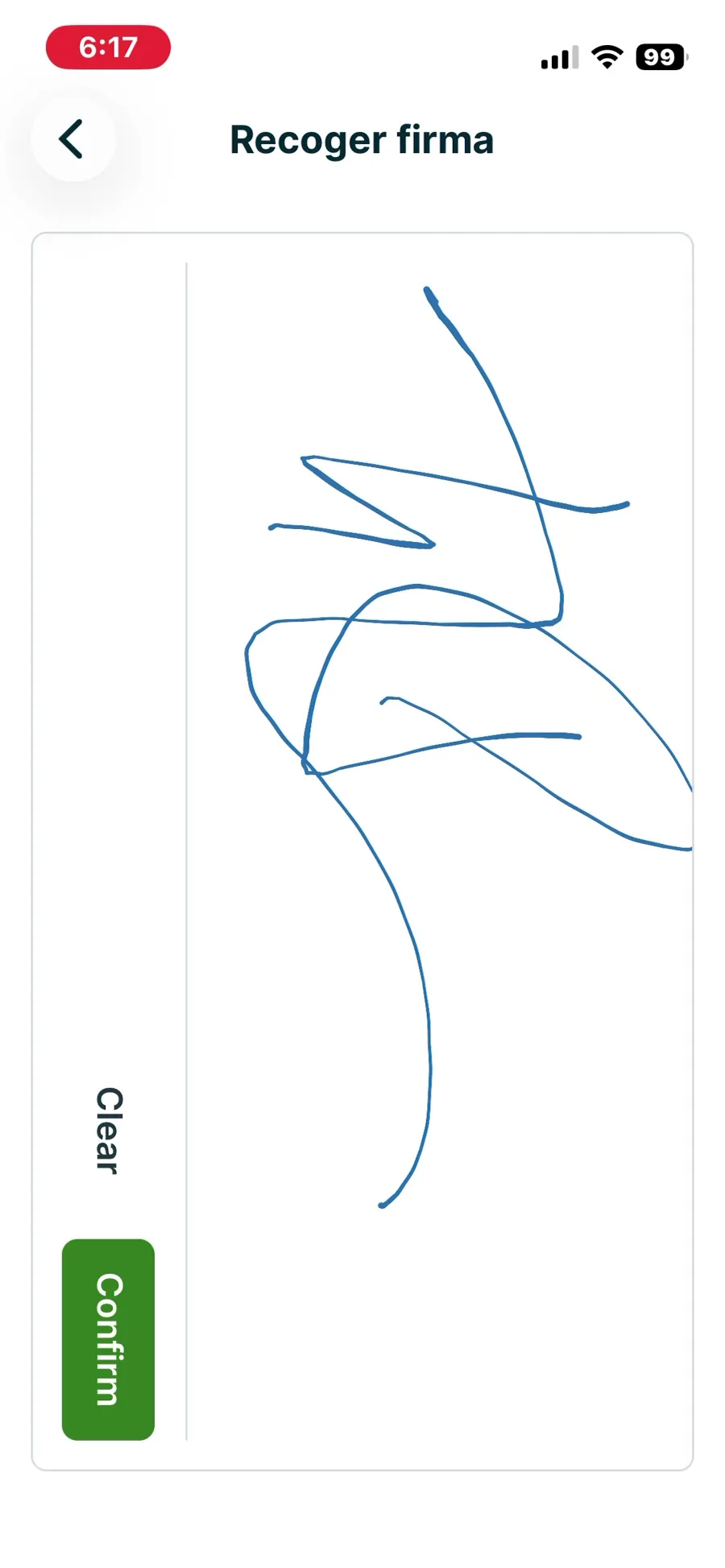
Jobber, T-09 (on a phone: open the job, see equipment history, add photos, notes and a checklist, capture a signature; repeat offline): signature captured in the visit checklist, online. Own capture from the test account, fictional Ridgeline fixture data.
- Task
- T-09 — On a phone: open the job, see equipment history, add photos, notes and a checklist, capture a signature; repeat offline
- Plan
- Grow
- Device
- iPhone 13 mini (MLJC3VC/A)
- App version
- Jobber iOS app (App Store, installed for the test), 2026-10-05, trial day 9
- Captured
T-10: Take a payment (test mode) or send a payment link · partial
Tested in a trial exposing Grow features
From Job #13 on the phone, Priya completed the visit with 'Close job and invoice now': invoice #4 'For Services Rendered', one line 'Service call' 1 x $11.00, tax $0, total and balance $11.00, salesperson Priya Fixture, created from job #13. Test mode: no card or test-mode flow was available. Jobber Payments is not set up in the trial account, the invoice shows 'Client hub payments: OFF - Clients can't pay invoices online. Contact your account admin to turn on client hub payments in account settings', and Collect Payment offers only Cash, Check and Other Payment Record (no card entry, no Tap to Pay, no payment link). No real card was used. Recorded $11.00 Cash dated Oct 05, 2026 against invoice 4 ('Payment Recorded'); the office web list then showed invoice #4 Paid, total $11.00, balance $0.00. Result partial: the payment is recorded against the invoice, but only as a manual record; a test-mode card payment or payment link could not be exercised without activating Jobber Payments.
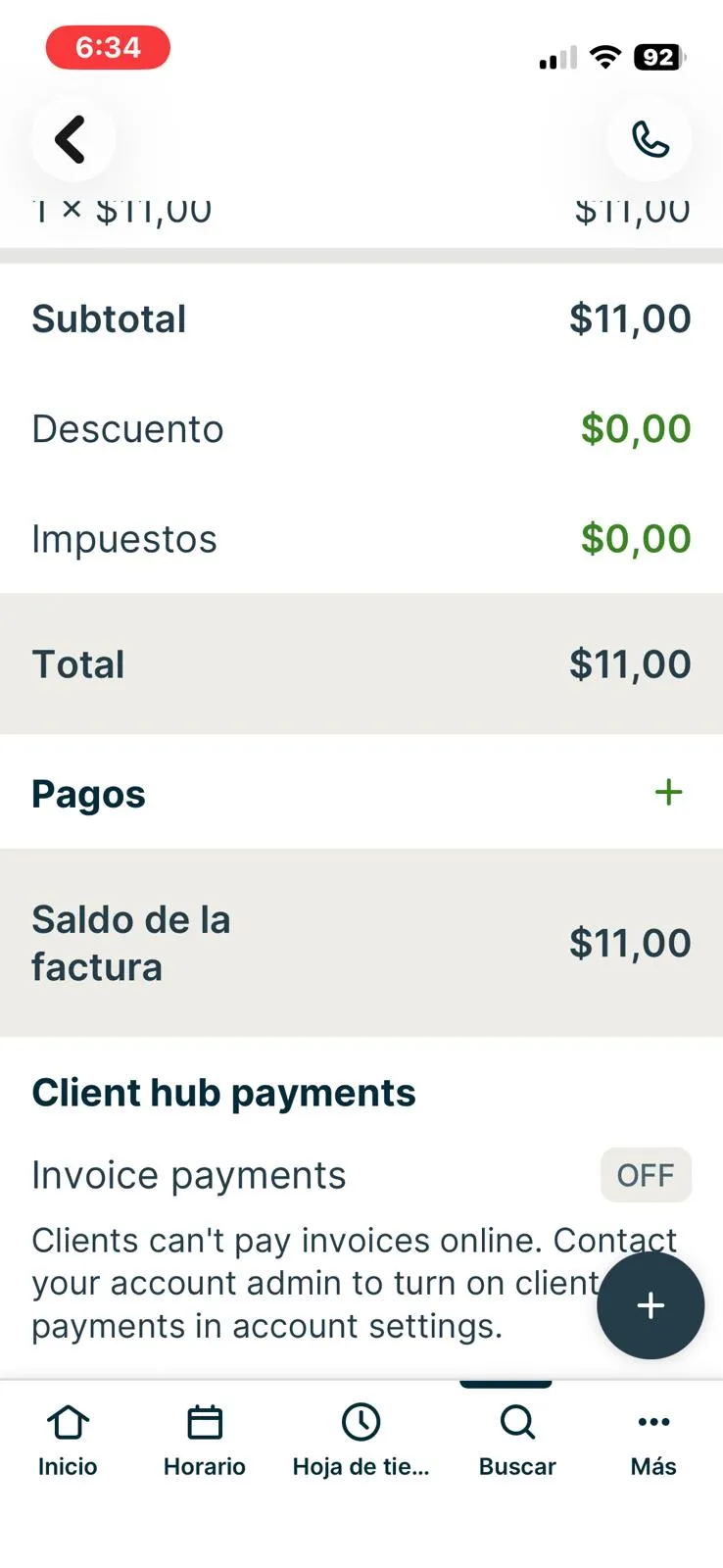
Jobber, T-10 (take a payment in test mode or send a payment link): online invoice payments off in the trial. Own capture from the test account, fictional Ridgeline fixture data.
- Task
- T-10 — Take a payment (test mode) or send a payment link
- Plan
- Grow
- Device
- iPhone 13 mini (MLJC3VC/A)
- App version
- Jobber iOS app (App Store, installed for the test), 2026-10-05, trial day 9
- Captured
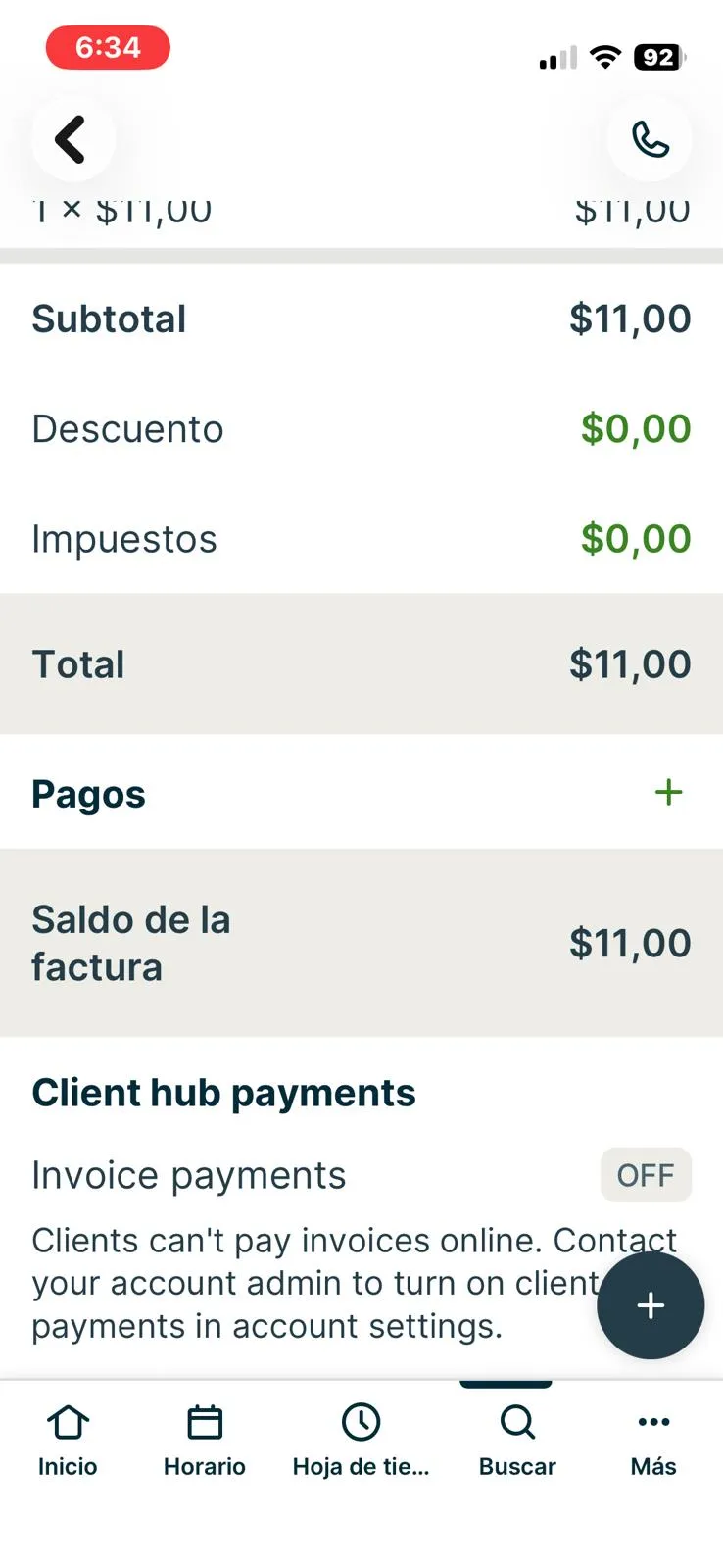
Jobber, T-10 (take a payment in test mode or send a payment link): collect payment options. Own capture from the test account, fictional Ridgeline fixture data.
- Task
- T-10 — Take a payment (test mode) or send a payment link
- Plan
- Grow
- Device
- iPhone 13 mini (MLJC3VC/A)
- App version
- Jobber iOS app (App Store, installed for the test), 2026-10-05, trial day 9
- Captured
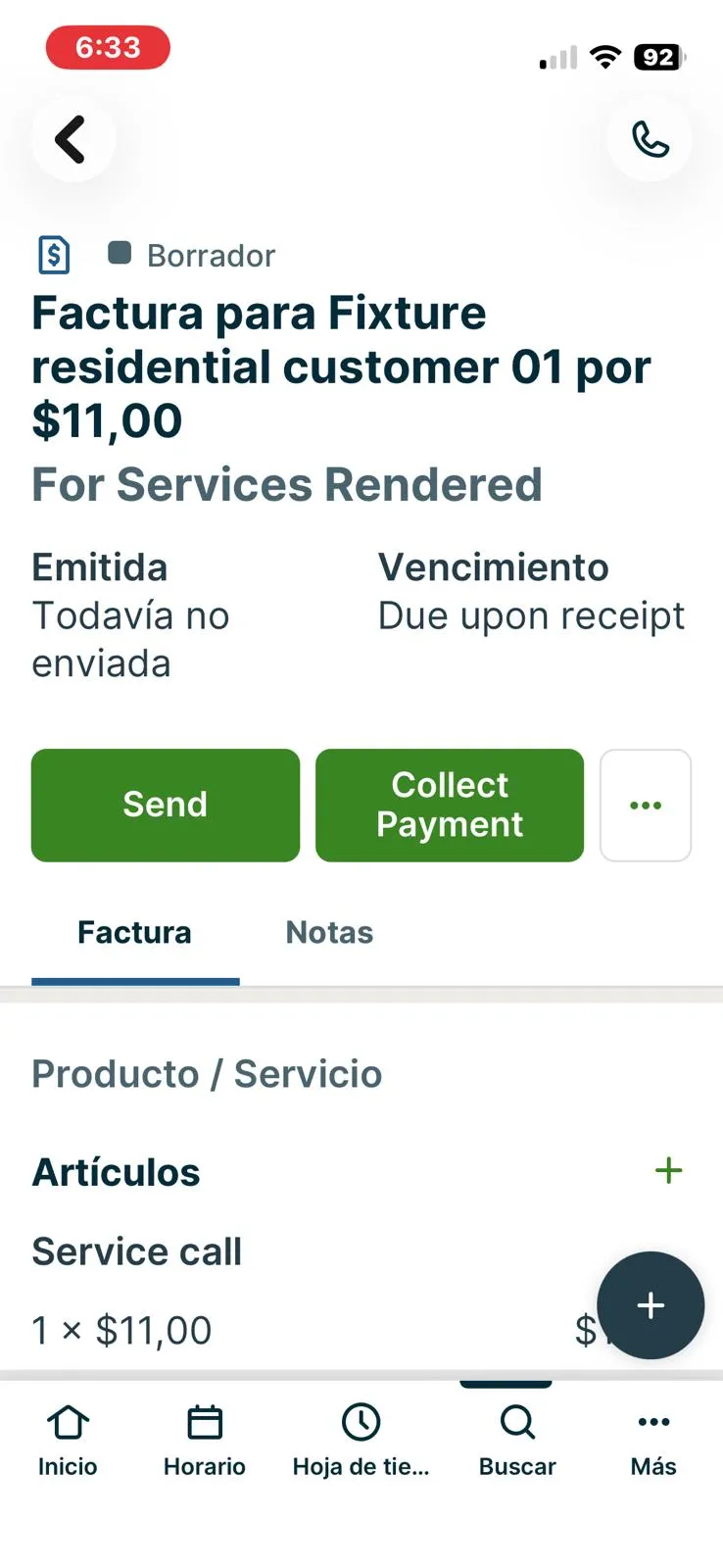
Jobber, T-10 (take a payment in test mode or send a payment link): invoice created on the phone. Own capture from the test account, fictional Ridgeline fixture data.
- Task
- T-10 — Take a payment (test mode) or send a payment link
- Plan
- Grow
- Device
- iPhone 13 mini (MLJC3VC/A)
- App version
- Jobber iOS app (App Store, installed for the test), 2026-10-05, trial day 9
- Captured
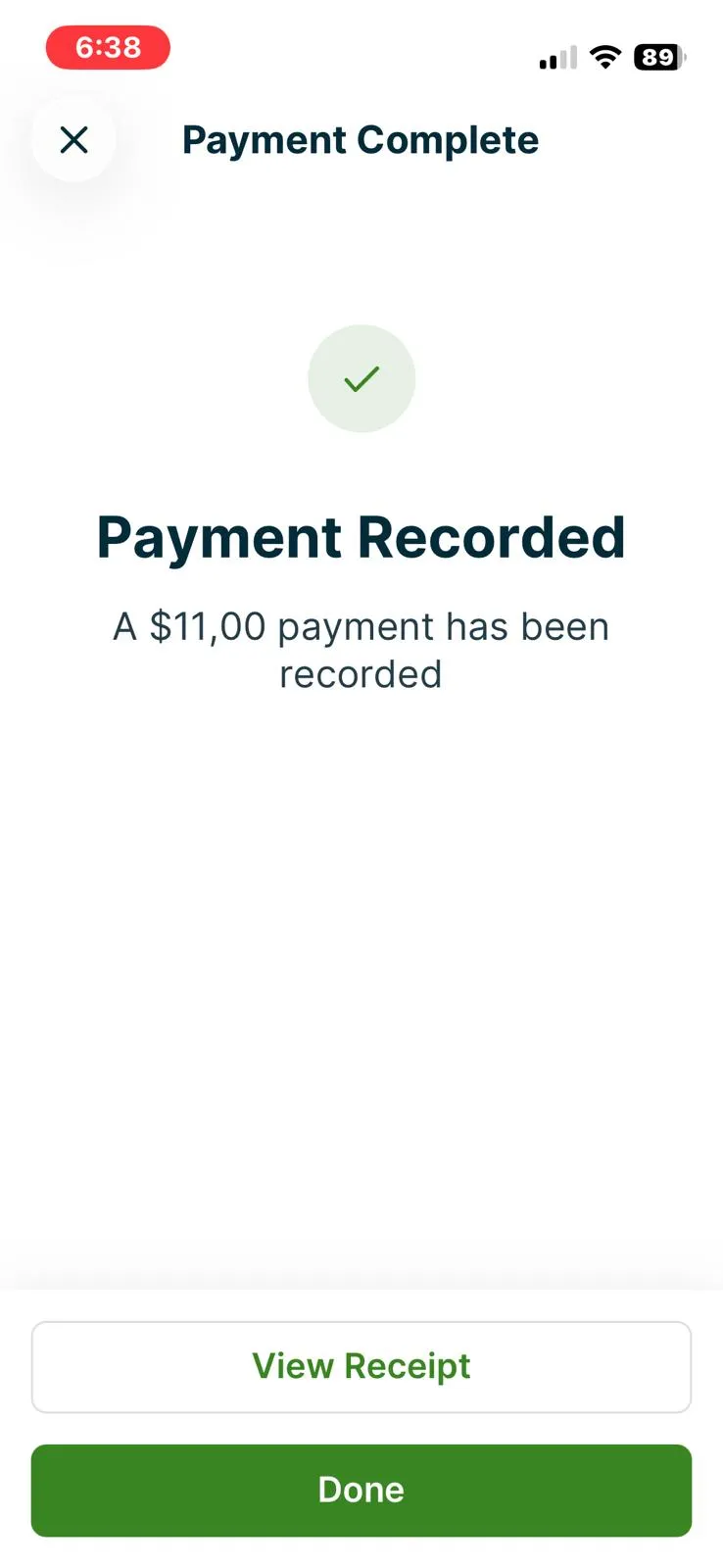
Jobber, T-10 (take a payment in test mode or send a payment link): cash payment recorded. Own capture from the test account, fictional Ridgeline fixture data.
- Task
- T-10 — Take a payment (test mode) or send a payment link
- Plan
- Grow
- Device
- iPhone 13 mini (MLJC3VC/A)
- App version
- Jobber iOS app (App Store, installed for the test), 2026-10-05, trial day 9
- Captured
T-11: Maintenance plan with 2 visits a year and recurring billing · pass
Tested in a trial exposing Grow features
Recurring job #12 'Maintenance plan - 2 visits a year (ridgeline-job-maintenance-01)' for Fixture residential customer 02 at 102 Fictional Example Lane. Schedule = Recurring > Repeats 'Custom schedule...' > every 6 months on the 1st (day of month), 9:00-11:00, Priya, 'Ends after 2 years'. Jobber previewed 'Mar 1, 2027 - Sep 1, 2028, 4 visits, Repeats every 6 months on the 1st' before saving and generated the four visits automatically (Mar 01 2027, Sep 01 2027, Mar 01 2028, Sep 01 2028). Billing & automatic payments: billing type 'Visit based' or 'Fixed price'; invoice frequency options are monthly on the last day, 'After each visit is completed', as needed, once when job is closed, or custom; chose per visit, with the preview 'Total invoices 4, First Mar 1 2027, Last Sep 1 2028'. Line item RIDGELINE-MAINT $12.00 per visit. The job page shows 'Billing frequency: After every visit', an Invoicing row per visit ($12.00 upcoming) and a 'Get paid automatically' panel: automatic charging of the saved card requires Jobber Payments (not set up in the lab; would need a US bank account). There is no separate 'maintenance agreement/contract' object: the plan is a recurring job. Interaction note: the Repeats select had to be set via the DOM; the 'Every N' field accepts typing.
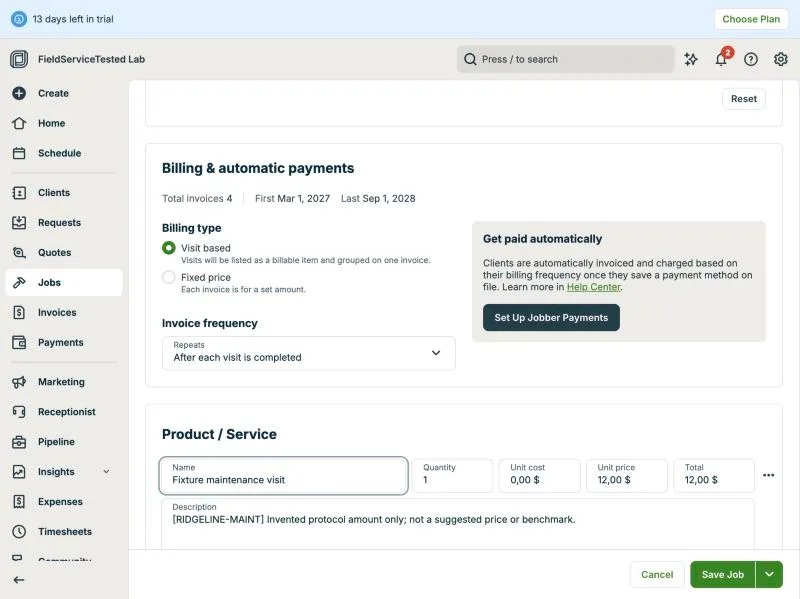
Jobber, T-11 (maintenance plan with 2 visits a year and recurring billing): billing setup. Own capture from the test account, fictional Ridgeline fixture data.
- Task
- T-11 — Maintenance plan with 2 visits a year and recurring billing
- Plan
- Grow
- Device
- MacBook Air M3 24 GB
- App version
- Jobber web app, 2026-09-28 (14-day trial, day 2)
- Captured
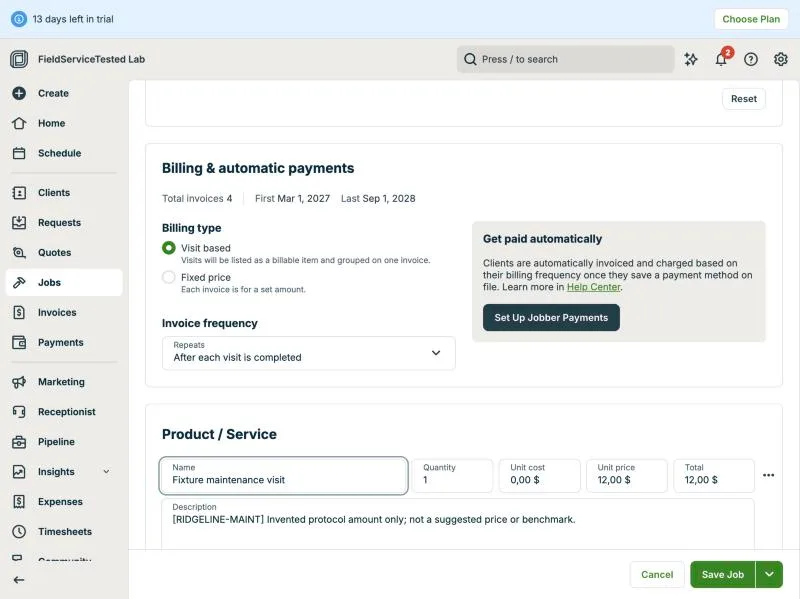
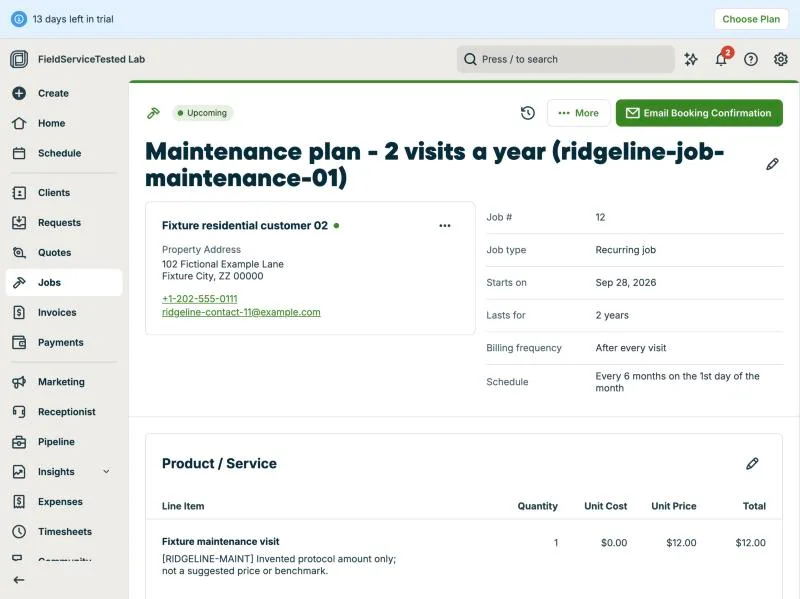
Jobber, T-11 (maintenance plan with 2 visits a year and recurring billing): job. Own capture from the test account, fictional Ridgeline fixture data.
- Task
- T-11 — Maintenance plan with 2 visits a year and recurring billing
- Plan
- Grow
- Device
- MacBook Air M3 24 GB
- App version
- Jobber web app, 2026-09-28 (14-day trial, day 2)
- Captured
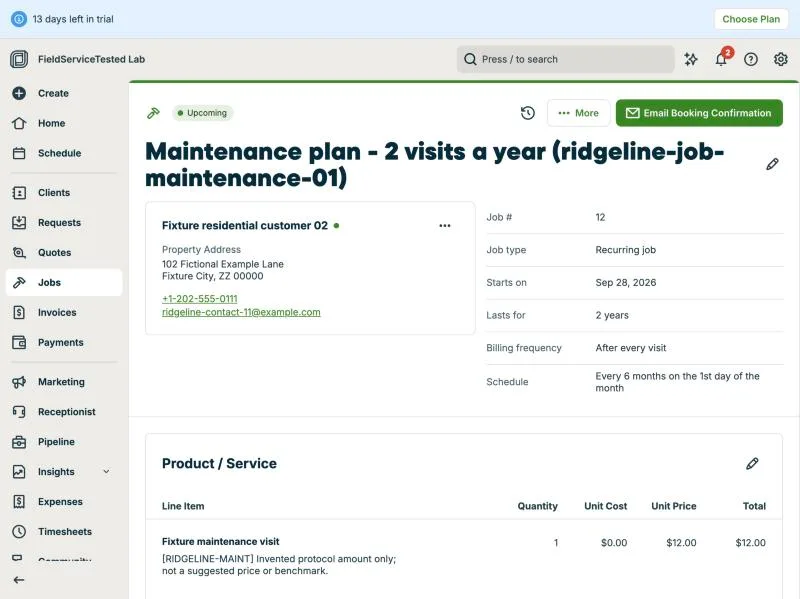
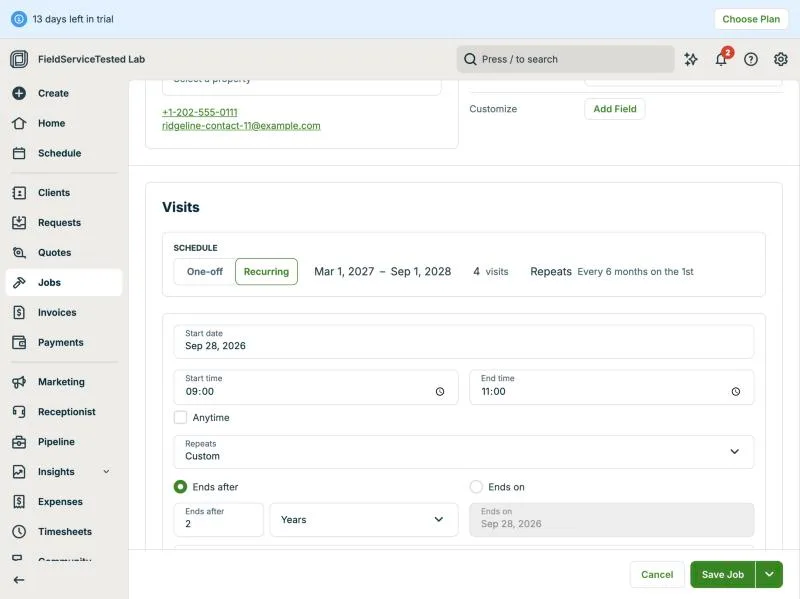
Jobber, T-11 (maintenance plan with 2 visits a year and recurring billing): recurring setup. Own capture from the test account, fictional Ridgeline fixture data.
- Task
- T-11 — Maintenance plan with 2 visits a year and recurring billing
- Plan
- Grow
- Device
- MacBook Air M3 24 GB
- App version
- Jobber web app, 2026-09-28 (14-day trial, day 2)
- Captured
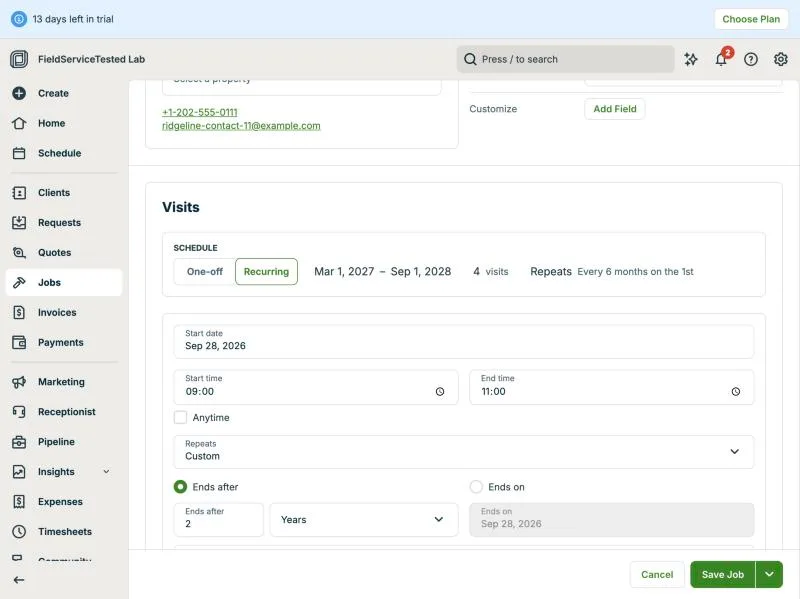
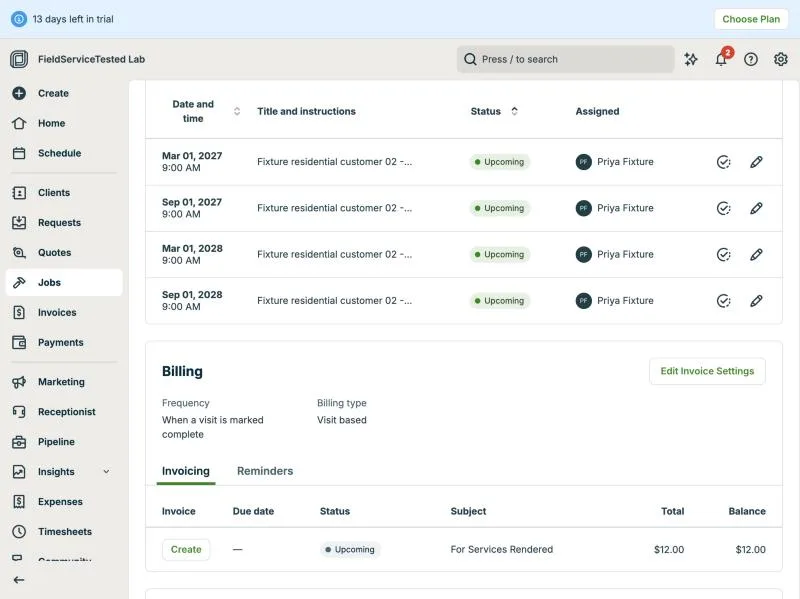
Jobber, T-11 (maintenance plan with 2 visits a year and recurring billing): visits billing. Own capture from the test account, fictional Ridgeline fixture data.
- Task
- T-11 — Maintenance plan with 2 visits a year and recurring billing
- Plan
- Grow
- Device
- MacBook Air M3 24 GB
- App version
- Jobber web app, 2026-09-28 (14-day trial, day 2)
- Captured
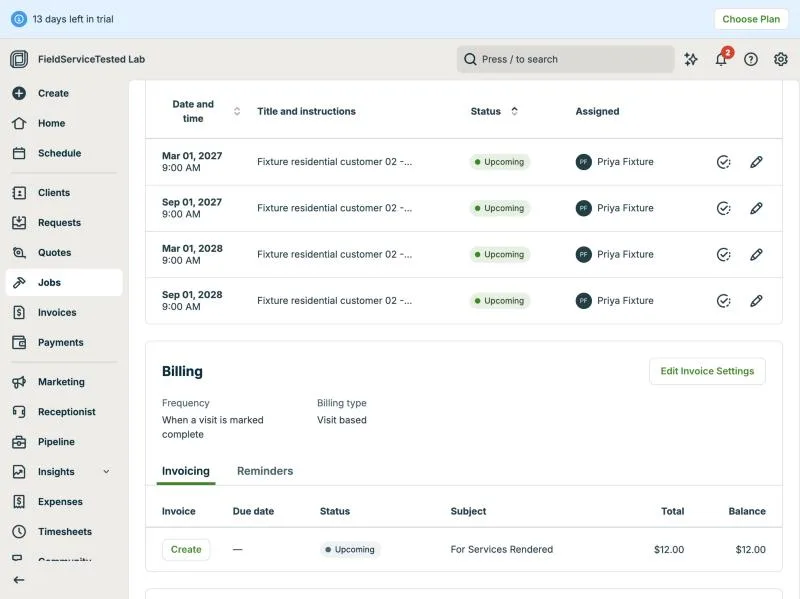
T-12: Job costing for the multi-stage job · pass
Tested in a trial exposing Grow features
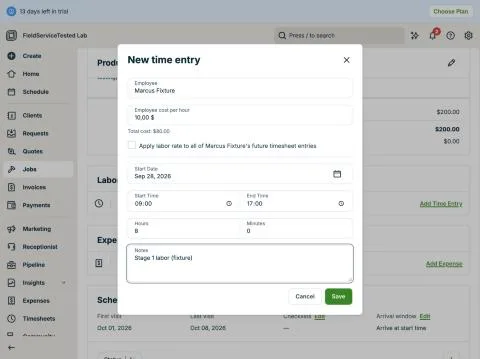
On the multi-stage job #11 ($200 price, RIDGELINE-REPLACE-02 with unit cost $0): Labor > Add time entry for Marcus Fixture, 8h at an employee cost of $10/h (fixture rate typed in the dialog; there is an option to apply the rate to the employee's future timesheet entries), total $80; Expenses > Add expense 'Condenser unit (fixture material)' $50, not reimbursable, receipt upload optional. The job page's 'Total cost to date' card then showed $130.00 with bars Revenue $200.00 / Cost $130.00 (expandable into Labor $80.00 and Expenses $50.00) and Profit 35% $70.00, updated immediately ('Hugo logged a $50.00 expense'). Line-item unit cost is a third cost input (left at $0 here). All visible on the job itself, no report or spreadsheet needed. Not checked: whether job costing is gated on lower paid plans (trial exposes everything); see T-16.
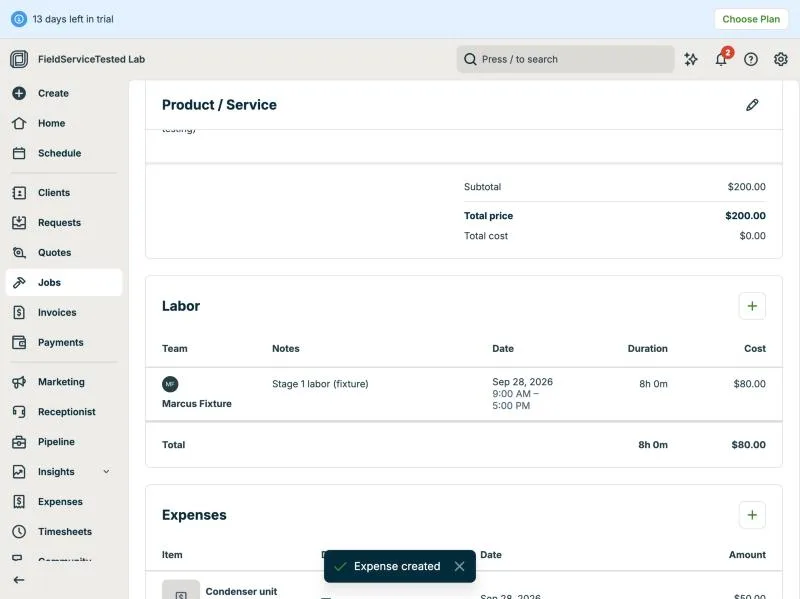
Jobber, T-12 (job costing for the multi-stage job): labor expense. Own capture from the test account, fictional Ridgeline fixture data.
- Task
- T-12 — Job costing for the multi-stage job
- Plan
- Grow
- Device
- MacBook Air M3 24 GB
- App version
- Jobber web app, 2026-09-28 (14-day trial, day 2)
- Captured
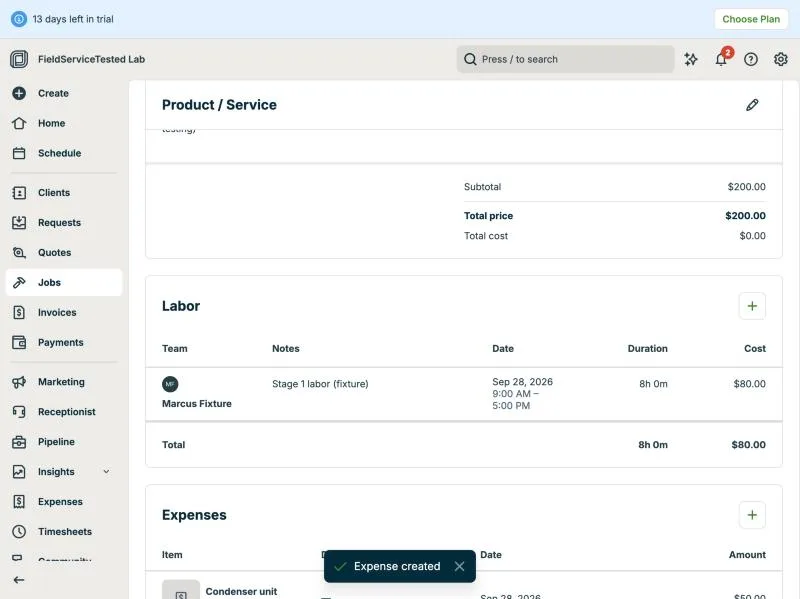
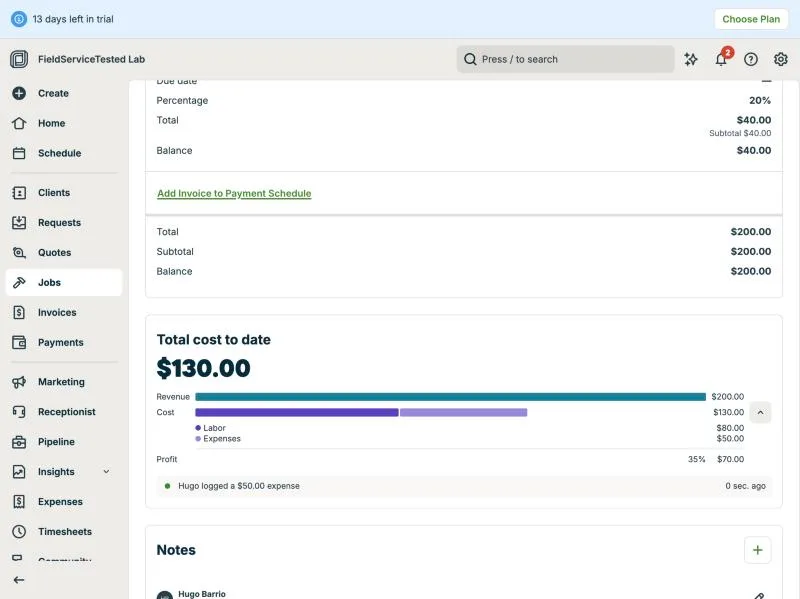
Jobber, T-12 (job costing for the multi-stage job): profit. Own capture from the test account, fictional Ridgeline fixture data.
- Task
- T-12 — Job costing for the multi-stage job
- Plan
- Grow
- Device
- MacBook Air M3 24 GB
- App version
- Jobber web app, 2026-09-28 (14-day trial, day 2)
- Captured
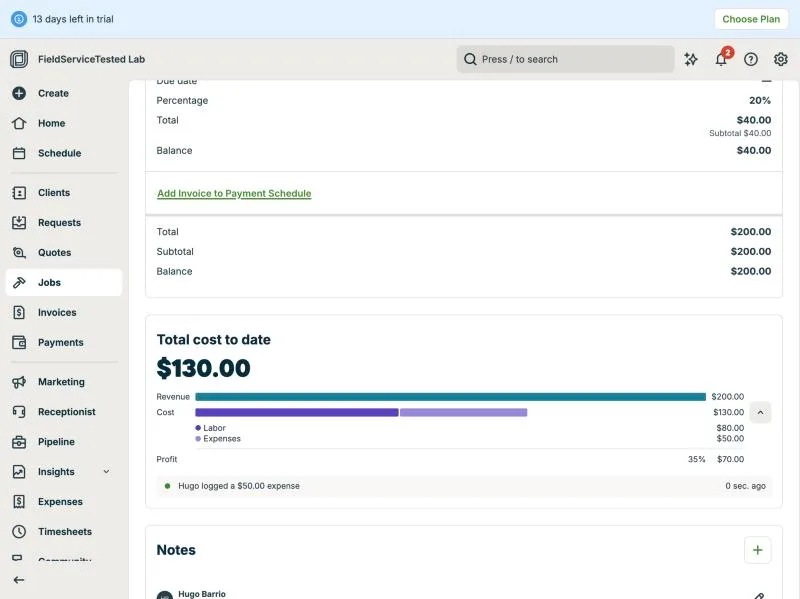
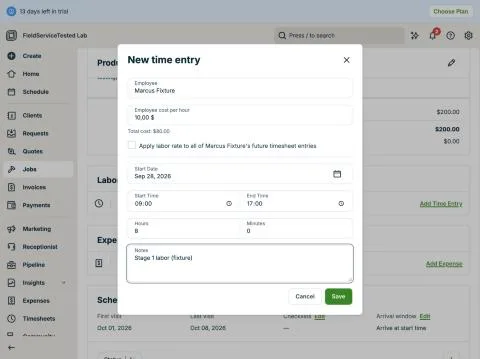
Jobber, T-12 (job costing for the multi-stage job): time entry. Own capture from the test account, fictional Ridgeline fixture data.
- Task
- T-12 — Job costing for the multi-stage job
- Plan
- Grow
- Device
- MacBook Air M3 24 GB
- App version
- Jobber web app, 2026-09-28 (14-day trial, day 2)
- Captured
T-13: QuickBooks Online sync of an invoice and a payment (sandbox) · pass
Tested in a trial exposing Grow features
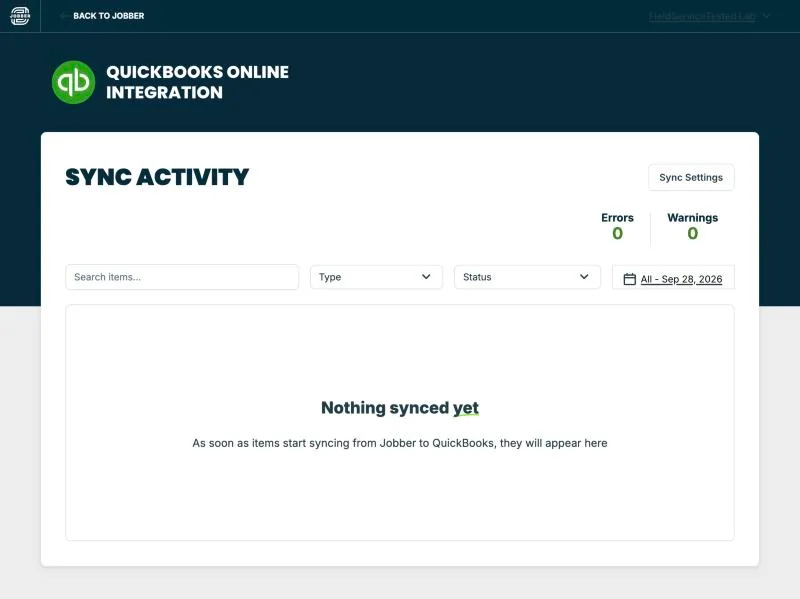
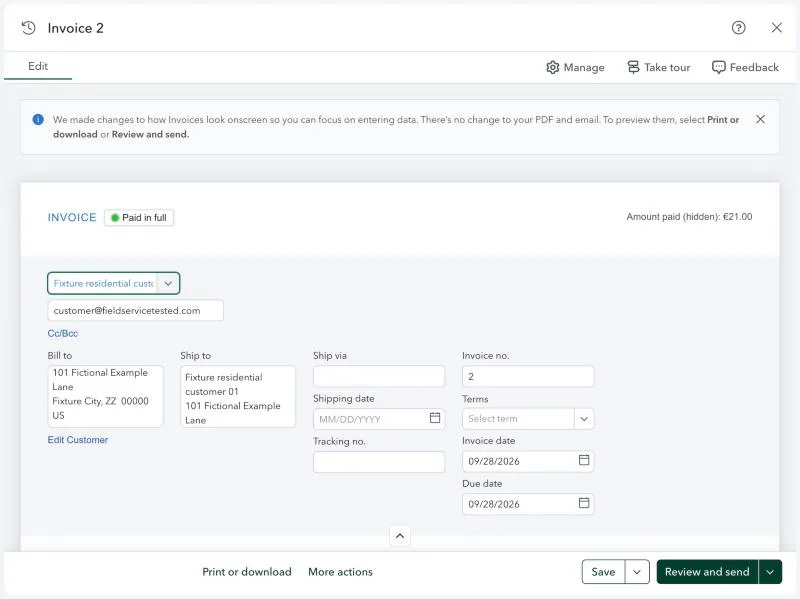
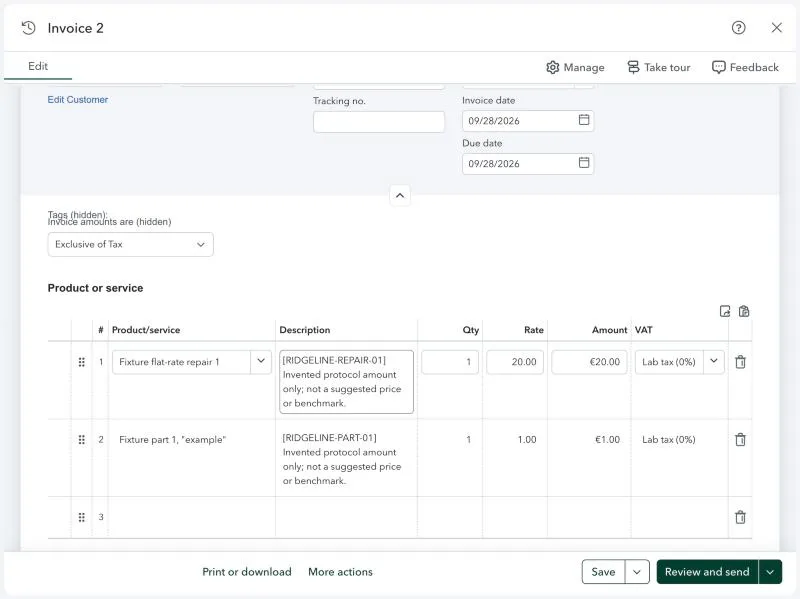
Lab caveat: we could not open a US QuickBooks company (US phone/billing address required), so the sync target is a QuickBooks Online Global trial company (Spain locale, EUR) rather than a US sandbox; Jobber's marketplace page did not restrict the connection. Setup: Apps > Accounting > QuickBooks Online > Connect: Jobber-side OAuth consent ('QuickBooks Online Integration wants to connect to your Jobber account', Allow Access by the owner), then Intuit sign-in and 'Conectar' consent (owner), then a 3-step wizard (import clients / products & services from QBO to Jobber, both turned off: 'no way to change this choice later'). Sync Settings defaults: clients after they appear on an invoice/payment/timesheet, products after they appear on an invoice, invoices after marked as sent, payments when collected, timesheets when approved; older items can be pushed manually. Test: Invoice #2 (job #4, $21.00, lines RIDGELINE-REPAIR-01 $20 + RIDGELINE-PART-01 $1) marked as sent, then a manual $21.00 payment (method Other, ref T13-fixture-payment) recorded. Sync Activity within about a minute: client and both products Synced; invoice Error '0% tax rate not found - Non-taxable item on invoice, but no tax code with a rate of 0% was found in QuickBooks', payment Error 'Missing invoice in QuickBooks'. Fix as instructed: in QBO Tax > Set up tax, created a 0% sales tax ('Lab tax', agency 'Lab tax agency', yearly, accrual); Retry (2) -> invoice Synced 12:06am, payment Synced right after; 0 errors, 5 synced items. Verified in QBO: Invoices list shows no. 2, customer 'Fixture residential customer 01', 9/28/26, 21.00, Paid; the invoice detail shows bill-to 101 Fictional Example Lane, email set to a lab mailbox, two lines 20.00 and 1.00 with VAT 'Lab tax (0%)', 'Paid in full', amount paid 21.00. Currency note: QBO displays EUR (company currency) for a USD Jobber invoice - the number is carried as-is without conversion; in a real US-to-US setup both sides are USD, so this is a lab artefact, not a Jobber defect. Time to first successful sync after fixing the tax code: under 2 minutes.
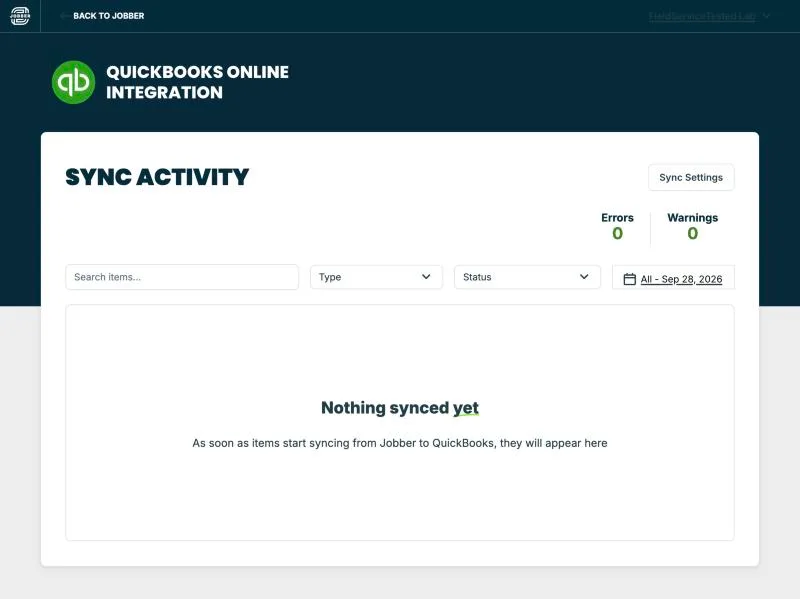
Jobber, T-13 (quickBooks Online sync of an invoice and a payment (sandbox)): connected. Own capture from the test account, fictional Ridgeline fixture data.
- Task
- T-13 — QuickBooks Online sync of an invoice and a payment (sandbox)
- Plan
- Grow
- Device
- MacBook Air M3 24 GB
- App version
- Jobber web app + QuickBooks Online Integration app, 2026-09-28/29; QuickBooks Online Global (es-es, EUR) trial company
- Captured
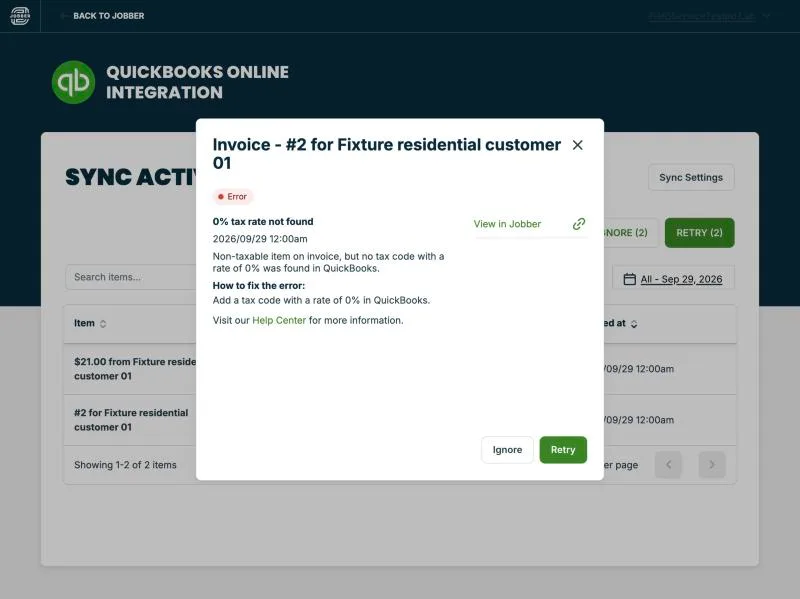
Jobber, T-13 (quickBooks Online sync of an invoice and a payment (sandbox)): invoice tax error. Own capture from the test account, fictional Ridgeline fixture data.
- Task
- T-13 — QuickBooks Online sync of an invoice and a payment (sandbox)
- Plan
- Grow
- Device
- MacBook Air M3 24 GB
- App version
- Jobber web app + QuickBooks Online Integration app, 2026-09-28/29; QuickBooks Online Global (es-es, EUR) trial company
- Captured
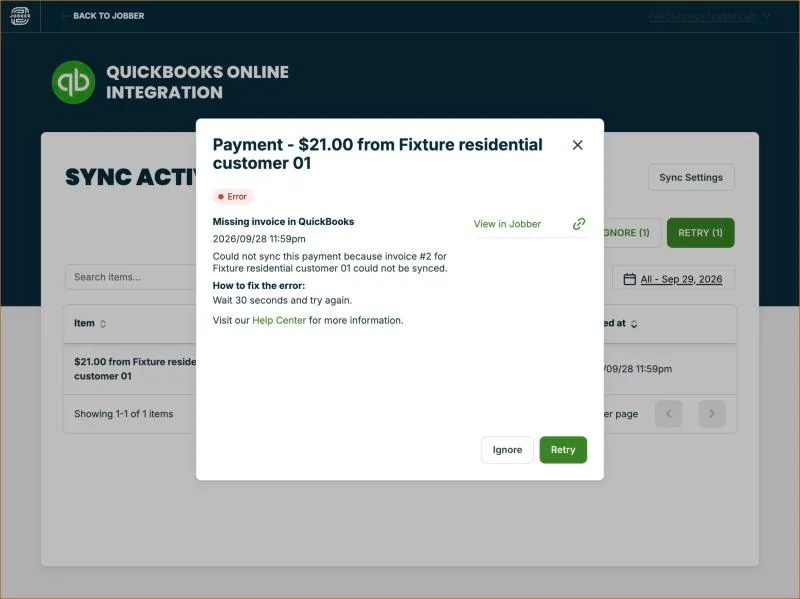
Jobber, T-13 (quickBooks Online sync of an invoice and a payment (sandbox)): payment error. Own capture from the test account, fictional Ridgeline fixture data.
- Task
- T-13 — QuickBooks Online sync of an invoice and a payment (sandbox)
- Plan
- Grow
- Device
- MacBook Air M3 24 GB
- App version
- Jobber web app + QuickBooks Online Integration app, 2026-09-28/29; QuickBooks Online Global (es-es, EUR) trial company
- Captured
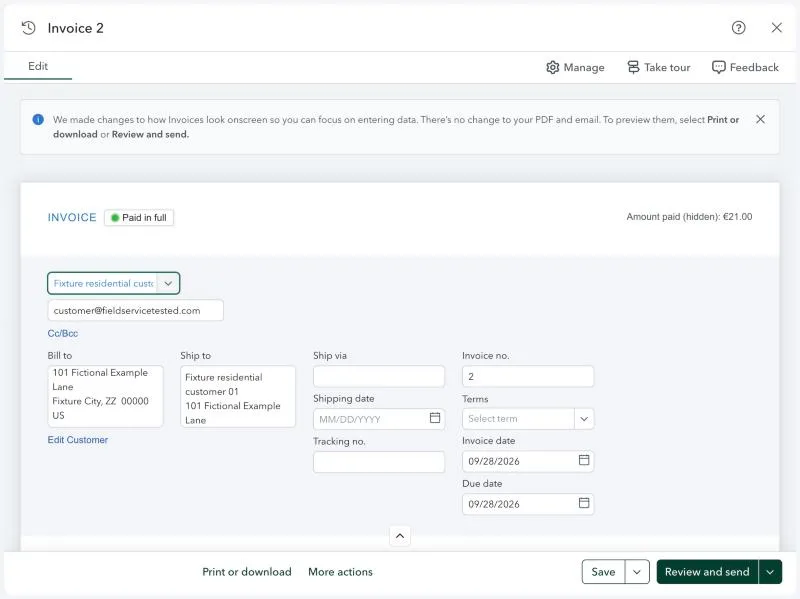
Jobber, T-13 (quickBooks Online sync of an invoice and a payment (sandbox)): qbo invoice header. Own capture from the test account, fictional Ridgeline fixture data.
- Task
- T-13 — QuickBooks Online sync of an invoice and a payment (sandbox)
- Plan
- Grow
- Device
- MacBook Air M3 24 GB
- App version
- Jobber web app + QuickBooks Online Integration app, 2026-09-28/29; QuickBooks Online Global (es-es, EUR) trial company
- Captured
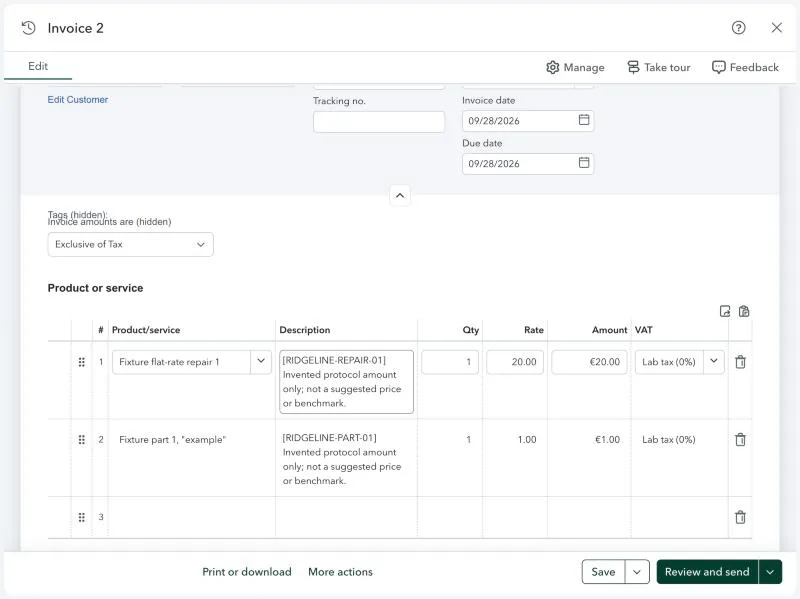
Jobber, T-13 (quickBooks Online sync of an invoice and a payment (sandbox)): qbo invoice lines. Own capture from the test account, fictional Ridgeline fixture data.
- Task
- T-13 — QuickBooks Online sync of an invoice and a payment (sandbox)
- Plan
- Grow
- Device
- MacBook Air M3 24 GB
- App version
- Jobber web app + QuickBooks Online Integration app, 2026-09-28/29; QuickBooks Online Global (es-es, EUR) trial company
- Captured
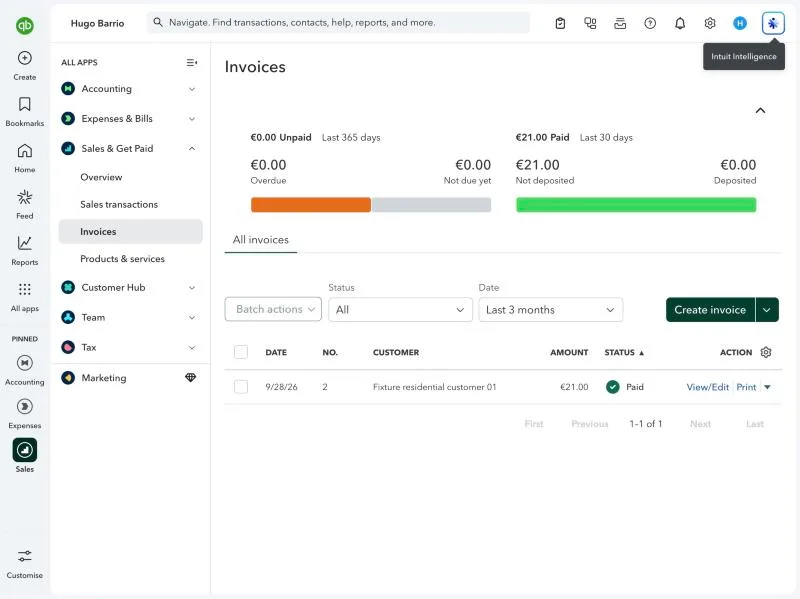
Jobber, T-13 (quickBooks Online sync of an invoice and a payment (sandbox)): qbo invoices. Own capture from the test account, fictional Ridgeline fixture data.
- Task
- T-13 — QuickBooks Online sync of an invoice and a payment (sandbox)
- Plan
- Grow
- Device
- MacBook Air M3 24 GB
- App version
- Jobber web app + QuickBooks Online Integration app, 2026-09-28/29; QuickBooks Online Global (es-es, EUR) trial company
- Captured
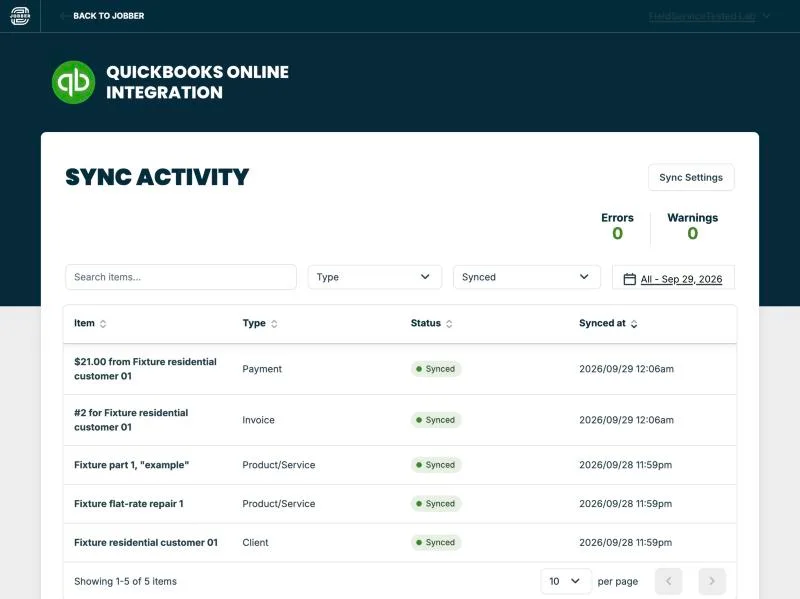
Jobber, T-13 (quickBooks Online sync of an invoice and a payment (sandbox)): synced all. Own capture from the test account, fictional Ridgeline fixture data.
- Task
- T-13 — QuickBooks Online sync of an invoice and a payment (sandbox)
- Plan
- Grow
- Device
- MacBook Air M3 24 GB
- App version
- Jobber web app + QuickBooks Online Integration app, 2026-09-28/29; QuickBooks Online Global (es-es, EUR) trial company
- Captured
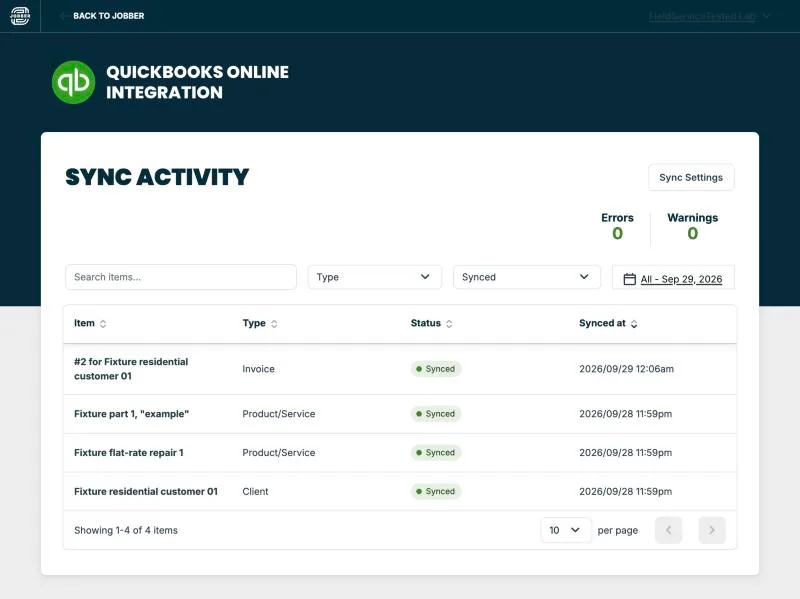
Jobber, T-13 (quickBooks Online sync of an invoice and a payment (sandbox)): synced invoice. Own capture from the test account, fictional Ridgeline fixture data.
- Task
- T-13 — QuickBooks Online sync of an invoice and a payment (sandbox)
- Plan
- Grow
- Device
- MacBook Air M3 24 GB
- App version
- Jobber web app + QuickBooks Online Integration app, 2026-09-28/29; QuickBooks Online Global (es-es, EUR) trial company
- Captured
T-14: Export and leave: customers, jobs, invoices, attachments; check the phone-number port-out policy · partial
Tested in a trial exposing Grow features
Self-service export (28-09): every export is emailed to the account owner (up to 15 min), no direct download. Received as CSV: Client Contact Info (25 fixture clients + 1 owner-created client 'Hugo Barrio' + totals row), Client Properties (33 properties incl. multi-property landlords/commercial units), One-off jobs (11), Invoices (3), Quotes (2), Recurring jobs (1), Products and Services (6 rows - a usage report listing only items used on quotes/jobs/invoices, not the full 30-item price book). Some exports arrived more than once (identical duplicates discarded). No bulk export of attachments/photos: files download individually, notes with >5 attachments as ZIP; jobs/invoices as individual PDFs. Porting the dedicated phone number out is possible but manual (support, T-15). Privacy: the owner's real email in the contact export was replaced by [owner-email-redacted] (sha256 before afa5fdfe..., after 7e61e5c0...). Result partial: core records export to CSV without contacting support, but only by email, no full price-book export and no bulk file/photo export.
Jobber, T-14 (export and leave: customers, jobs, invoices, attachments; check the phone-number port-out policy): jobber export client contact info 20260928. File exported from the test account, fictional Ridgeline fixture data.
Jobber, T-14 (export and leave: customers, jobs, invoices, attachments; check the phone-number port-out policy): jobber export client contact info 20260928. File exported from the test account, fictional Ridgeline fixture data.
- Task
- T-14 — Export and leave: customers, jobs, invoices, attachments; check the phone-number port-out policy
- Plan
- Grow
- Device
- MacBook Air M3 24 GB
- App version
- getjobber.com/pricing, observed 2026-09-28 23:55 CEST (annual promo 'Save up to 40%, offer ends September 30th')
- Captured
Jobber, T-14 (export and leave: customers, jobs, invoices, attachments; check the phone-number port-out policy): jobber export client properties 20260928. File exported from the test account, fictional Ridgeline fixture data.
Jobber, T-14 (export and leave: customers, jobs, invoices, attachments; check the phone-number port-out policy): jobber export client properties 20260928. File exported from the test account, fictional Ridgeline fixture data.
- Task
- T-14 — Export and leave: customers, jobs, invoices, attachments; check the phone-number port-out policy
- Plan
- Grow
- Device
- MacBook Air M3 24 GB
- App version
- getjobber.com/pricing, observed 2026-09-28 23:55 CEST (annual promo 'Save up to 40%, offer ends September 30th')
- Captured
Jobber, T-14 (export and leave: customers, jobs, invoices, attachments; check the phone-number port-out policy): jobber export invoices 20260928. File exported from the test account, fictional Ridgeline fixture data.
Jobber, T-14 (export and leave: customers, jobs, invoices, attachments; check the phone-number port-out policy): jobber export invoices 20260928. File exported from the test account, fictional Ridgeline fixture data.
- Task
- T-14 — Export and leave: customers, jobs, invoices, attachments; check the phone-number port-out policy
- Plan
- Grow
- Device
- MacBook Air M3 24 GB
- App version
- getjobber.com/pricing, observed 2026-09-28 23:55 CEST (annual promo 'Save up to 40%, offer ends September 30th')
- Captured
Jobber, T-14 (export and leave: customers, jobs, invoices, attachments; check the phone-number port-out policy): jobber export one off jobs 20260928. File exported from the test account, fictional Ridgeline fixture data.
Jobber, T-14 (export and leave: customers, jobs, invoices, attachments; check the phone-number port-out policy): jobber export one off jobs 20260928. File exported from the test account, fictional Ridgeline fixture data.
- Task
- T-14 — Export and leave: customers, jobs, invoices, attachments; check the phone-number port-out policy
- Plan
- Grow
- Device
- MacBook Air M3 24 GB
- App version
- getjobber.com/pricing, observed 2026-09-28 23:55 CEST (annual promo 'Save up to 40%, offer ends September 30th')
- Captured
Jobber, T-14 (export and leave: customers, jobs, invoices, attachments; check the phone-number port-out policy): jobber export products services 20260928. File exported from the test account, fictional Ridgeline fixture data.
Jobber, T-14 (export and leave: customers, jobs, invoices, attachments; check the phone-number port-out policy): jobber export products services 20260928. File exported from the test account, fictional Ridgeline fixture data.
- Task
- T-14 — Export and leave: customers, jobs, invoices, attachments; check the phone-number port-out policy
- Plan
- Grow
- Device
- MacBook Air M3 24 GB
- App version
- getjobber.com/pricing, observed 2026-09-28 23:55 CEST (annual promo 'Save up to 40%, offer ends September 30th')
- Captured
Jobber, T-14 (export and leave: customers, jobs, invoices, attachments; check the phone-number port-out policy): jobber export quotes 20260928. File exported from the test account, fictional Ridgeline fixture data.
Jobber, T-14 (export and leave: customers, jobs, invoices, attachments; check the phone-number port-out policy): jobber export quotes 20260928. File exported from the test account, fictional Ridgeline fixture data.
- Task
- T-14 — Export and leave: customers, jobs, invoices, attachments; check the phone-number port-out policy
- Plan
- Grow
- Device
- MacBook Air M3 24 GB
- App version
- getjobber.com/pricing, observed 2026-09-28 23:55 CEST (annual promo 'Save up to 40%, offer ends September 30th')
- Captured
Jobber, T-14 (export and leave: customers, jobs, invoices, attachments; check the phone-number port-out policy): jobber export recurring jobs 20260928. File exported from the test account, fictional Ridgeline fixture data.
Jobber, T-14 (export and leave: customers, jobs, invoices, attachments; check the phone-number port-out policy): jobber export recurring jobs 20260928. File exported from the test account, fictional Ridgeline fixture data.
- Task
- T-14 — Export and leave: customers, jobs, invoices, attachments; check the phone-number port-out policy
- Plan
- Grow
- Device
- MacBook Air M3 24 GB
- App version
- getjobber.com/pricing, observed 2026-09-28 23:55 CEST (annual promo 'Save up to 40%, offer ends September 30th')
- Captured
T-15: Support: 2 standard questions via chat or email · pass
Tested in a trial exposing Grow features
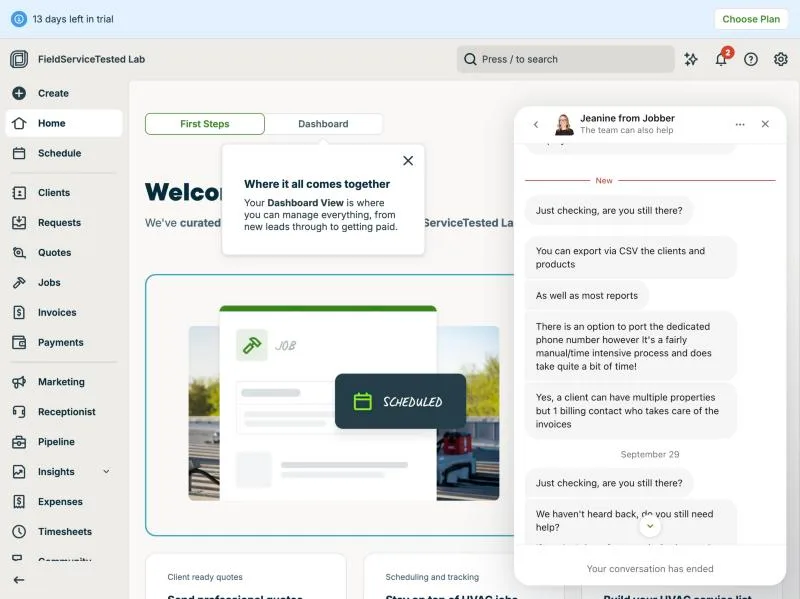
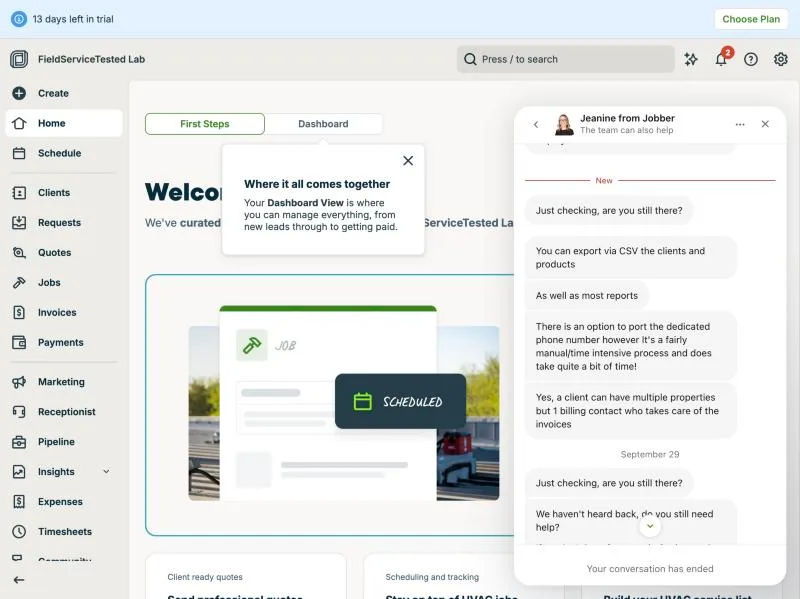
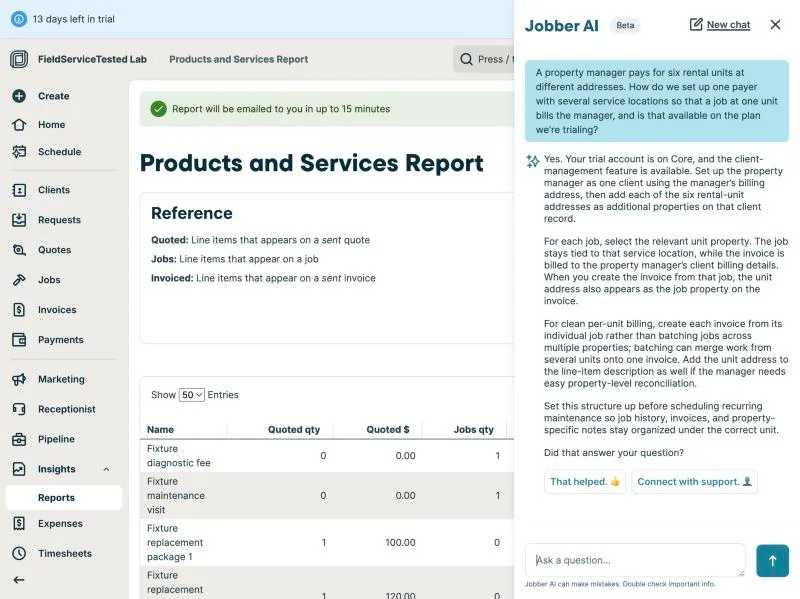
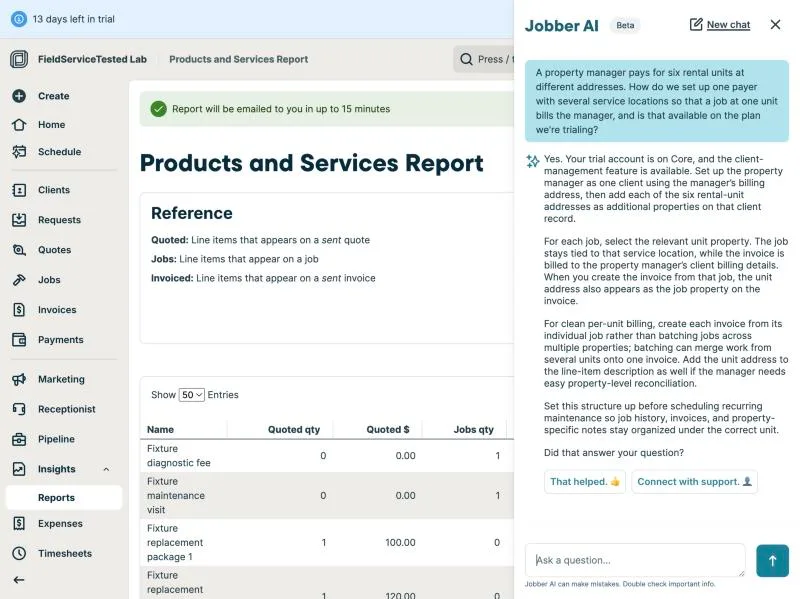
Channel: in-app '?' > Get Support opens Jobber AI (beta) first; 'Connect with support' > 'Help using your Jobber Account' hands over to Intercom live chat (a human, first name only, redacted in evidence). Bot answers: Q1 (export) in under 1 minute - CSV/vCard client export emailed, jobs and invoices as individual PDFs plus report CSVs, attachments individually or ZIP per note, 'no self-serve full-account attachment export'; Q2 (payer + locations) in 20 s - one client with additional properties, invoice from the unit's job bills the manager, 'your trial account is on Core'. Both correct and consistent with our T-03/T-14 observations, no documentation links: quality 2. Human chat: questions sent 23:49/23:50 CEST, agent joined and acknowledged at ~23:51 (about 2 minutes), substantive reply ~15 minutes later (before 00:10 CEST, seen at 00:09): 'You can export via CSV the clients and products, as well as most reports'; the dedicated phone number can be ported out, but support described it as a manual and slow process; 'Yes, a client can have multiple properties but 1 billing contact who takes care of the invoices'. Then two 'are you still there?' nudges and the conversation auto-closed. Quality: Q1 = 2 (correct but incomplete: no formats for jobs/invoices/attachments, no link); phone port-out answered (possible, manual) - the only source we have for T-14's port-out policy; Q2 = 2 (correct, brief, no plan gating stated, no link). Time to first useful answer: bot <1 min; human ~15 min. Replies are also emailed to the owner address.
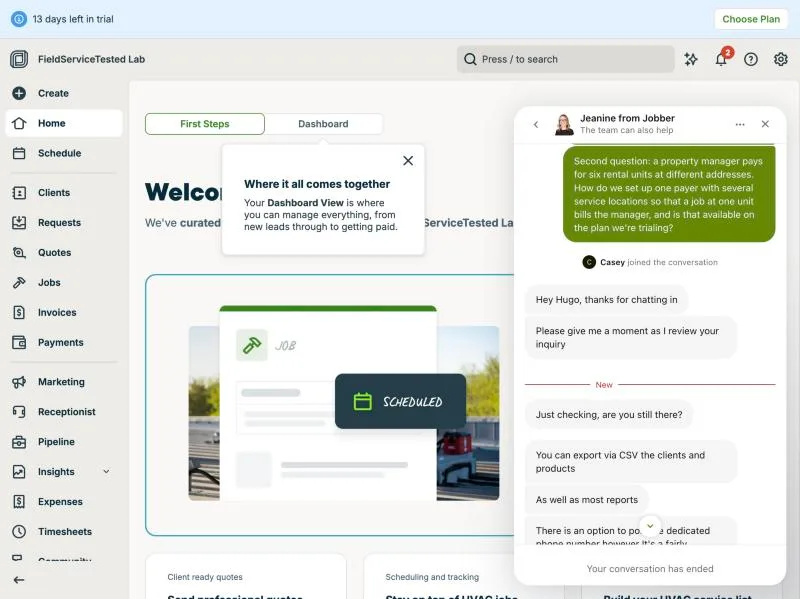
Jobber, T-15 (support: 2 standard questions via chat or email): human 1. Own capture from the test account, fictional Ridgeline fixture data.
- Task
- T-15 — Support: 2 standard questions via chat or email
- Plan
- Grow
- Device
- MacBook Air M3 24 GB
- App version
- Jobber web app, 2026-09-28 (trial day 2); in-app Help > Get Support (Jobber AI beta + Intercom live chat)
- Captured
Jobber, T-15 (support: 2 standard questions via chat or email): human 2. Own capture from the test account, fictional Ridgeline fixture data.
- Task
- T-15 — Support: 2 standard questions via chat or email
- Plan
- Grow
- Device
- MacBook Air M3 24 GB
- App version
- Jobber web app, 2026-09-28 (trial day 2); in-app Help > Get Support (Jobber AI beta + Intercom live chat)
- Captured
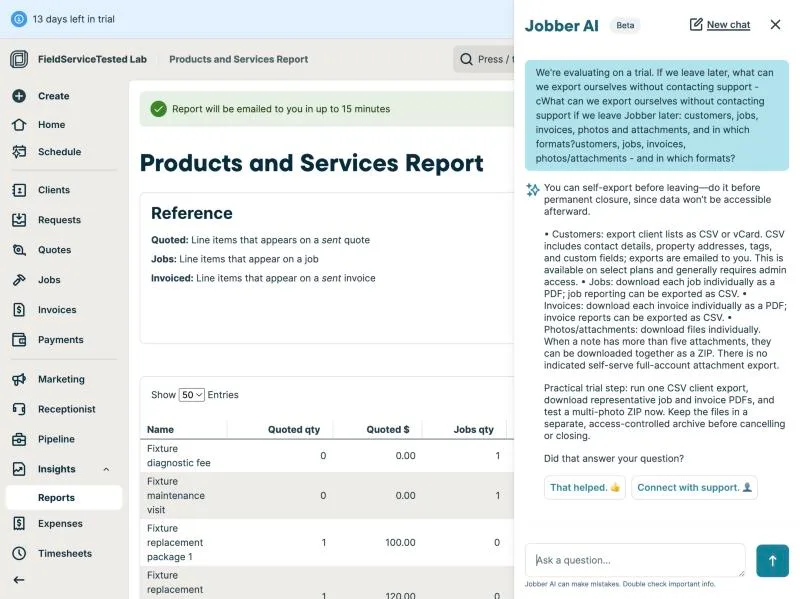
Jobber, T-15 (support: 2 standard questions via chat or email): q1 ai. Own capture from the test account, fictional Ridgeline fixture data.
- Task
- T-15 — Support: 2 standard questions via chat or email
- Plan
- Grow
- Device
- MacBook Air M3 24 GB
- App version
- Jobber web app, 2026-09-28 (trial day 2); in-app Help > Get Support (Jobber AI beta + Intercom live chat)
- Captured
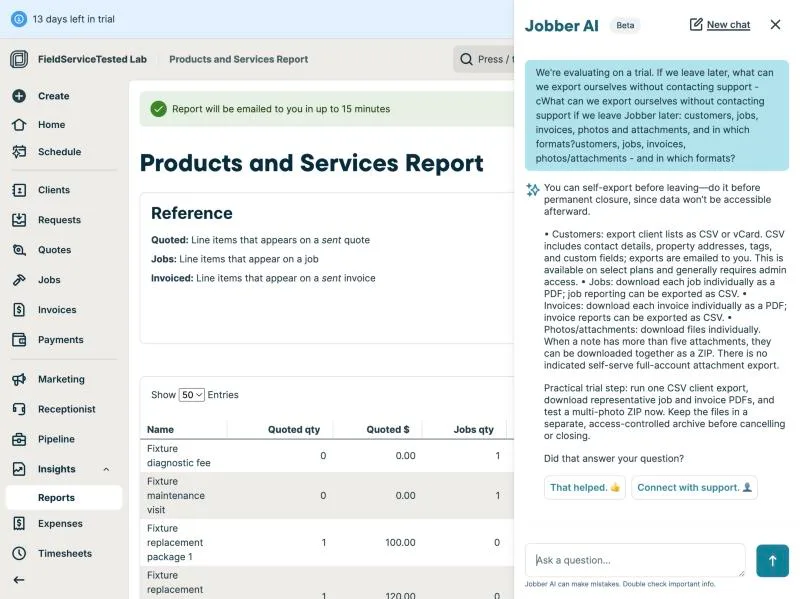
Jobber, T-15 (support: 2 standard questions via chat or email): q2 ai. Own capture from the test account, fictional Ridgeline fixture data.
- Task
- T-15 — Support: 2 standard questions via chat or email
- Plan
- Grow
- Device
- MacBook Air M3 24 GB
- App version
- Jobber web app, 2026-09-28 (trial day 2); in-app Help > Get Support (Jobber AI beta + Intercom live chat)
- Captured
T-16: Real cost for 1, 3 and 8 techs, including every add-on needed to pass T-01 to T-15 · pass
Tested in a trial exposing Grow features
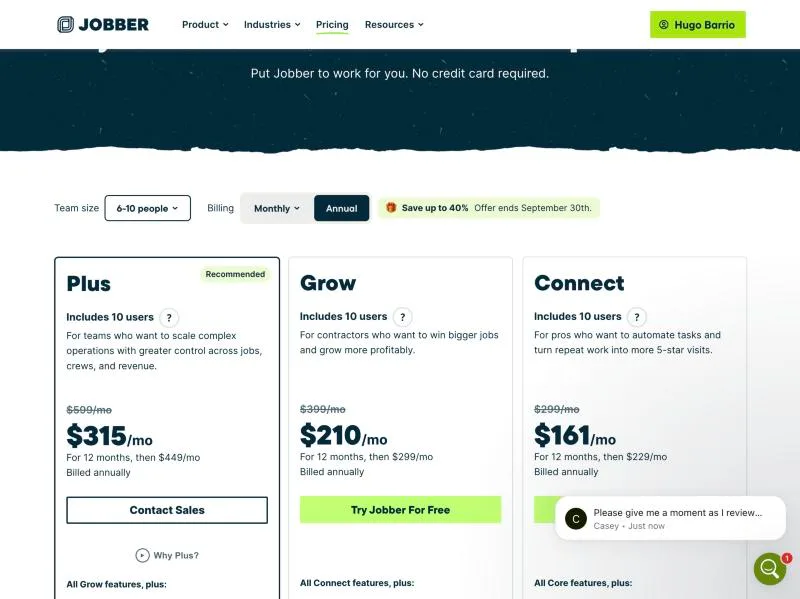
Plans (USD, monthly / annual-promo per month then regular annual): Core 1 user $49 / $21 then $29; Connect 1 user $139 / $70 then $99; Grow 1 user $199 / $105 then $149. Team tiers on the same page: 2-5 people = Connect $199 / $105 then $149, Grow $299 / $161 then $229, Plus (5 users) $499 / $280 then $399 (Contact Sales); 6-10 people = Connect $299 / $161 then $229, Grow $399 / $210 then $299, Plus (10 users) $599 / $315 then $449. Feature table (Plus|Grow|Connect|Core): Job costing = Plus, Grow only (T-12); Optional add-ons and markups = Plus, Grow only (T-05 optional line items); Two-way text messaging = Plus, Grow (dedicated number, T-07 SMS); Automated client notifications = Plus, Grow, Connect, not Core (T-07 visit reminders); QuickBooks Online and Xero sync = Plus, Grow, Connect, not Core (T-13); Checklists, Routing, GPS tracking, Time tracking, Expense tracking, Custom fields, Automatic payments = Plus, Grow, Connect; Progress invoicing and Online booking = all four (T-08); Files and media library, Job profit alerts, Crew scheduling = Plus only. Payments: card 2.9% + 30c, Tap to Pay 2.7% + 30c, ACH 1% (all plans). Add-ons: Marketing Suite $99/mo, Receptionist $29/mo, Pipeline $49/mo (not needed for T-01..T-15). Lowest plan that passes the whole protocol as executed = Grow (job costing + optional line items + QBO + notifications). Real cost: 1 tech = Grow $199/mo monthly ($105/mo first-year annual); 3 techs = Grow 2-5 tier $299/mo ($161 annual); 8 techs = Grow 6-10 tier $399/mo ($210 annual). Without job costing/optional items, Connect: $139 / $199 / $299. Note: the 14-day trial (Jobber AI said 'your trial account is on Core') exposed Grow-level features (job costing, optional line items, recurring jobs), so trial behaviour overstates Core. Sales tax excluded; prices US.
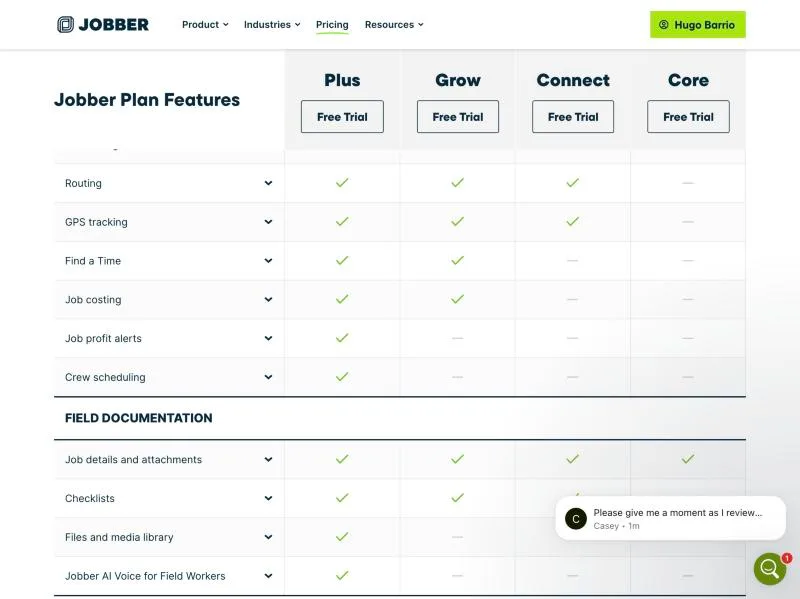
Jobber, T-16 (real cost for 1, 3 and 8 techs, including every add-on needed to pass T-01 to T-15): feature table. Own capture from the test account, fictional Ridgeline fixture data.
- Task
- T-16 — Real cost for 1, 3 and 8 techs, including every add-on needed to pass T-01 to T-15
- Plan
- Grow
- Device
- MacBook Air M3 24 GB
- App version
- getjobber.com/pricing, observed 2026-09-28 23:55 CEST (annual promo 'Save up to 40%, offer ends September 30th')
- Captured
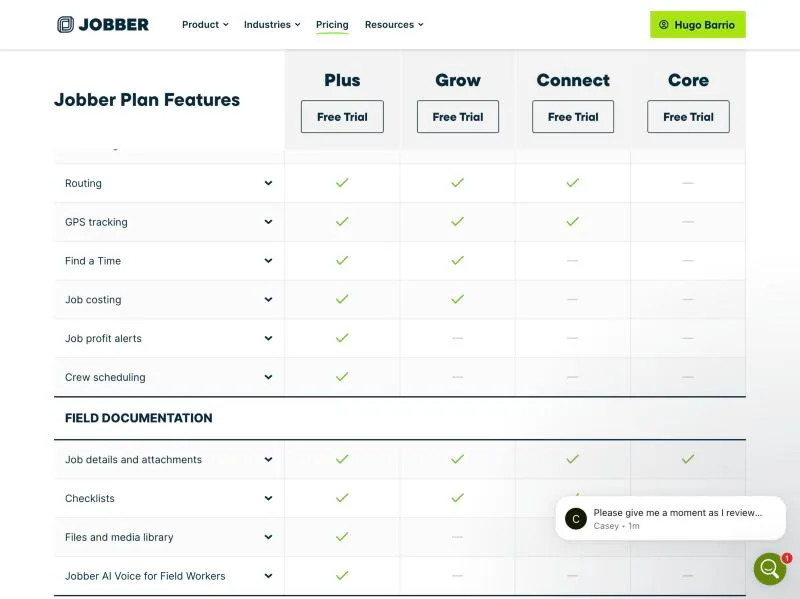
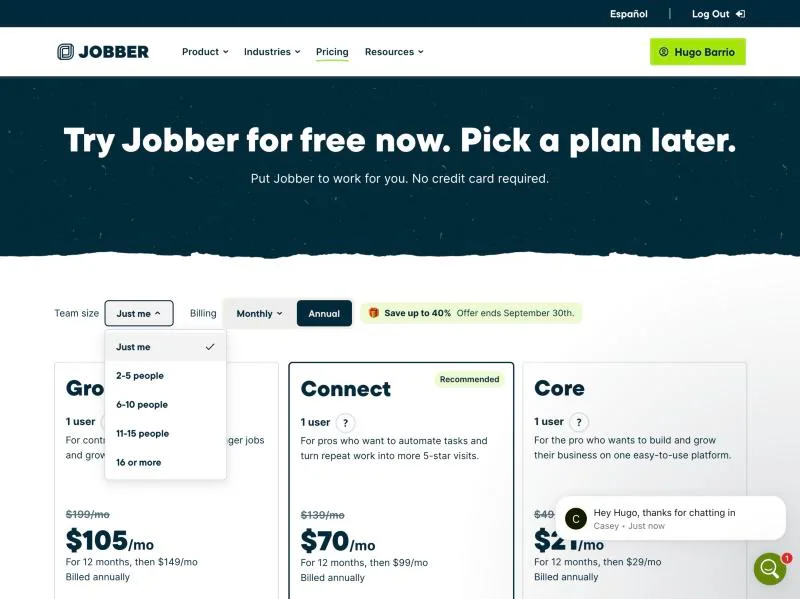
Jobber, T-16 (real cost for 1, 3 and 8 techs, including every add-on needed to pass T-01 to T-15): pricing 1user. Own capture from the test account, fictional Ridgeline fixture data.
- Task
- T-16 — Real cost for 1, 3 and 8 techs, including every add-on needed to pass T-01 to T-15
- Plan
- Grow
- Device
- MacBook Air M3 24 GB
- App version
- getjobber.com/pricing, observed 2026-09-28 23:55 CEST (annual promo 'Save up to 40%, offer ends September 30th')
- Captured
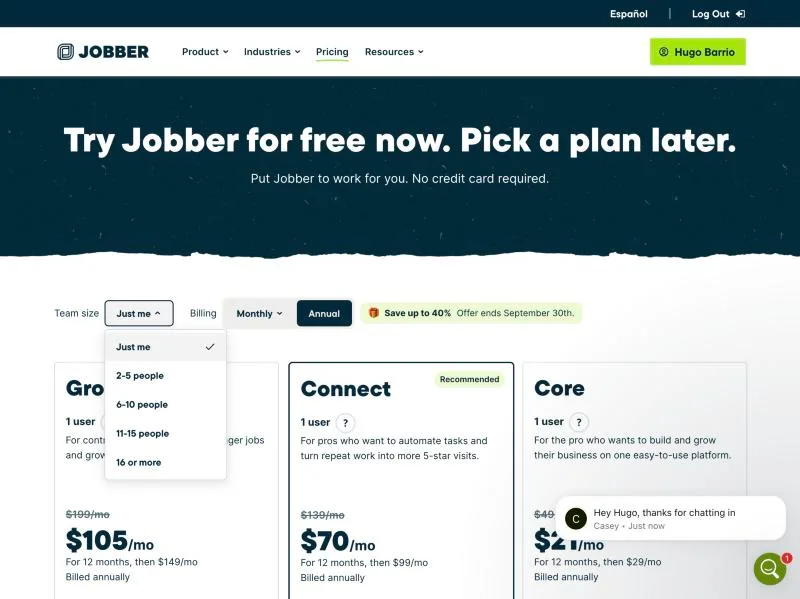
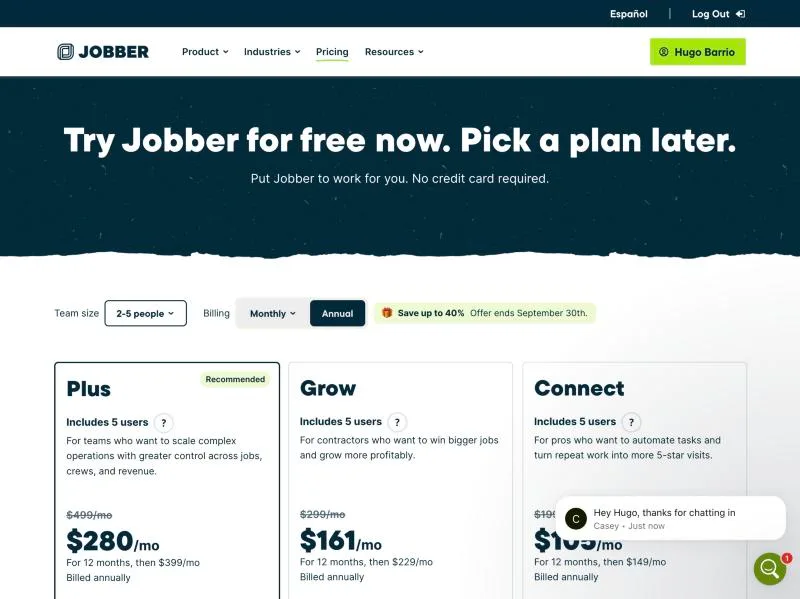
Jobber, T-16 (real cost for 1, 3 and 8 techs, including every add-on needed to pass T-01 to T-15): pricing 2 5. Own capture from the test account, fictional Ridgeline fixture data.
- Task
- T-16 — Real cost for 1, 3 and 8 techs, including every add-on needed to pass T-01 to T-15
- Plan
- Grow
- Device
- MacBook Air M3 24 GB
- App version
- getjobber.com/pricing, observed 2026-09-28 23:55 CEST (annual promo 'Save up to 40%, offer ends September 30th')
- Captured
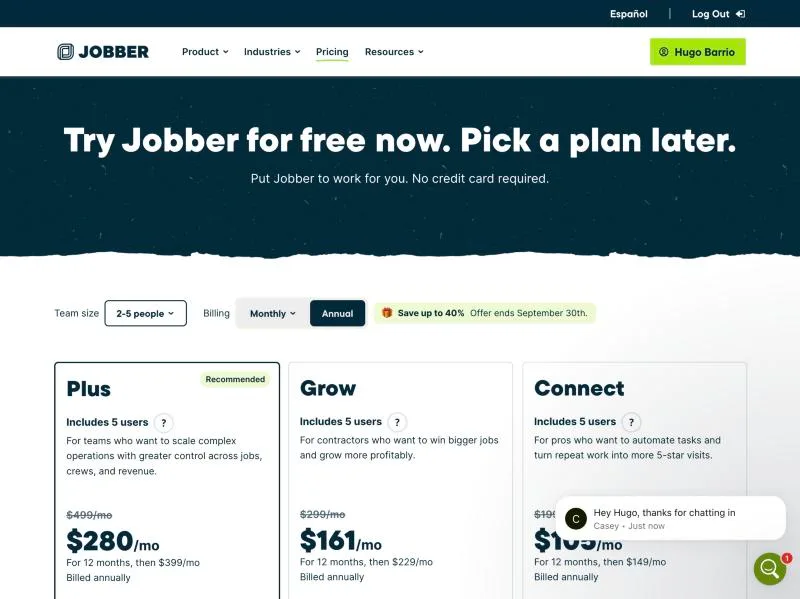
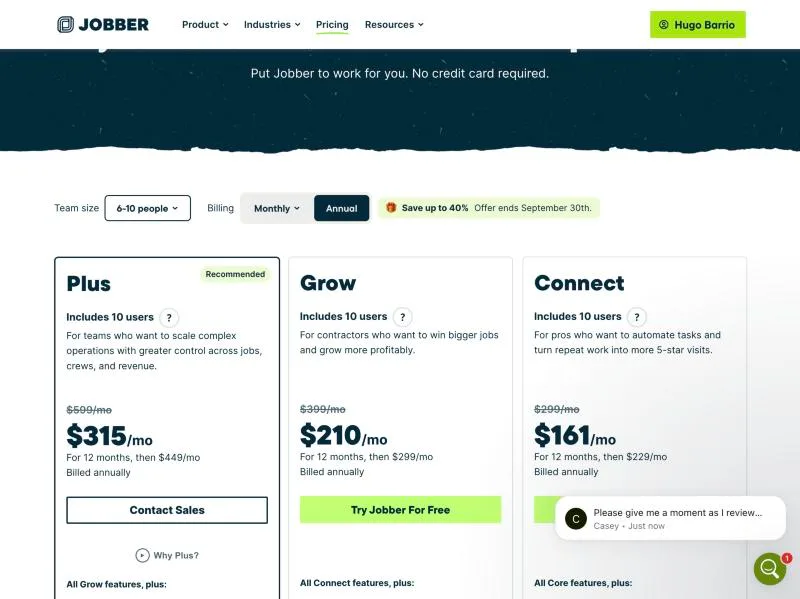
Jobber, T-16 (real cost for 1, 3 and 8 techs, including every add-on needed to pass T-01 to T-15): pricing 6 10. Own capture from the test account, fictional Ridgeline fixture data.
- Task
- T-16 — Real cost for 1, 3 and 8 techs, including every add-on needed to pass T-01 to T-15
- Plan
- Grow
- Device
- MacBook Air M3 24 GB
- App version
- getjobber.com/pricing, observed 2026-09-28 23:55 CEST (annual promo 'Save up to 40%, offer ends September 30th')
- Captured
Pricing and add-ons
| Plan | Model | Billing | Renewal price | Promotional price and conditions | Add-ons | Observation date |
|---|---|---|---|---|---|---|
| Connect | flat | monthly | $139.00 / per month Monthly billing, 1 user tier as shown on the public pricing page. Sales tax excluded. Source | No promotion recorded |
| Renewal: |
| Connect — annual | flat | annual | $99.00 / per month, billed annually Regular annual price after the first-year offer for the 1 user tier; effective monthly figure with annual prepayment. Source | $70.00 / per month, billed annually First-year annual offer shown on the pricing page for the 1 user tier; effective monthly figure with annual prepayment. |
| Renewal: Promotional: |
| Connect (2-5 people) | flat | monthly | $199.00 / per month Monthly billing, 2-5 user tier as shown on the public pricing page. Sales tax excluded. Source | No promotion recorded | No add-ons recorded | Renewal: |
| Connect (2-5 people) — annual | flat | annual | $149.00 / per month, billed annually Regular annual price after the first-year offer for the 2-5 user tier; effective monthly figure with annual prepayment. Source | $105.00 / per month, billed annually First-year annual offer shown on the pricing page for the 2-5 user tier; effective monthly figure with annual prepayment. | No add-ons recorded | Renewal: Promotional: |
| Connect (6-10 people) | flat | monthly | $299.00 / per month Monthly billing, 6-10 user tier as shown on the public pricing page. Sales tax excluded. Source | No promotion recorded | No add-ons recorded | Renewal: |
| Connect (6-10 people) — annual | flat | annual | $229.00 / per month, billed annually Regular annual price after the first-year offer for the 6-10 user tier; effective monthly figure with annual prepayment. Source | $161.00 / per month, billed annually First-year annual offer shown on the pricing page for the 6-10 user tier; effective monthly figure with annual prepayment. | No add-ons recorded | Renewal: Promotional: |
| Core | flat | monthly | $49.00 / per month Monthly billing, 1 user tier as shown on the public pricing page. Sales tax excluded. Source | No promotion recorded |
| Renewal: |
| Core — annual | flat | annual | $29.00 / per month, billed annually Regular annual price after the first-year offer for the 1 user tier; effective monthly figure with annual prepayment. Source | $21.00 / per month, billed annually First-year annual offer shown on the pricing page for the 1 user tier; effective monthly figure with annual prepayment. |
| Renewal: Promotional: |
| Grow | flat | monthly | $199.00 / per month Monthly billing, 1 user tier as shown on the public pricing page. Sales tax excluded. Source | No promotion recorded |
| Renewal: |
| Grow — annual | flat | annual | $149.00 / per month, billed annually Regular annual price after the first-year offer for the 1 user tier; effective monthly figure with annual prepayment. Source | $105.00 / per month, billed annually First-year annual offer shown on the pricing page for the 1 user tier; effective monthly figure with annual prepayment. |
| Renewal: Promotional: |
| Grow (2-5 people) | flat | monthly | $299.00 / per month Monthly billing, 2-5 user tier as shown on the public pricing page. Sales tax excluded. Source | No promotion recorded | No add-ons recorded | Renewal: |
| Grow (2-5 people) — annual | flat | annual | $229.00 / per month, billed annually Regular annual price after the first-year offer for the 2-5 user tier; effective monthly figure with annual prepayment. Source | $161.00 / per month, billed annually First-year annual offer shown on the pricing page for the 2-5 user tier; effective monthly figure with annual prepayment. | No add-ons recorded | Renewal: Promotional: |
| Grow (6-10 people) | flat | monthly | $399.00 / per month Monthly billing, 6-10 user tier as shown on the public pricing page. Sales tax excluded. Source | No promotion recorded | No add-ons recorded | Renewal: |
| Grow (6-10 people) — annual | flat | annual | $299.00 / per month, billed annually Regular annual price after the first-year offer for the 6-10 user tier; effective monthly figure with annual prepayment. Source | $210.00 / per month, billed annually First-year annual offer shown on the pricing page for the 6-10 user tier; effective monthly figure with annual prepayment. | No add-ons recorded | Renewal: Promotional: |
| Plus (10 users) | flat | monthly | $599.00 / per month Monthly billing, 6-10 user tier as shown on the public pricing page. Sales tax excluded. Source | No promotion recorded | No add-ons recorded | Renewal: |
| Plus (10 users) — annual | flat | annual | $449.00 / per month, billed annually Regular annual price after the first-year offer for the 6-10 user tier; effective monthly figure with annual prepayment. Source | $315.00 / per month, billed annually First-year annual offer shown on the pricing page for the 6-10 user tier; effective monthly figure with annual prepayment. | No add-ons recorded | Renewal: Promotional: |
| Plus (5 users) | flat | monthly | $499.00 / per month Monthly billing, 2-5 user tier as shown on the public pricing page. Sales tax excluded. Source | No promotion recorded | No add-ons recorded | Renewal: |
| Plus (5 users) — annual | flat | annual | $399.00 / per month, billed annually Regular annual price after the first-year offer for the 2-5 user tier; effective monthly figure with annual prepayment. Source | $280.00 / per month, billed annually First-year annual offer shown on the pricing page for the 2-5 user tier; effective monthly figure with annual prepayment. | No add-ons recorded | Renewal: Promotional: |
Data export and leaving
partial: Self-service export (28-09): every export is emailed to the account owner (up to 15 min), no direct download. Received as CSV: Client Contact Info (25 fixture clients + 1 owner-created client 'Hugo Barrio' + totals row), Client Properties (33 properties incl. multi-property landlords/commercial units), One-off jobs (11), Invoices (3), Quotes (2), Recurring jobs (1), Products and Services (6 rows - a usage report listing only items used on quotes/jobs/invoices, not the full 30-item price book). Some exports arrived more than once (identical duplicates discarded). No bulk export of attachments/photos: files download individually, notes with >5 attachments as ZIP; jobs/invoices as individual PDFs. Porting the dedicated phone number out is possible but manual (support, T-15). Privacy: the owner's real email in the contact export was replaced by [owner-email-redacted] (sha256 before afa5fdfe..., after 7e61e5c0...). Result partial: core records export to CSV without contacting support, but only by email, no full price-book export and no bulk file/photo export.
T-14: Export and leave: customers, jobs, invoices, attachments; check the phone-number port-out policySupport
pass: Channel: in-app '?' > Get Support opens Jobber AI (beta) first; 'Connect with support' > 'Help using your Jobber Account' hands over to Intercom live chat (a human, first name only, redacted in evidence). Bot answers: Q1 (export) in under 1 minute - CSV/vCard client export emailed, jobs and invoices as individual PDFs plus report CSVs, attachments individually or ZIP per note, 'no self-serve full-account attachment export'; Q2 (payer + locations) in 20 s - one client with additional properties, invoice from the unit's job bills the manager, 'your trial account is on Core'. Both correct and consistent with our T-03/T-14 observations, no documentation links: quality 2. Human chat: questions sent 23:49/23:50 CEST, agent joined and acknowledged at ~23:51 (about 2 minutes), substantive reply ~15 minutes later (before 00:10 CEST, seen at 00:09): 'You can export via CSV the clients and products, as well as most reports'; the dedicated phone number can be ported out, but support described it as a manual and slow process; 'Yes, a client can have multiple properties but 1 billing contact who takes care of the invoices'. Then two 'are you still there?' nudges and the conversation auto-closed. Quality: Q1 = 2 (correct but incomplete: no formats for jobs/invoices/attachments, no link); phone port-out answered (possible, manual) - the only source we have for T-14's port-out policy; Q2 = 2 (correct, brief, no plan gating stated, no link). Time to first useful answer: bot <1 min; human ~15 min. Replies are also emailed to the owner address.
T-15: Support: 2 standard questions via chat or emailAlternatives for your operation
Owner-operator
You track individual units by serial number: Jobber had no equipment record in our trial, and history lives on the property, not the unit (T-04).
You need card payments working on day one: in our trial only cash, check and manual payment records were available, because Jobber Payments was not set up on the account (T-10).
You are counting on the lowest plan: the features we tested put a contractor on Grow, $199 a month for one person at the time of our check (T-16).
View this operation profileSmall residential shop
You track individual units by serial number: Jobber had no equipment record in our trial, and history lives on the property, not the unit (T-04).
You expect the app's search to find a job by its number: in our test it returned the customer and the address, not the job (T-09).
You want the displaced customer told automatically when an emergency bumps their slot: the reschedule notice is a manual send (T-07).
View this operation profileMixed service + projects
You track individual units by serial number: Jobber had no equipment record in our trial, and history lives on the property, not the unit (T-04).
Your payer is often not the owner of the service location: in our trial Jobber billed the client that owns the property, so a property manager's unit needed a workaround that either duplicates the location or demotes the tenant to a contact (T-03).
View this operation profileCommercial-leaning
Your payer is often not the owner of the service location: in our trial Jobber billed the client that owns the property, so a property manager's unit needed a workaround that either duplicates the location or demotes the tenant to a contact (T-03).
You track individual units by serial number: Jobber had no equipment record in our trial, and history lives on the property, not the unit (T-04).
Your customer list already has property managers or landlords: the importer takes one row per property and cannot link the payer, so that structure is rebuilt by hand after import (T-01, T-03).
View this operation profile