T-07: Schedule 8 jobs across 3 techs; an emergency call bumps one
Task definition
T-07 · Schedule 8 jobs across 3 techs; an emergency call bumps one
Version 1.0.0 · Operator role: office
Pass criteria: Rescheduled, and the customer is notified automatically
- In a fresh scheduling copy of ridgeline-operation, load ridgeline-job-service-01 through ridgeline-job-service-08 as unfinished jobs. Compare each service customer and location with ridgeline-jobs and ridgeline-locations.
- Schedule all eight jobs across ridgeline-person-marcus, ridgeline-person-priya and ridgeline-person-tyler using their fixture technician assignments; give each a recorded, non-overlapping appointment window. Capture the initial schedule.
- Confirm ridgeline-job-service-06 is assigned to ridgeline-person-tyler for ridgeline-customer-residential-04 at ridgeline-location-04. Enable appointment-change notifications for that fixture customer and record the configured channel.
- Treat ridgeline-job-service-08 as the emergency at ridgeline-location-06. Move it to ridgeline-person-tyler's window occupied by ridgeline-job-service-06, and reschedule service-06 to a later free window.
- Reopen both ridgeline-job-service-08 and ridgeline-job-service-06 and verify the new technician/time assignments. Inspect the notification history for ridgeline-customer-residential-04 without manually sending a separate message; record whether a change notification was generated automatically.
- Capture the before/after schedule and the notification event or its absence for ridgeline-job-service-06. With reserved contact details, report the observable send/queue/failure status; do not claim receipt by a customer.
Fixture used
Ridgeline Comfort Heating & Air · Version 1.0.0
ridgeline-customers· customers · 1.0.0ridgeline-jobs· jobs · 1.0.0ridgeline-locations· locations · 1.0.0ridgeline-operation· operation · 1.0.0ridgeline-people· people · 1.0.0
Results by product
Pinned: Jobber · ServiceM8. All tasks are shown on desktop; narrow screens start with differences. These selected results are available without JavaScript.
| Task | Housecall Pro | Jobber | Kickserv | ServiceM8 | ServiceTitan | Workiz |
|---|---|---|---|---|---|---|
Emergency dispatch | Housecall Pro Not tested UnverifiedT-07 | Jobber Partial TestedT-07 | Kickserv Not tested UnverifiedT-07 | ServiceM8 Partial TestedT-07 | ServiceTitan Not tested UnverifiedT-07 | Workiz Not tested UnverifiedT-07 |
No differences among the pinned products for these tasks.
- Price checked
- Not verified
- Last tested
- Last edited
Housecall Pro
Not tested: Housecall Pro advertises a 14-day free trial, but its terms say the service is offered to users who reside in the US or Canada, and when we signed up on September 28, 2026 the onboarding form did not accept our Spanish phone number. Our lab is in Spain, so we have not run our tasks on it. What this page shows comes from public sources and is marked as documented, not tested.
Review: Housecall ProJobber
partial · Grow
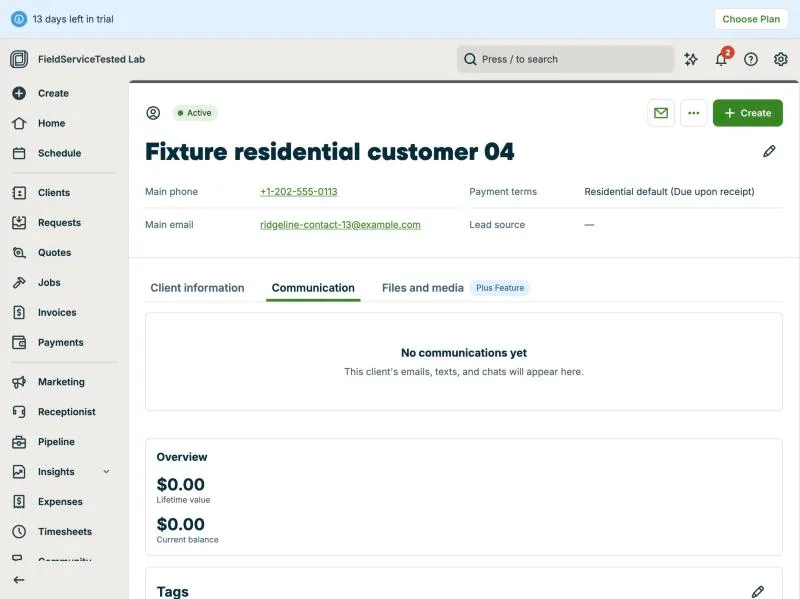
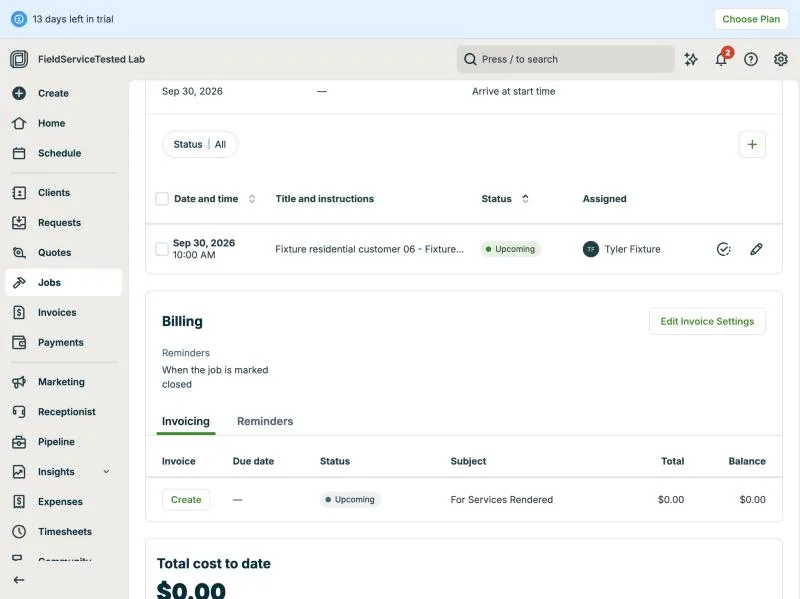
Setup: eight fixture jobs (service-01..08) scheduled on Wed Sep 30 2026 across Marcus, Priya and Tyler (2-hour slots 8-10, 10-12, 13-15); the Schedule day view showed them by technician with the 'before' state (Priya 3 visits, Tyler 2). Emergency: Job #10 (service-08, Fixture residential customer 06, 'no heat') was moved from Priya 13:00-15:00 into Tyler's 10:00-12:00 slot from the job page's Edit visit dialog (times changed, Priya removed, Tyler assigned); Job #8 (service-06, Fixture residential customer 04) was then pushed from 10:00-12:00 to 13:00-15:00 the same way. Both saves succeeded and the day view reflects the new order (Tyler: service-03 8-10, service-08 10-12, service-06 13-15). Client notification: no prompt to notify the displaced client appeared at either save; the job page 'More' menu offers Text/Email Booking Confirmation and follow-up email but no reschedule notice; the calendar visit popover only offers Duplicate; the client's Communication tab shows 'No communications yet' after the change. Settings > Emails & Text Messages lists 'Visit rescheduling notification' as sent 'when sent' (manual) whereas 'Visit reminder' is automatic (1 hour / 1 day before, email only on trial; SMS needs a paid plan). Calendar drag-and-drop could not be exercised from our lab browser (drag registered as a click), so the drag path was not observed. Result partial: reschedule is quick and visible on the calendar, but the displaced client is not informed unless the office sends something manually.
TestedT-07Execution exe-jobber-t-07-20260928-1 · Protocol 1.0.0 · MacBook Air M3 24 GB · macOS Tahoe 26.6.2 · Claude desktop built-in browser (Chromium) · Home fibre, Cádiz, Spain
Kickserv
Not tested: Kickserv's terms of service do not allow use of the service for benchmarking or competitive purposes, so we do not publish hands-on test results for it. What this page shows comes from public sources and is marked as documented, not tested.
Review: KickservServiceM8
partial · Premium Plus
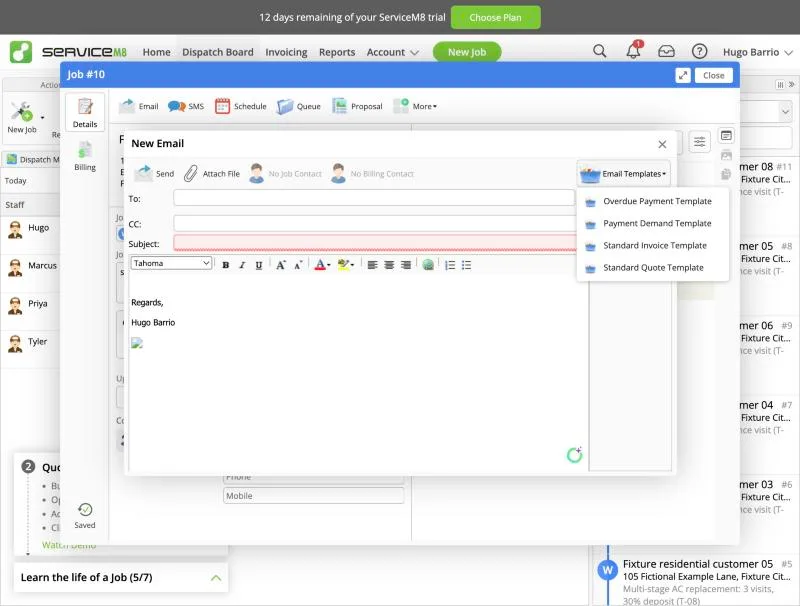
Setup (API, before recording): eight fixture jobs #6-#13 (service-03..10, Fixture residential customers 03-10) booked on Thu Oct 1 2026 in 2-hour slots: Priya 8-10/10-12/1-3, Tyler 8-10/10-12/1-3, Marcus 1-3/3-5 (Marcus also holds job #5 8-12). Dispatch Board > Staff Schedules day view showed the 'before' state per technician. Emergency: New Job #14 for Fixture residential customer 11 ('EMERGENCY - no cooling...'), status Work Order, Schedule > Add Booking. The booking dialog lists suggested slots ('Earliest') per staff member and only proposes free slots (for Tyler on Oct 1 it offered 3:00 pm). Forcing Tyler 10:00 AM, 2 hrs flagged 'Conflicted Booking' in red and showed both events side by side in the dialog calendar, but saving was allowed. On the Staff Schedules day view the two overlapping bookings are stacked: only #14 is visible in Tyler's 10:00 slot and the displaced job #10 is hidden (no conflict marker). The displaced job was moved from its job card (Upcoming Bookings > Edit Booking > time 3:00 PM > Save Booking); the dialog showed the conflict cleared. Job diary logs 'Booking - Scheduled for Tyler on 10/1/2026 3:00 PM'. Client notification: nothing sent automatically on booking or reschedule; the job card offers manual Email/SMS; default Email Templates are Overdue Payment, Payment Demand, Standard Invoice, Standard Quote (no reschedule or on-the-way template). Note: the eight setup jobs had no job contact, so a contact-level automation could not have fired for them anyway. Dispatch Map: fictional addresses not geocoded; the map centred on the operator's real area, so that segment was cut from the video for privacy and route context was not judged. Result partial: emergency insertion is quick and conflicts are flagged at booking time, but the day view hides the displaced job and the client must be informed manually.
TestedT-07Execution exe-servicem8-t-07-20260930-1 · Protocol 1.0.0 · MacBook Air M3 24 GB · macOS Tahoe 26.6.2 · Claude desktop built-in browser (Chromium) · Home fibre, Cádiz, Spain
ServiceTitan
Not tested: ServiceTitan has no self-serve trial. Its pricing page asks visitors to request pricing or book a demo with sales, and we do not open test accounts through sales calls. What this page shows comes from public sources and is marked as documented, not tested.
Review: ServiceTitanWorkiz
Not tested: Workiz advertises a 7-day free trial, but when we signed up on September 28, 2026 its onboarding asked for a phone number with a fixed +1 prefix, so we could not finish setup from our lab in Spain. The assistant on its website could not confirm availability outside the US and Canada and pointed us to a sales demo. We have not run our tasks on it. What this page shows comes from public sources and is marked as documented, not tested.
Review: WorkizEvidence files
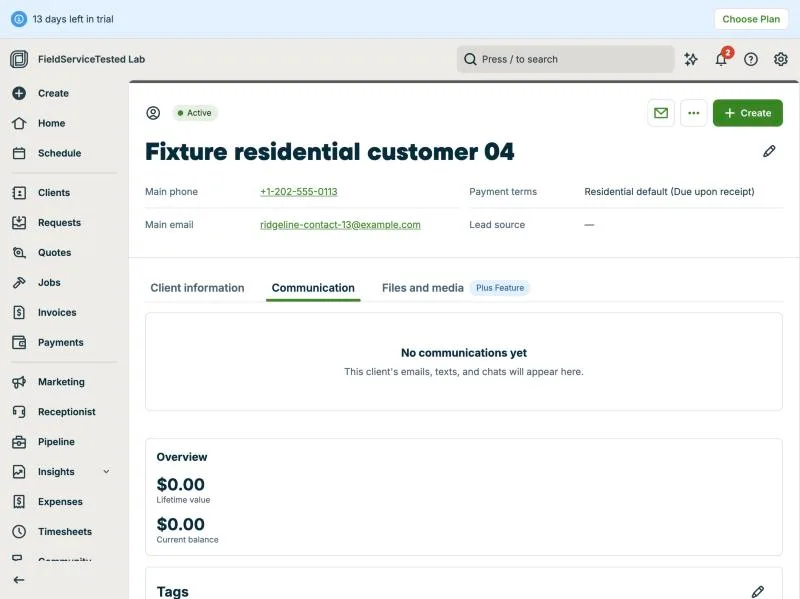
Jobber, T-07 (schedule 8 jobs across 3 techs; an emergency call bumps one): client communication. Own capture from the test account, fictional Ridgeline fixture data.
- Task
- T-07 — Schedule 8 jobs across 3 techs; an emergency call bumps one
- Plan
- Grow
- Device
- MacBook Air M3 24 GB
- App version
- Jobber web app, 2026-09-28 (14-day trial, day 2)
- Captured
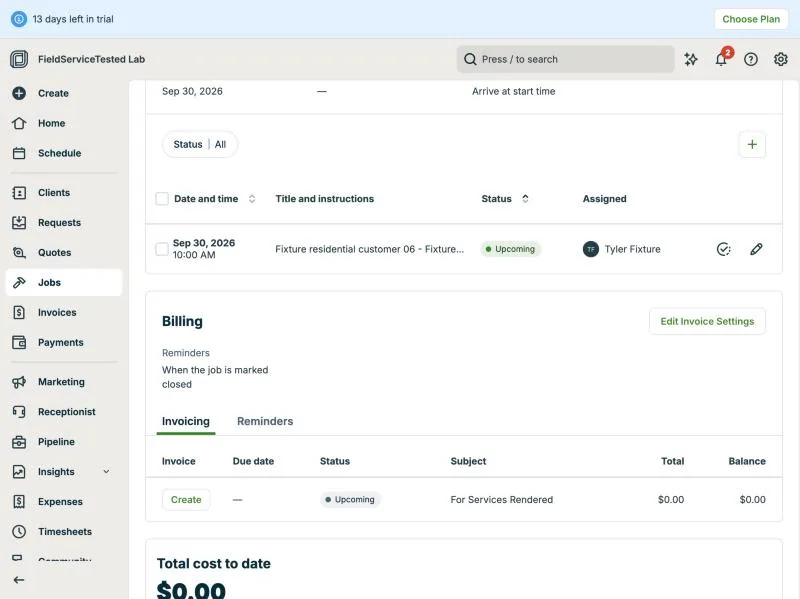
Jobber, T-07 (schedule 8 jobs across 3 techs; an emergency call bumps one): emergency job. Own capture from the test account, fictional Ridgeline fixture data.
- Task
- T-07 — Schedule 8 jobs across 3 techs; an emergency call bumps one
- Plan
- Grow
- Device
- MacBook Air M3 24 GB
- App version
- Jobber web app, 2026-09-28 (14-day trial, day 2)
- Captured
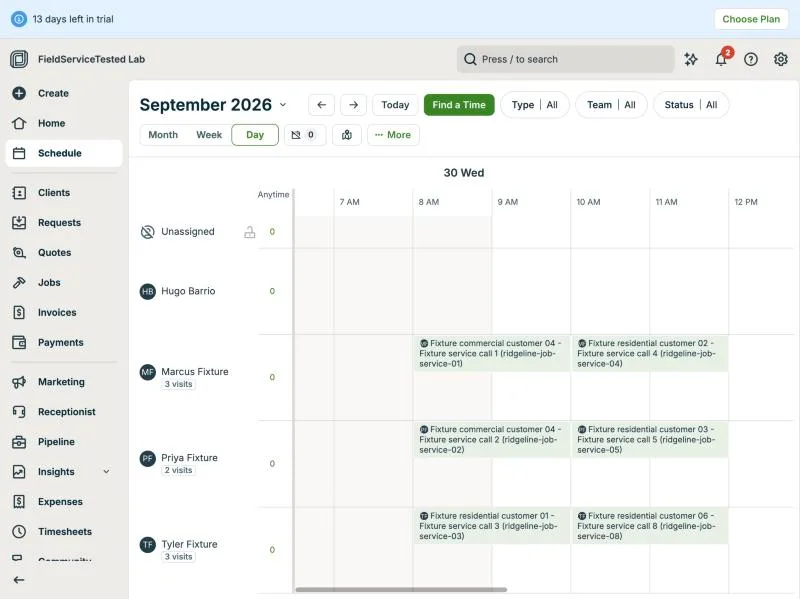
Jobber, T-07 (schedule 8 jobs across 3 techs; an emergency call bumps one): schedule after am. Own capture from the test account, fictional Ridgeline fixture data.
- Task
- T-07 — Schedule 8 jobs across 3 techs; an emergency call bumps one
- Plan
- Grow
- Device
- MacBook Air M3 24 GB
- App version
- Jobber web app, 2026-09-28 (14-day trial, day 2)
- Captured
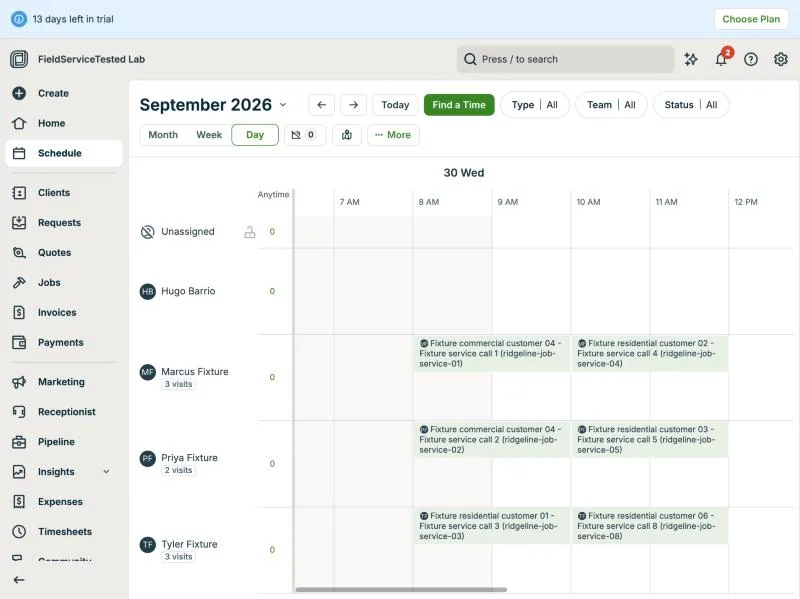
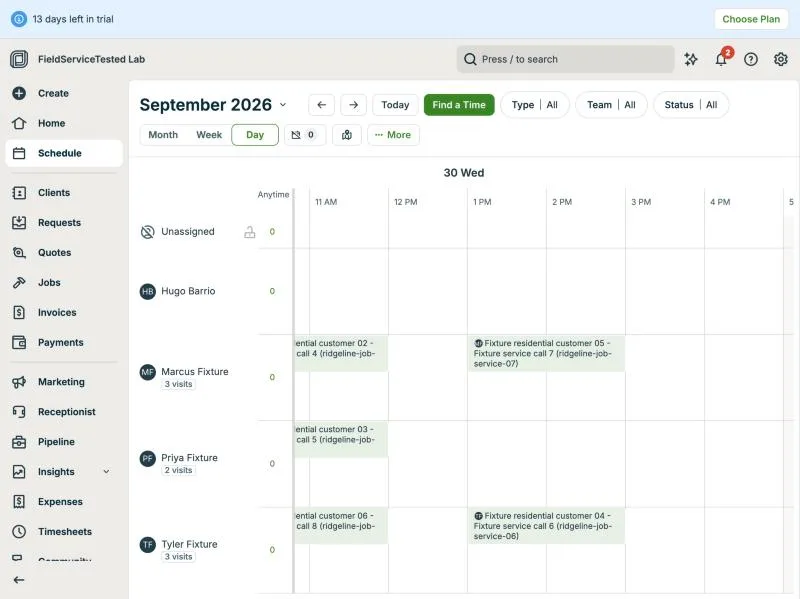
Jobber, T-07 (schedule 8 jobs across 3 techs; an emergency call bumps one): schedule after pm. Own capture from the test account, fictional Ridgeline fixture data.
- Task
- T-07 — Schedule 8 jobs across 3 techs; an emergency call bumps one
- Plan
- Grow
- Device
- MacBook Air M3 24 GB
- App version
- Jobber web app, 2026-09-28 (14-day trial, day 2)
- Captured
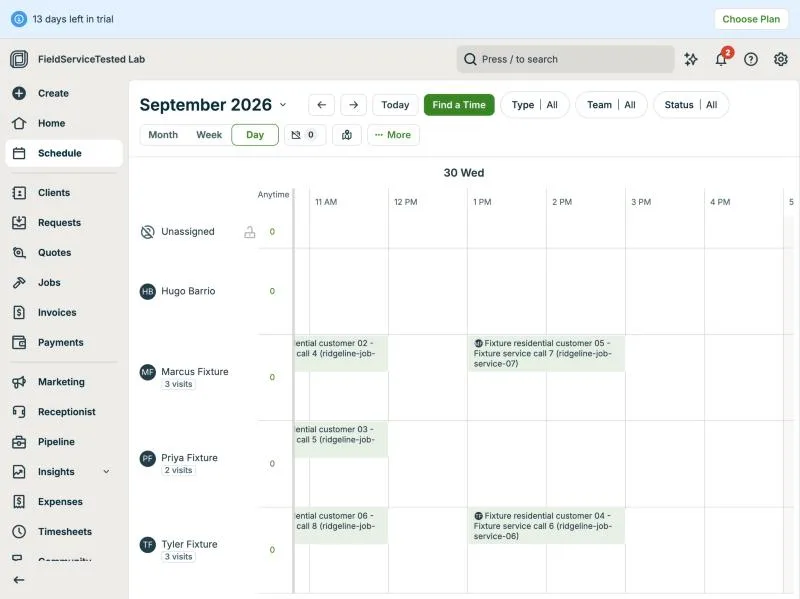
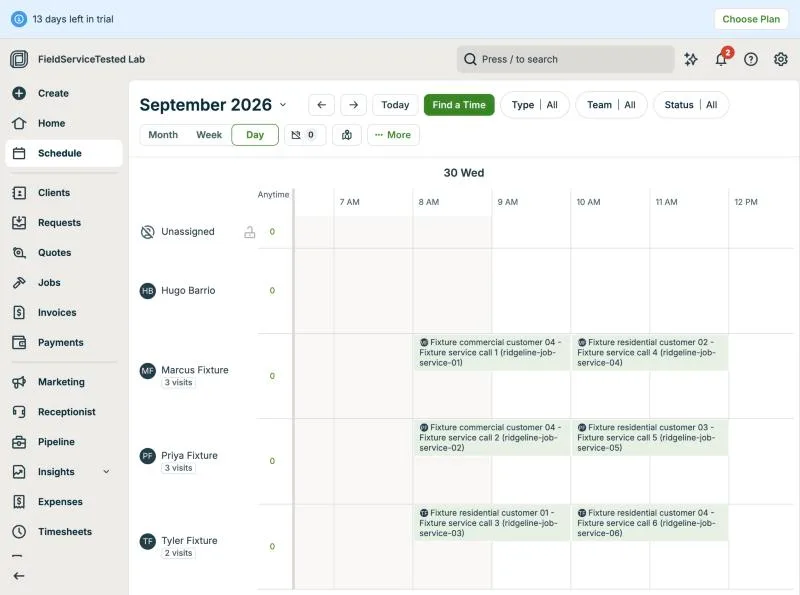
Jobber, T-07 (schedule 8 jobs across 3 techs; an emergency call bumps one): schedule before. Own capture from the test account, fictional Ridgeline fixture data.
- Task
- T-07 — Schedule 8 jobs across 3 techs; an emergency call bumps one
- Plan
- Grow
- Device
- MacBook Air M3 24 GB
- App version
- Jobber web app, 2026-09-28 (14-day trial, day 2)
- Captured
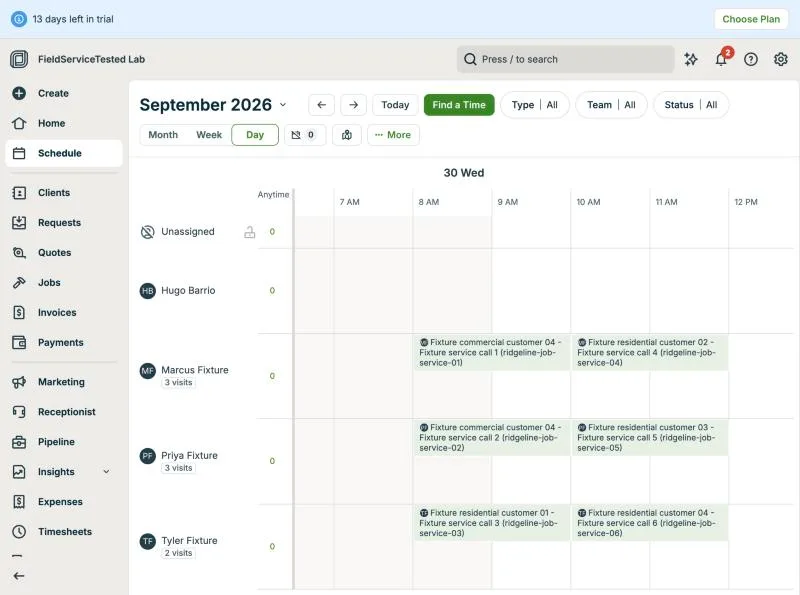
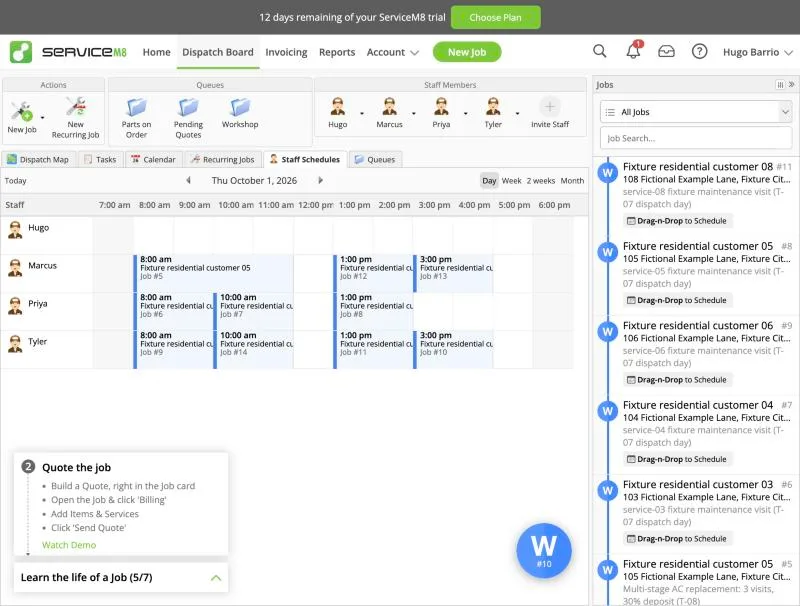
ServiceM8, T-07 (schedule 8 jobs across 3 techs; an emergency call bumps one): after. Own capture from the test account, fictional Ridgeline fixture data.
- Task
- T-07 — Schedule 8 jobs across 3 techs; an emergency call bumps one
- Plan
- Premium Plus
- Device
- MacBook Air M3 24 GB
- App version
- ServiceM8 web app (go.servicem8.com), 2026-09-29, trial day 2; region English (United States)
- Captured
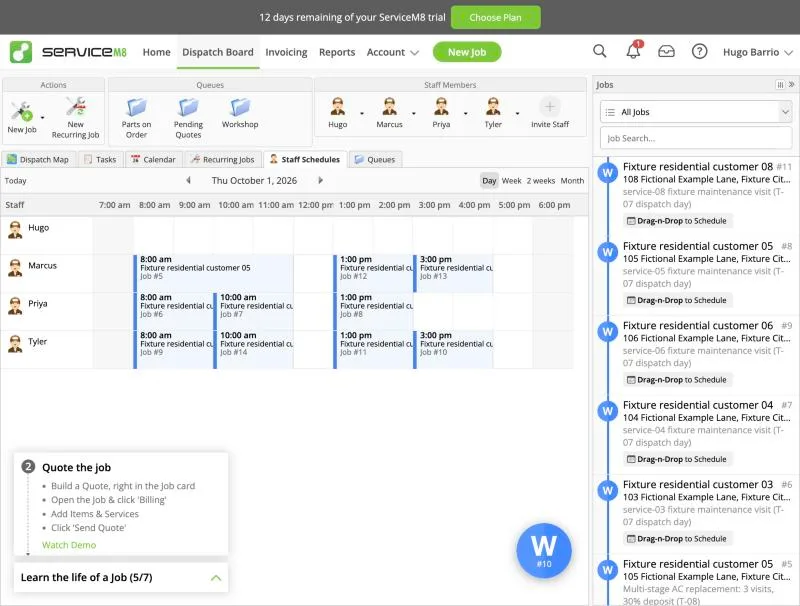
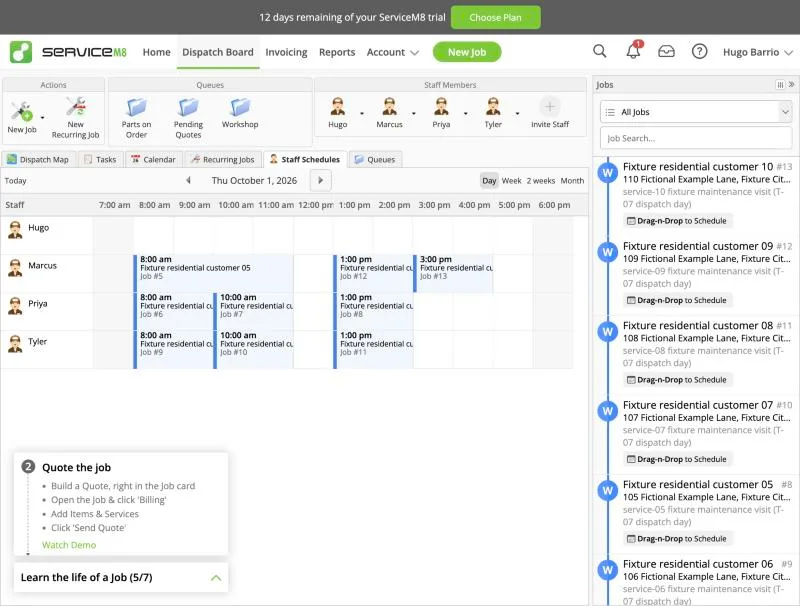
ServiceM8, T-07 (schedule 8 jobs across 3 techs; an emergency call bumps one): before. Own capture from the test account, fictional Ridgeline fixture data.
- Task
- T-07 — Schedule 8 jobs across 3 techs; an emergency call bumps one
- Plan
- Premium Plus
- Device
- MacBook Air M3 24 GB
- App version
- ServiceM8 web app (go.servicem8.com), 2026-09-29, trial day 2; region English (United States)
- Captured
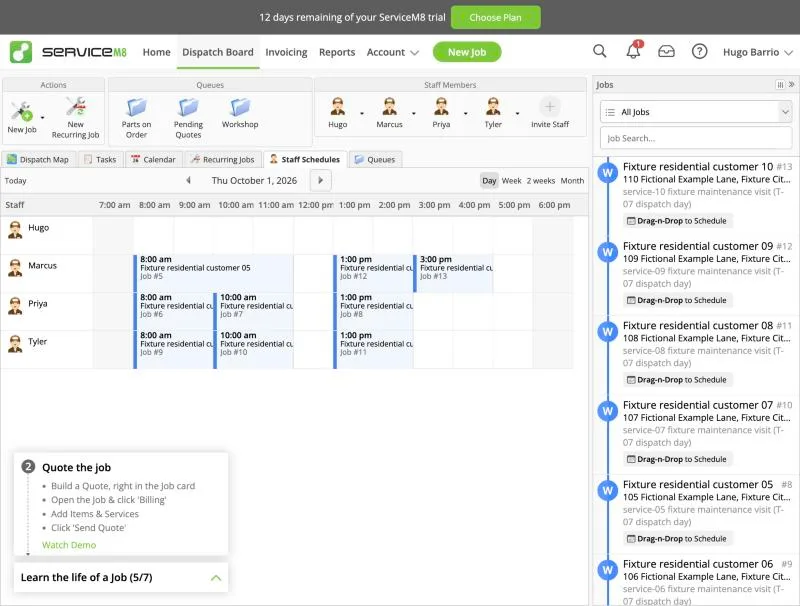
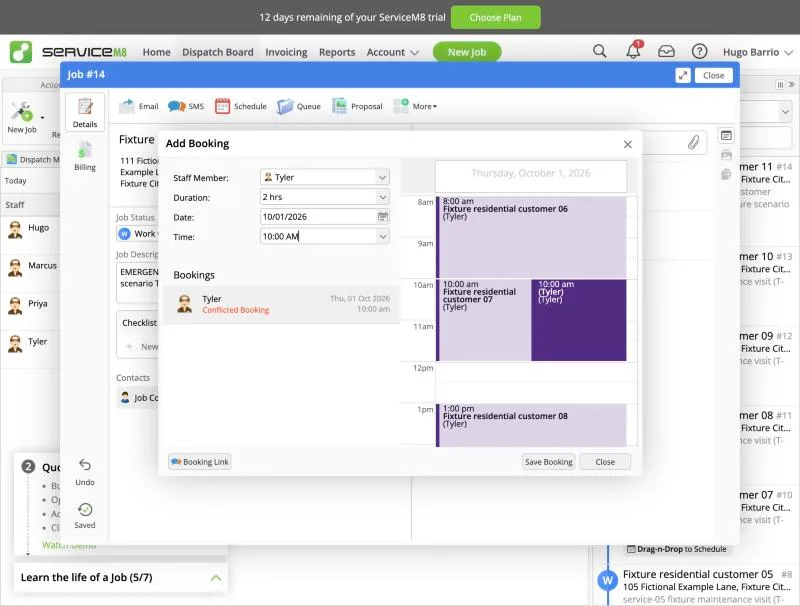
ServiceM8, T-07 (schedule 8 jobs across 3 techs; an emergency call bumps one): conflict. Own capture from the test account, fictional Ridgeline fixture data.
- Task
- T-07 — Schedule 8 jobs across 3 techs; an emergency call bumps one
- Plan
- Premium Plus
- Device
- MacBook Air M3 24 GB
- App version
- ServiceM8 web app (go.servicem8.com), 2026-09-29, trial day 2; region English (United States)
- Captured
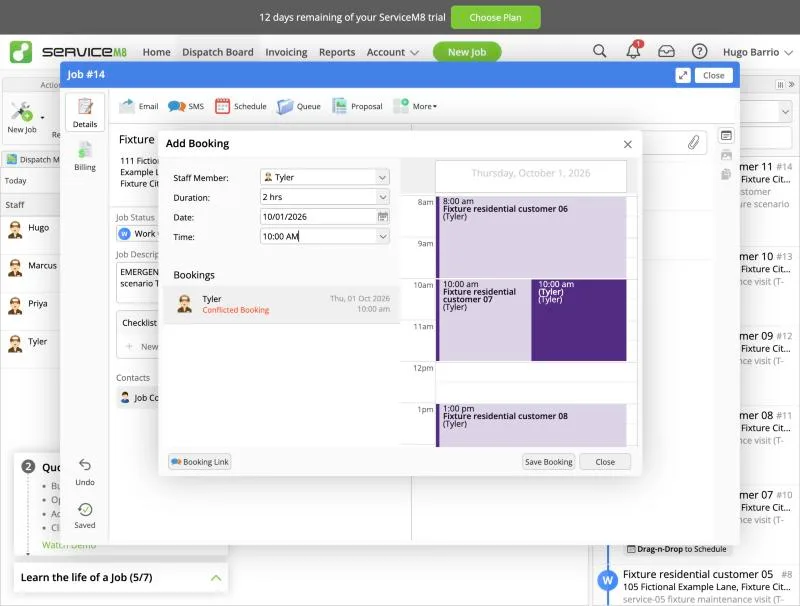
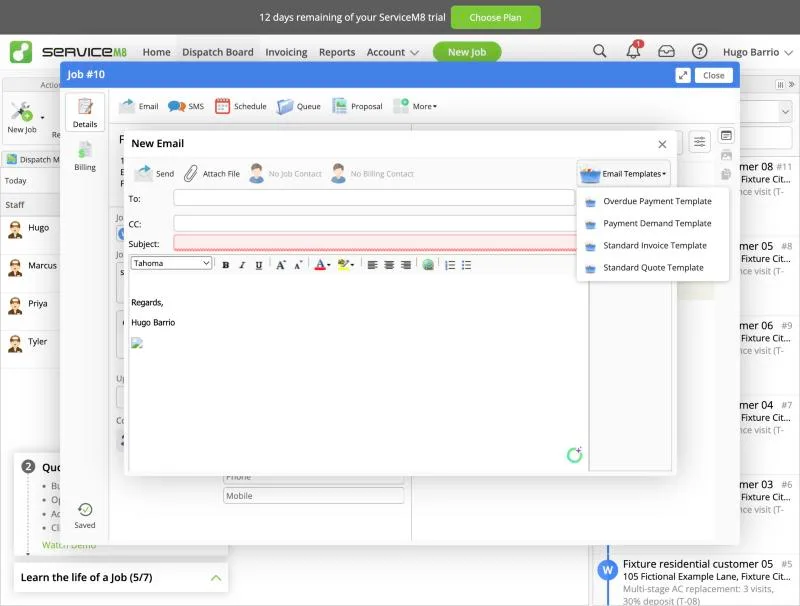
ServiceM8, T-07 (schedule 8 jobs across 3 techs; an emergency call bumps one): email templates. Own capture from the test account, fictional Ridgeline fixture data.
- Task
- T-07 — Schedule 8 jobs across 3 techs; an emergency call bumps one
- Plan
- Premium Plus
- Device
- MacBook Air M3 24 GB
- App version
- ServiceM8 web app (go.servicem8.com), 2026-09-29, trial day 2; region English (United States)
- Captured
Retests
Housecall Pro
No retest recorded.
Jobber
No retest recorded.
Kickserv
No retest recorded.
ServiceM8
No retest recorded.
ServiceTitan
No retest recorded.
Workiz
No retest recorded.